

Solved MacBook won’t restart

Status
Not open for further replies.

gingergreg

New Member
Thread author
Apr 5, 2018
3
0
1
UK
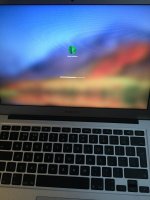
Hi all, followed the recommendation on here to use the Malware bytes software to get rid of MacKeeper pop ups etc. Cleared the two malware things it found then was asked to restart MacBook. Did that, it’s now stuck on the screen that comes up prior to my entering the password...it’s showing as though something is loading but it doesn’t progress at all.

Any ideas?! Panicking now and don’t know what to do with it. CDE61034-38EC-404C-8586-9D14FB55F2E9.jpeg
 
Hey there,
To reboot your Mac, use these keys; Control+Command+Power button. That will turn the Mac off. Try turning it on again and see if you have the same issue.
 
Do you have a list of the files it removed? Unplug all connected asseccories and then try to boot your Mac again.If you are still having issues try to reset the PRAM first and if that doesnt work try to reset the SMC as well
 
Status
Not open for further replies.

You may also like...