Make Windows 10 Blazing fast (by Mrizos)

  • Thread starter Thread starter Deleted member 178
  • Start date Start date
Status
Not open for further replies.
D

Deleted member 178

Thread author
Video on Youtube there:


Detailed procedure there: How To Make Windows 10 Run Blazingly Fast - TechyNotes.net

I have to say that those tweaks are only for speed not for comfort, security or keeping Win10 shiny to the eyes.

Most of the Win10 apps will be useless after.

Personally i did some of those tweaks naturally while checking the options after i installed Win10; some are justified , other are not, of course everything mentioned depends of your personal needs.

Enjoy.

Thanks :D
 
for me, w10 is slower than w7 in terms of responsiveness. ram management is not good IMO cuz it overuses pagefile => slower and degrades HDD. I think w8.1 was better but it was a bit buggy

w10 on my gf's laptop causes 100% disk activity. I tried 18-20 solutions found on the internet, it was just a bit better but cannot cure the problem :thumbsdown:. It cannot be solved without reinstalling w10 but she doesn't want to. never had any problem with w7
 
for me, w10 is slower than w7 in terms of responsiveness. ram management is not good IMO cuz it overuses pagefile => slower and degrades HDD. I think w8.1 was better but it was a bit buggy

Comparing different generation OS in term of speed is pointless:
1- you must test both of them in a decent rig powerful enough to run Win10 decently: 6Gb Ram with an Intel i5 is a minimum. Anything below is worthless whatever MS marketing department said.
2- and even you do that , obviously Win7 will always run faster since it requires less resources because less visual features and animations. The only thing Win10 will win is the boot time because its Hybrid boot feature.

Im sure XP is faster than Win7 :D

The only OS you can compare speed is Linux , same kernel version, multiple distros. Example you can compare Linux Mint with Ubuntu , etc...

i have 2 Win10 machines :

- one is i5 (2.6ghz) & 6gb Ram : Fast
- one is Atom (1ghz) & 2gb Ram : Sluggish

However if i put XP on the second one , im sure it will run faster than Win10...
 
;)
Comparing different generation OS in term of speed is pointless:
1- you must test both of them in a decent rig powerful enough to run Win10 decently: 6Gb Ram with an Intel i5 is a minimum. Anything below is worthless whatever MS marketing department said.
2- and even you do that , obviously Win7 will always run faster since it requires less resources because less visual features and animations. The only thing Win10 will win is the boot time because its Hybrid boot feature.

Im sure XP is faster than Win7 :D

The only OS you can compare speed is Linux , same kernel version, multiple distros. Example you can compare Linux Mint with Ubuntu , etc...

i have 2 Win10 machines :

- one is i5 (2.65ghz) & 6gb Ram : Fast
- one is Atom (1ghz) & 2gb Ram : Sluggish

However if i put XP on the second one , im sure it will run faster than Win10...

she has 4gb ram so I will install w7 on her laptop. Thanks for the head up ;)
I dont know w10 requires 6gb ram and i5 to run smoothly
 
;)

she has 4gb ram so I will install w7 on her laptop. Thanks for the head up ;)
I dont know w10 requires 6gb ram and i5 to run smoothly

it is a "comfort" requirement, of course ( as i said above) it can run on very low-end machine, like my mini-laptop but you must be very very patient when using it :D
MS can't say "you need an i5 and 6gb" , if they do, nobody will use it...

"dont trust the vendors, trust your experimentation"
 
it is a "comfort" requirement, of course ( as i said above) it can run on very low-end machine, like my mini-laptop but you must be very very patient when using it :D
MS can't say "you need an i5 and 6gb" , if they do, nobody will use it...

"dont trust the vendors, trust your experimentation"
what do you think about the "comfort" requirement for w8.1? I'm thinking about it because of hybrid fast startup
 
Win10 AU is faster than Win10 which is faster than Win8 (personal observation).

just do aclean install of Win10 AU , do some tweaks mentioned in the video and link above and you will see. In your case case Pagefile is heavily used because lack of available RAM iguess.

read this: http://lifehacker.com/5426041/understanding-the-windows-pagefile-and-why-you-shouldnt-disable-it
thank you again. I will try AU in her laptop after a month to let it more stable

her available ram is a lot, only 35% used but w10 just simply fetches more to pagefile as I feel because I observed that pagefile.sys was utilized very frequently even with disablepagingexecutive reg tweak enabled and superfetcher and prefetch set both to 2 or 0
 
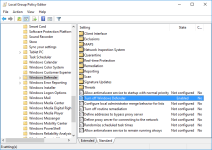
Windows Defender must be turn off via gpedit.msc not this way like in video because it will turn back on.

Clipboard01.png

System Restore is already turn off by default.
Turn off all in Privacy Settings accept Smart Screen.
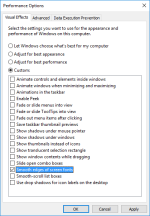
Set Performance Options like this:

Clipboard01.png

This video could have been made better. :cool:
 
Last edited:
And no matter how tight you think you have it locked down MS does try to run these one or twice a day.
Its random but all 4 try at somepoint see SS.
WAR_SS.png

Its not going to take MS long to fix this and make it so that we can't turn Defender off, or that doing so will cause a BSOD
 
Windows 10 for me there's no risk because it is not the meaning I installed it.
I remained at its Windows 8.1 and do not intend to change it.
Windows 8.1 performs well I do not need to change.:)
why change something that works well.
 
Last edited:
more traffic, views and subscribers ($$$$$$) ? :rolleyes:

"Thanks guys for watching my video about tips I randomly Google'd and put together and that are common knowledge for those who know how to use a computer properly, don't forget to like, subscribe and share my video to all your friends so I can have more views and make more money :D"
 
  • Like
Reactions: Deleted member 178
Status
Not open for further replies.