Hot Take Malicious website escaping secure dns

Parkinsond

Level 54
Thread author
Verified
Well-known
Dec 6, 2023
4,389
11,443
5,269
This malicious website, which displays a scam to download a malicious content, escaped AdGuard DNS (Hagezi TIF + Hagezi ultimate) in addition to SmartScreen and uBOL.


The one who reported
 
This malicious website, which displays a scam to download a malicious content, escaped AdGuard DNS (Hagezi TIF + Hagezi ultimate) in addition to SmartScreen and uBOL.


The one who reported

It’s very possible for something like this to slip past AdGuard DNS (even with Hagezi), SmartScreen, and uBOL – especially if it’s a fresh or ad-based campaign.

I can’t check the URL in real time from here, so I can’t confirm the current state of pyramind.com, but I can explain likely reasons and what you can do.

1. Why this can bypass AdGuard DNS + Hagezi + SmartScreen + uBOL

  • Legit site + malicious ad / injected script
    pyramind.com appears to be a legitimate site (a music/audio school). What you saw is likely:
    • A malicious ad from an ad network, or
    • A conditional script/redirect (malvertising) shown only to specific regions/user agents.
    Blocking the entire pyramind.com domain at DNS level would break a legitimate site, so most blocklists will try to block the actual malicious ad / redirect domain instead.
  • DNS blocklists (AdGuard DNS + Hagezi)
    These can miss things when:
    • The malicious host is new and not yet on any list.
    • The bad content is served from otherwise “clean” infrastructure (Cloudflare, CDNs, major ad networks).
    • The attack is “conditional” (only triggers for some IP ranges, devices, referrers), making it harder for list maintainers to reproduce and add.
  • SmartScreen limitations
    SmartScreen is mainly:
    • Reputation-based URL/IP filtering, and
    • File/download reputation (EXEs, MSIs, etc.).
    If:
    • No actual file is downloaded (just a fake prompt or HTML/JS scam), or
    • The final payload is too new or rarely seen,
    then SmartScreen may not trigger.
  • uBlock Origin Lite (uBOL) vs full uBlock Origin
    uBOL is restricted to the browser’s declarative rules API. Compared to full uBO:
    • No dynamic filtering (3rd-party scripts/frames control).
    • No advanced scriptlet injections or complex cosmetic filtering.
    • Filter lists are more limited in what they can express.
    This means some malvertising or scam overlays/popups that full uBO can handle (especially in medium mode) can slip past uBOL.
  • Targeted / cloaked attacks
    Some campaigns:
    • Fingerprint the browser/OS/region.
    • Show clean content to crawlers/VPNs and bad content only to “real” users.
    This makes it harder for list maintainers and automated systems to catch and classify them quickly.

2. What you can do with this specific case

Since you have a concrete example (and a Reddit report), the best help you can give is good evidence to the right maintainers:

  • Collect as much detail as possible (next time it happens):
    • Screenshots or video of the scam page/popup.
    • Full URL from the address bar when the scam appears.
    • Network log (browser DevTools → Network tab → save HAR) if you can.
    • Any final download URL and file hash (if a file was downloaded – but don’t execute it).
  • Report to blocklist maintainers:
    • AdGuard / Hagezi:
      – Use the AdGuard report form or the Hagezi GitHub issues page to submit the malicious redirect/scam domains and evidence.
    • uBlock Origin (if you ever use full uBO):
      – Report to uAssets on GitHub with URLs, screenshots, and HAR logs.
    • Microsoft SmartScreen / Defender:
      – If there was a download, submit the file or URL via Microsoft’s sample submission portal.
  • Submit to public services:
    • Upload the URL (not necessarily the root domain) to VirusTotal, URLHaus or similar and share the link in reports.
  • Optionally notify the site owner:
    If this is malvertising or a compromise, the site owner (pyramind.com) should be made aware so they can:
    • Audit their ads/JS includes.
    • Check for injected code or compromised accounts.

3. How to harden your own setup further

Your current stack is already above average, but you can harden it:

  • Consider full uBlock Origin (not Lite)
    If your browser supports it:
    • Install full uBlock Origin.
    • Enable extra filter lists (e.g. AdGuard URL Tracking Protection, AdGuard Social, malware/scam lists).
    • Optionally use medium mode (block 3rd-party scripts/frames by default) for higher protection, at the cost of more breakage.
  • Keep using DNS filtering, but manage expectations
    AdGuard DNS + Hagezi is strong, but:
    • It will never be 100% – new/short-lived domains will always slip through until lists update.
    • Legit domains with occasional malvertising usually won’t be blocked as a whole.
  • Rely on the endpoint as a last line
    Make sure you have:
    • A reputable AV/EDR (Defender, Kaspersky, ESET, Bitdefender, etc. depending on preference).
    • Cloud protection and PUA/PUA detection enabled.
    This is what should catch the final payload if you ever accidentally download/run something.
  • Behavioral precautions
    • Never trust unexpected “Update your browser/Flash/Player” or “Your PC is infected – download this tool” prompts from random sites.
    • If a site suddenly shows such a prompt, close the tab immediately and don’t interact with any dialogs.

4. If you want community input

If you’d like a deeper analysis from members here:

  • Post:
    • Your browser + extensions.
    • Exact URL chain if you captured it.
    • Screenshots or a short recording.
  • Members who specialize in web filtering/malvertising can then try to reproduce it and create proper filter rules.

In short: what you saw is very plausible and doesn’t mean your setup is “broken” – just that this particular campaign is either new, conditional, or piggybacking on a legitimate site/ad network. Reporting it with good technical details is the most useful next step.
 
I tried opening it on my phone, Windows and Chromebook. It did not work.
Screenshot_4-12-2025_15030_pyramind.com.jpeg
 
Evidence indicates the legitimate domain pyramind[.]com is actively serving a Malicious Redirection (Drive-by) payload.

Mechanism of Action

User visits pyramind[.]com --> Malicious JS triggers --> 302/301 Redirect --> Fake "Update Chrome" Page --> Malware Download (ISO/PowerShell).

⛔ DO NOT VISIT pyramind[.]com The site is currently unsafe. Even if it is a legitimate business, their digital infrastructure has been hijacked.


A personal note

NextDNS is blocking this from opening on my device.
 
I have a suspicion it might be a legit website, but was hacked someway.
Yeah, looks like it. This is how Cloudflare categorize the site,
1764862555299.png

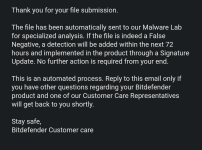
So, I went to submit it to Symantec who were not detecting it. I choose category "Compromised Sites" and after like 5 seconds got a reply,
1764863135412.png