McShield Anti-Malware Tool for USB--a good option?

McShield Anti-Malware Tool for USB

  • Thumbs up

    Votes: 37 78.7%
  • Thumbs down

    Votes: 10 21.3%

  • Total voters
    47
Status
Not open for further replies.
There will always be false detection with MCShield, and it is something you need to know about this tool. It is so powerful against all kinds of USB spreading malware, so you should expect few FPs, just like so many other security programs.

You can set to use Interactive mode that will always ask you before deleting/renaming suspicious files.
 
I don't know what algorithm is going on but I guess it's nuking out files located at the root folder of any USB drive.

Here are the PF found on my bootable USB drive.
  • LIST.COM
  • NTLDR
  • ntdetect.com
  • grldr
  • windefault
  • ren.bat
"nuking out files located at the root folder of any USB drive." Then do you think those detections were false positives?

I think this setting is good enough for me.

MCShield%252520Control%252520Center%2525207222015%252520120145%252520PM.bmp.jpg

Thanks, WinXPert, for the screenshot and for showing your configuration. Somebody said this was all about heuristic detection, but I see the "in-depth signature scan". Just curious: why did you mark that for "only in the case of infection."

What would "paranoid mode" be like? And what are "Fastest" and "Bulletproof"?
 
Bulletproof = more PF

Try copying notepad, regedit, cmd, mspaint to your USB drive (root folder)

Fullscreen%252520capture%2525207232015%25252081749%252520AM.bmp.jpg
 
  • Like
Reactions: frogboy
Not sure. Probably not worth the time. Does it detect BadUSB type of threats?
 
Bulletproof = more PF

I don't know what PF stands for, but it appears to mean detections.

Try copying notepad, regedit, cmd, mspaint to your USB drive (root folder)

Fullscreen%252520capture%2525207232015%25252081749%252520AM.bmp.jpg

Paranoid mode is extremely aggressive to any executable code, so you should only use this if you work in Nuclear facility :D

So Paranoid Mode is completely clarified!

I don't know what algorithm is going on but I guess it's nuking out files located at the root folder of any USB drive.

Here are the PF found on my bootable USB drive.
  • LIST.COM
  • NTLDR
  • ntdetect.com
  • grldr
  • windefault
  • ren.bat
I still don't understand about these detections. Were they overzealous or satisfactory?
 
  • Like
Reactions: AtlBo
MCShield is a very lightweight program mainly used to detect malware on USB's and certain auto-run files, it is compatible with almost every anti-virus and anti-malware, you should use it :)
 
I know it s an old thread but I did not see it necessary to open a new topic.
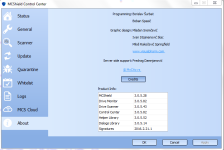
Why MC Shield is not receiving any sig. update?!!!
 

Attachments

  • Capture.PNG
    Capture.PNG
    57.2 KB · Views: 485
  • Like
Reactions: upnorth and frogboy
Search for McShield threads here on MalwareTips, one developer said if they see the need to update its signatures, then they will. They believe the current signatures and its powerful heuristics are enough for the kind of malware their product tries to kill.
 
  • Like
Reactions: Prorootect
I know it s an old thread but I did not see it necessary to open a new topic.
Why MC Shield is not receiving any sig. update?!!!

Send @TwinHeadedEagle a pm and ask or even better point him here.

Almost forgot another thing. Scroll down to " Similar Threads " and you will find more information there.
 
Last edited:
Status
Not open for further replies.