
Zoho Office Suite is my best buddy.


Open MalwareTips from your Home Screen or desktop. Follow discussions, find answers and pick up where you left off.
If you cannot find an install option, update your browser or use its bookmark option to keep MalwareTips close.
After installation, open the app and sign in. Enable push notifications in Preferences if you want alerts. On iPhone and iPad, push requires a Home Screen web app and iOS or iPadOS 16.4 or later.
Sign in to manage notificationsInstallation is optional. Your notification settings stay under your control.
 Thread starter
lokamoka820
Thread starter
lokamoka820

MS Office occupies 4 GB of disk, its RAM usage is the least.How much space does Office 2024 occupy? what about RAM consumption when opening any document? You had also installed OnlyOffice in the past, so want to get a comparison.

Yes, OnlyOffice consumes a lot of RAM and also feels sluggish on the system. I have been thinking about moving to MS Office, but then I only use it for 30 minutes a week, so maybe I will stick with OnlyOffice itself.MS Office occupies 4 GB of disk, its RAM usage is the least.
OnlyOffice the reverse; less than 2 GB of diks, but the highest in RAM usage as any other web wrapper.
When using for some personal note taking, any office suite will do the job.Yes, OnlyOffice consumes a lot of RAM and also feels sluggish on the system. I have been thinking about moving to MS Office, but then I only use it for 30 minutes a week, so maybe I will stick with OnlyOffice itself.
When using for some personal note taking, any office suite will do the job.
But for work, MS Office is more reliable.

Why is RAM usage problem again? Unused RAM is wasted money.
 At least that's from my point of view
Have you installed the free Bitdefender antivirus software to get the most out of your money?I could just be a matter of perspective, once you see the difference. Maybe along the same line as AV processes and Ram used? Bitdefender free version with 11 plus 1-2 more if the VPN is installed, compared to F-Secure or Eset with less processes ~4-5? It just looks and feels better to see less being used (efficiency?)


Numbers don't bother me as long as I don't have any issues and PC is fast to be honest. In fact, I rarely open Task Manager. Pretty much limited to end misbehaving process and that is it.I could just be a matter of perspective, once you see the difference. Maybe along the same line as AV processes and Ram used? Bitdefender free version with 11 plus 1-2 more if the VPN is installed, compared to F-Secure or Eset with less processes ~4-5? It just looks and feels better to see less being used (efficiency?)
I have the opposite experience. It took Office few seconds before it opened the document or spreadsheet. ONLYOFFICE does it instantly for me.Apart from the RAM usage, OnlyOffice is also quite slow and sluggish when compared to MS Office, which is fast and efficient. Even the CPU usage is much higher in OnlyOffice.
Numbers don't bother me as long as I don't have any issues and PC is fast to be honest. In fact, I rarely open Task Manager. Pretty much limited to end misbehaving process and that is it.
The more RAM in use, the better because the more responsive and faster PC is.
I have the opposite experience. It took Office few seconds before it opened the document or spreadsheet. ONLYOFFICE does it instantly for me.
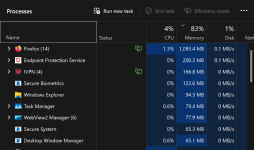
For Surface 5 with 8 GB RAM, LTSC version is the only solution. Normal Windows 11, as of now, still cannot work normally on 8 GB RAM.On my Surface 5 with 8 GB of Ram, I do occasionally check Task Manager to make sure of where I'm at and what to use. This is with 3 tabs open in FF, let alone trying to run another app or two at the same time. I know I can never install Snagit on this laptop without starting to possibly max out of Ram while running or doing to much?
On my other laptop with 16 GB of Ram, no problem, full steam ahead
View attachment 299268
Members who viewed this thread in the last 5 minutes

