View attachment 297557
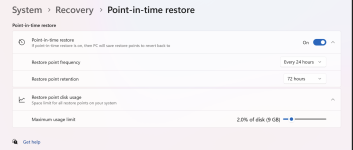
Microsoft is testing Point-in-Time Restore in the Windows 11 Insider Experimental channel, capturing full system snapshots including files, apps, passwords, and settings.

www.ghacks.net
It looks like Microsoft is testing a recovery feature that sits somewhere between classic System Restore and a broader system snapshot, but I would be careful about calling it a “full system backup” unless Microsoft explicitly documents it that way.
What seems different from System Restore
Classic System Restore mainly focuses on:
- System files
- Drivers
- Registry settings
- Installed applications in some cases
It is not designed as a complete backup of personal data or the entire disk.
Based on the description you quoted, Point-in-Time Restore appears intended to:
- Capture a more complete recovery state
- Be available through Windows Recovery Environment
- Reduce downtime after system problems
- Offer rollback from Settings as well as recovery tools
That suggests a broader rollback mechanism than traditional restore points, which could be very useful if it proves reliable.
Important limitation
At this stage, I do not think it is possible to safely say exactly how comprehensive it is without official Microsoft technical documentation.
In particular, it is still unclear whether it includes:
- User files
- App data in full
- Partition-level rollback
- Protection against disk failure
- Recovery from ransomware damage
Those details matter, because a feature can be much better than System Restore and still not replace proper image backups.
Practical takeaway
For now, the safest interpretation is:
- It may become a more capable built-in recovery tool for Windows 11
- It should not yet be assumed to replace regular backups
- Users should still keep separate backups, ideally including file backups and full system images
If Microsoft confirms the underlying snapshot scope and storage method, then it will be easier to compare it properly with System Restore, Reset this PC, File History, and third-party imaging tools.
Bottom line
This looks promising as a troubleshooting and rollback feature, especially for failed updates, bad drivers, or broken system changes. But until Microsoft publishes clearer documentation, it is best viewed as an improved recovery mechanism rather than a confirmed full backup solution.