

You've tried quite a few antivirus programs (Microsoft Defender, Comodo Internet Security, Trend Micro Maximum Security, Kaspersky Premium, McAfee Total Security, F-Secure Total, ZoneAlarm Next Gen, Sophos Home Free, Norton 360 Deluxe) and you almost always go back to Microsoft Defender. I've only tried ESET, Kaspersky, and Bitdefender, and I almost always end up going back to Microsoft Defender. Sometimes the simplest solution is the best. Happy New Year!6.1.2026
Did some cleanup on photos, files i dont need, backupped everything needed to external hdds.
> clean install
Im going now after 2 months of McAfee with most simple setup, so the current setup is:
- Microsoft defender
- Smart application Controld (sac) enabled
- microsoft edge as browser, ublock origin lite as adblocker
- ControlD DNS - Hagezi Pro list as DNS
Thanks to dns thread i went for this config
Advanced Plus Security Moonhorse 2026 windows config
- Thread starter Moonhorse
- Start date
You are using an out of date browser. It may not display this or other websites correctly.
You should upgrade or use an alternative browser.
You should upgrade or use an alternative browser.
- Last updated
- Mar 13, 2026
- How it's used?
- For home and private use
- Operating system
- Windows 11
- On-device encryption
- BitLocker Device Encryption for Windows
- Log-in security
- Biometrics (Windows Hello PIN, TouchID, Face, Iris, Fingerprint)
- Basic account password (insecure)
- Security updates
- Allow security updates and latest features
- Update channels
- Allow stable updates only
- User Access Control
- Always notify
- Smart App Control
- On
- Network firewall
- Enabled
- About WiFi router
- ZTE MC888 PRO
- Real-time security
- Bitdefender total security
- Firewall security
- Other - Internet Security (3rd-party)
- About custom security
- None
- Periodic malware scanners
- Norton power eraser
Adwcleaner
- Malware sample testing
- I do not participate in malware testing
- Environment for malware testing
- None
- Browser(s) and extensions
- Brave
- bitwarden
- Secure DNS
- Cloudflare dns
- Desktop VPN
- None
- Password manager
- Bitwarden
- Maintenance tools
- None
- File and Photo backup
- Google drive, Onedrive, external hdd
- Subscriptions
- None
- System recovery
- USB, aomei backup
- Risk factors
- Browsing to popular websites
- Working from home
- Opening email attachments
- Buying from online stores, entering banks card details
- Logging into my bank account
- Downloading software and files from reputable sites
- Gaming
- Streaming audio/video content from trusted sites or paid subscriptions
- Computer specs
- Geforce RTX 4070 Super
AMD Ryzen 7800X3D
Corsair Vengeance DDR5-6000 CL36 DC - 32GB
- Notable changes
- microsoft defender > Mcafee total protection > microsoft defender > kaspersky > sophos home free > sophos home premium > microsoft defender > trend micro > mcafee > Microsoft defender> kaspersky > MCafee> defender > sophos > bitdefender
- What I'm looking for?
Looking for minimum feedback.


in the past i was tempted to try every antivirus, changed config quite often but now i have been more chill about it. I still think the antivirus engine of defender can compete with any other av, and the biggest threat is phishing still, but i have safe practices, adblocker, tracking protection & smartscreen of edge, also the controld with hagezi pro. Also its free and simple config, sometimes less is more (reminds me of @oldschool 's phrases. Happy new year to you too!You've tried quite a few antivirus programs (Microsoft Defender, Comodo Internet Security, Trend Micro Maximum Security, Kaspersky Premium, McAfee Total Security, F-Secure Total, ZoneAlarm Next Gen, Sophos Home Free, Norton 360 Deluxe) and you almost always go back to Microsoft Defender. I've only tried ESET, Kaspersky, and Bitdefender, and I almost always end up going back to Microsoft Defender. Sometimes the simplest solution is the best. Happy New Year!
Anyways i have question, probs dumb one but i use hagezi pro throught controlD DNS, i live in finland but the dns routes throught netherlands, i dont have any problems with internet browsing speed, but could it somehow affect ping in games?
8.1.2026
added norton safe web
edit: also moved from controld to cloudflare , due region matchs the current im living now.
added norton safe web
edit: also moved from controld to cloudflare , due region matchs the current im living now.
Last edited:
F
ForgottenSeer 123960
While DNS does not carry game traffic, utilizing a Dutch DNS resolver while physically located in Finland creates a specific risk vector known as "GeoDNS Misrouting." This could trick matchmaking algorithms into assigning you to Amsterdam (AMS) servers rather than Helsinki (HEL) servers, indirectly increasing your ping by adding physical distance to your connection.Anyways i have question, probs dumb one but i use hagezi pro throught controlD DNS, i live in finland but the dns routes throught netherlands, i dont have any problems with internet browsing speed, but could it somehow affect ping in games?
DNS is strictly a directory service. It translates game.server.com to 192.168.x.x. Once this "lookup" is complete (milliseconds), the DNS server is disconnected from the loop. The actual game packets (UDP/TCP) travel directly between your Finnish client and the game server.
Many modern services (including Cloudflare, AWS, and specific game matchmakers) use EDNS Client Subnet (ECS) or the IP address of your DNS Resolver to guess your physical location.
Scenario
You (Finland) -> DNS Server (Netherlands).
Result
The game’s load balancer sees the request coming from the Netherlands.
Consequence
It may route you to a "local" server in Amsterdam.
Net Impact
You play on a server 1,500km away instead of one 50km away, effectively increasing your ping despite the DNS itself not carrying traffic.
i did some googling , but you added much new info. Anyways i changed to cloudflare malware blocking dns, as i was bit unsure about the controld anyways.While DNS does not carry game traffic, utilizing a Dutch DNS resolver while physically located in Finland creates a specific risk vector known as "GeoDNS Misrouting." This could trick matchmaking algorithms into assigning you to Amsterdam (AMS) servers rather than Helsinki (HEL) servers, indirectly increasing your ping by adding physical distance to your connection.
DNS is strictly a directory service. It translates game.server.com to 192.168.x.x. Once this "lookup" is complete (milliseconds), the DNS server is disconnected from the loop. The actual game packets (UDP/TCP) travel directly between your Finnish client and the game server.
Many modern services (including Cloudflare, AWS, and specific game matchmakers) use EDNS Client Subnet (ECS) or the IP address of your DNS Resolver to guess your physical location.
Scenario
You (Finland) -> DNS Server (Netherlands).
Result
The game’s load balancer sees the request coming from the Netherlands.
Consequence
It may route you to a "local" server in Amsterdam.
Net Impact
You play on a server 1,500km away instead of one 50km away, effectively increasing your ping despite the DNS itself not carrying traffic.
Tried cloudflare zero trust too, but on android it makes discord not to work (doesnt load messages properly, no internet connection)
- even i added bypass rule on app > discord and domain discord.com too
Cheers for answer, MalwareTips is always helpful

14.1.2026
+ Added DefenderUI - Aggressive profile
I was thinking about adding malwarebytes anti-exploit , but seems its not updated in year ( beta ) but it would still work i guess , just doesnt require update
Also was thinking about checkmals appcheck app, but after all i decided to go with defenderUI for ASR rules
+ Added DefenderUI - Aggressive profile
I was thinking about adding malwarebytes anti-exploit , but seems its not updated in year ( beta ) but it would still work i guess , just doesnt require update
Also was thinking about checkmals appcheck app, but after all i decided to go with defenderUI for ASR rules

How about adding SiriusGPT to DefenderUI instead?14.1.2026
+ Added DefenderUI - Aggressive profile
I was thinking about adding malwarebytes anti-exploit , but seems its not updated in year ( beta ) but it would still work i guess , just doesnt require update
Also was thinking about checkmals appcheck app, but after all i decided to go with defenderUI for ASR rules
should i keep the dui as agressive like its currently is and just install sirius as bonus? Or just set defender to default and let sirius do the work?How about adding SiriusGPT to DefenderUI instead?

You might want to watch this test to evaluate it yourself:should i keep the dui as agressive like its currently is and just install sirius as bonus? Or just set defender to default and let sirius do the work?

Microsoft Defender is the anti-malware solution present on Windows since Windows 8.
It offers completely free protection powered by daily updates and cloud-based protection powered by AI Machine Learning.
In this test, we will compare the antivirus twice.
The first time, configured by Microsoft, as if you had installed Windows.
The second time, we'll use the DefenderUI tool, which we'll set to “Recommended Settings”.
Is it useful to configure Defender...
It offers completely free protection powered by daily updates and cloud-based protection powered by AI Machine Learning.
In this test, we will compare the antivirus twice.
The first time, configured by Microsoft, as if you had installed Windows.
The second time, we'll use the DefenderUI tool, which we'll set to “Recommended Settings”.
Is it useful to configure Defender...
- Shadowra
- Replies: 56
- Forum: Video Reviews - Security and Privacy
Well I think setting DefenderUI to "High" + SiriusGPT is nicely balanced between usability and protection. I don't see any reason not to set DefenderUI to aggressive if you want to tho. Normally Microsoft Defender should detect malware pre-execution, SiriusGPT on-execution and if even SiriusGPT misses it, then you still have Defenders post-execution-protection. Just make sure to get SiriusGPT and not SiriusLLMshould i keep the dui as agressive like its currently is and just install sirius as bonus? Or just set defender to default and let sirius do the work?
And here a test of SiriusGPT as an addition to @lokamoka820 post:
App Review Thread 'SiriusGPT Anti-Malware'
SiriusGPT is a new anti-malware program developed by the VoodooShield/CyberLock ( @danb ) team using LLM technology.
LLM (Large Language Model) technology is used in malware research to analyze code semantics, detect anomalous patterns, and enhance threat classification beyond traditional signature-based methods.
Let's take a look at this technology and how it reacts to malware and four programs that are commonly used in cases of false positives.
...
LLM (Large Language Model) technology is used in malware research to analyze code semantics, detect anomalous patterns, and enhance threat classification beyond traditional signature-based methods.
Let's take a look at this technology and how it reacts to malware and four programs that are commonly used in cases of false positives.
...
- Shadowra
- Replies: 15
- Forum: Video Reviews - Security and Privacy
Last edited:
16.1.2025
+ added NextDNS free, with hagezi multi, lets see if i survive that 300k queries a month or have to buy it later.
About siriusGPT i havent decided yet if i start using it, im waiting for shadowras test on hawk eye
+ added NextDNS free, with hagezi multi, lets see if i survive that 300k queries a month or have to buy it later.
About siriusGPT i havent decided yet if i start using it, im waiting for shadowras test on hawk eye

How many devices you have connected to NextDNS?16.1.2025
+ added NextDNS free, with hagezi multi, lets see if i survive that 300k queries a month or have to buy it later.
About siriusGPT i havent decided yet if i start using it, im waiting for shadowras test on hawk eye

Which one is the most valuable filter list of NextDNS?16.1.2025
+ added NextDNS free, with hagezi multi, lets see if i survive that 300k queries a month or have to buy it later.
About siriusGPT i havent decided yet if i start using it, im waiting for shadowras test on hawk eye
My gaming pc + my pixel 6aHow many devices you have connected to NextDNS?
I only have 1 third party filter and its hagezi multi or ulti, dont remember right now. I just use nextdns for NRD:s. I guess its time to buy year of license with 20$ if i want to keep using thisWhich one is the most valuable filter list of NextDNS?

by the way, i tried also cloudflare zero trust and had multiple issues with discord not working, tried all guides i found, asked chatgpt and did some own research, but didnt managed to get it work.
Sure i have 2,5 years of adguard dns available , and it has NRD option too.
300k should be more than enough.gaming pc + my pixel 6a
I never reached half of the quota with NextDNS; only AG free consumes queries like a crazy, whatever I make changes to settings.300k should be more than enough.

- Apr 28, 2015
- 9,480
- 1
- 85,517
- 8,389
I have free NextDNS set in my W11 and also in my Mozilla FireFox, and every month I surpass easily those 300000 1 week before the end of the month.

Maybe Kaspersky has sth to do with it?I have free NextDNS set in my W11 and also in my Mozilla FireFox, and every month I surpass easily those 300000 1 week before the end of the month.
- Apr 28, 2015
- 9,480
- 1
- 85,517
- 8,389
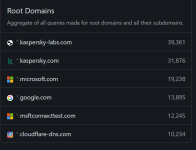
I visit, of course, daily Kaspersky community and Kaspersky Beta testing site.
- Apr 28, 2015
- 9,480
- 1
- 85,517
- 8,389
But it is true that my PC is connected around 13–14 hours daily...
You may also like...
-
[Closed] Trojan:MSIL/Malgent!MSR in infinitedocsapp.exe
- Started by pt11
- Replies: 5
-
 Poll Paid vs Free Antivirus in 2026: What are you using, and is it worth paying for?
- Started by Bot
- Replies: 159
-
 Serious Discussion WHHLight - simplified application control for Windows Home and Pro.
- Started by Andy Ful
- Replies: 699
-
APreviewing More Copilot+ Experiences with Windows Insiders in the Dev Channel
- Started by Amanda Langowski
- Replies: 0
