

Zanzibari's Second setup
- Thread starter zanzibari
- Start date
You are using an out of date browser. It may not display this or other websites correctly.
You should upgrade or use an alternative browser.
You should upgrade or use an alternative browser.
S
starchild76
hello and welcome to mt! first of all you should definately turn on uac , will help you out a lot in protecting your pc. you could also ad more plugins to chrome ensuring your privacy , speed up browsing and also for security reasons obviously : https everywhere , adblock , bitdefender traficlight. do you use a third party firewall? if not you can use comodo firewall or online armor , both free. do you use malwarebytes anti malware pro as realtime protection? you do know this is not a fullfledge av and that you need an av to run alongside of it : avast , avg , 360 internet security are good choices 
you couls also use win 8.1 built in security ( defender , uac , win firewall ) uses virtually no recources and does interfere / crash your operating system or make it instable.
you couls also use win 8.1 built in security ( defender , uac , win firewall ) uses virtually no recources and does interfere / crash your operating system or make it instable.

Hi @zanzibari
Thanks for posting your set up.
I agree with @starchild76
A complimentary AV would be recommended (Panda or avast!) or even Comodo Firewall with cloud.
Extensions for Chrome i always recommend are: HTTPS Everywhere and µBlock
Thanks for posting your set up.
I agree with @starchild76
A complimentary AV would be recommended (Panda or avast!) or even Comodo Firewall with cloud.
Extensions for Chrome i always recommend are: HTTPS Everywhere and µBlock

Enable UAC to Always Notify Me.
Download and install Hitman Pro.
Download Avast Free Edition (recommended) or AVG (also recommended).
Download Tinywall (Comodo FW is too advanced for you, it seems)
Download and install Hitman Pro.
Download Avast Free Edition (recommended) or AVG (also recommended).
Download Tinywall (Comodo FW is too advanced for you, it seems)

- Aug 17, 2014
- 12,729
- 123,837
- 8,399
User Account Control settings: Enable UAC
Real-Time Protection: use any proper antivirus of your choice...
On-Demand Scanner: use Hitman Pro or Emsisoft Emergency Kit both are portable
Real-Time Protection: use any proper antivirus of your choice...
On-Demand Scanner: use Hitman Pro or Emsisoft Emergency Kit both are portable
Last edited:
By 'portable', Silversurfer means they can be run on Mac, Linux and Windows. You don't need to download an additional file.User Account Control settings: Enable UAC
Real-Time Protection: use any proper antivirus of your choice...
On-Demand Scanner: install and use Hitman Pro or Emsisoft Emergency Kit both are portable

I also recommend the following add-ons:
MyWOT. (Highly recommended)
Adblock/UBlock (Strongly recommended)
Click and Clean. (recommended)
Lastpass (highly recommended)
If you have the money, you should buy Emsisoft Anti-Malware (instead of Avast or AVG. Never use two antiviruses unless you know what you're doing)
S
starchild76
if you do want to play with more than one av on your machine and do the most crazy and imagionable configs known to mankind and dare every aspect of your brain , do ask our übertweaker @Umbra Polaris for advice : notorious for his famous umbra total security


UAC(Enabled),Defender,windows Firewall & smartscreen would be a good start as long as you exercise some common sense while online and what you click on. Thanks for sharing your config
What was your last known malware infection ?
I'm honestly not surprised that you were infected if you're running that setup.
You're lacking : an Antivirus, an enabled UAC, a back-up solution and protection/privacy browser add-ons such as HTTPSEverywhere, Ghostery, Web of Trust (WOT), NoScript, etc.
I'm honestly not surprised that you were infected if you're running that setup.
You're lacking : an Antivirus, an enabled UAC, a back-up solution and protection/privacy browser add-ons such as HTTPSEverywhere, Ghostery, Web of Trust (WOT), NoScript, etc.
use Norton av..so far use already one year pass..very good defender...
There's honestly tons of Antiviruses I would use before relying on a Norton product.
Hi ! I'm sure I need to slow down my replies as this is just my first day here on this forum,but I'm finding so many things that I want to reply on here. I agree 100%. Norton would be my last choice. I think I would even go bare before using Norton. I have not heard one good thing about Norton. My choices are MSE and MBAM Pro. Then there are tons of on demand programs you can use to keep your PC cleaned up.There's honestly tons of Antiviruses I would use before relying on a Norton product.

Norton is doing pretty good these days ...I'm using it from last Week ,no false positive ,Excellent detection , Ram uses around 10mb in background and only use 30mb foreground (during scans or doing other stuffs ) , Scan time is fast Give it a try .Of course turn on UAC At least set it to recommended
see Ram used by norton (it is not going to slow down your pc Trust me )
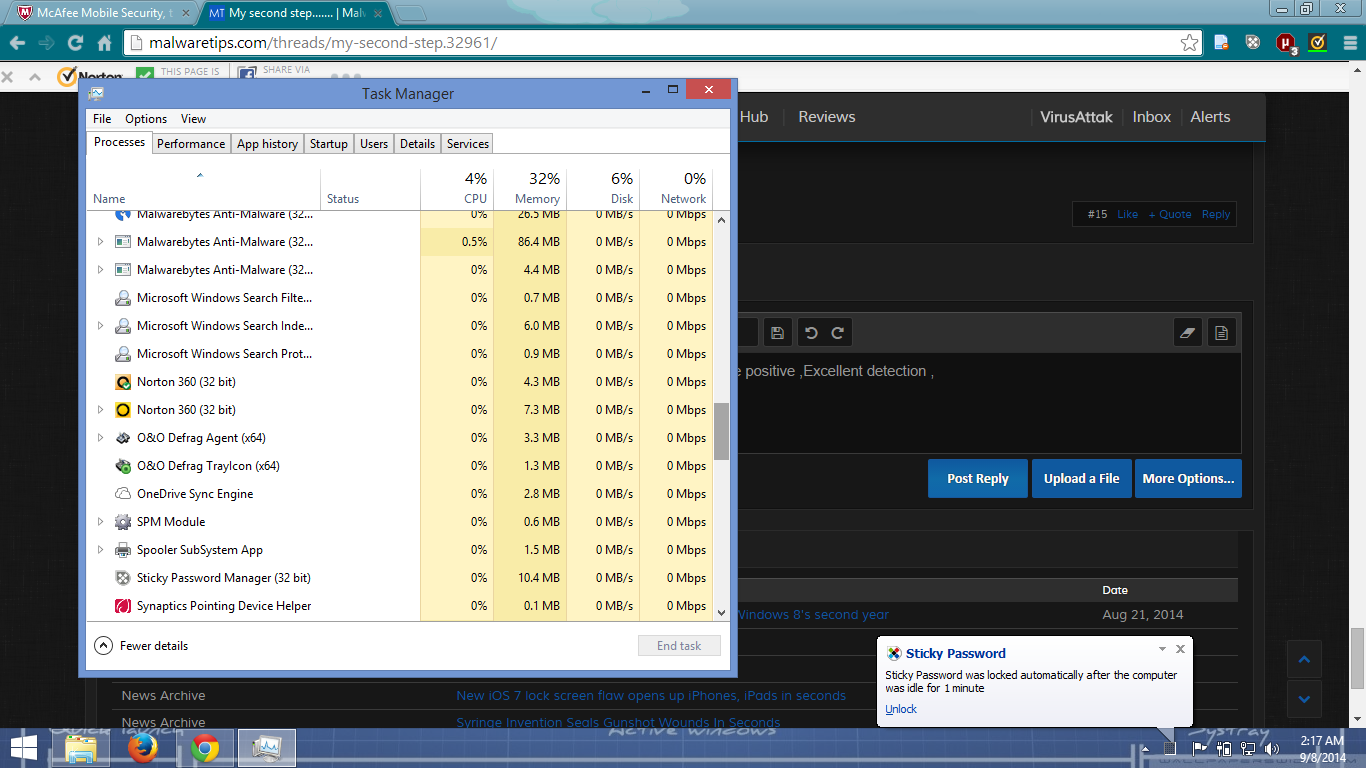
see Ram used by norton (it is not going to slow down your pc Trust me )
Norton is actualy pretty good and one of the lightes out there. no need for switch. and if u know what ur doing u realy, realy dont need uac. i never use uac and never get infected. useless future for advanced users, just annoying.
he is a Medium user i think it is better for him to turn it one.
Norton is actualy pretty good and one of the lightes out there. no need for switch. and if u know what ur doing u realy, realy dont need uac. i never use uac and never get infected. useless future for advanced users, just annoying.
I know exactly what I'm doing and my UAC is on default settings. Your point is ?
For starters, re-enable the default Windows 8 security;
- Windows Defender
- Windows Smartscreen
- Windows Firewall
- UAC on default
- Windows Update to automatic
http://windows.microsoft.com/en-gb/windows-8/security-checklist-windows
http://www.microsoft.com/en-GB/security/pc-security/windows8.aspx
Work on from there, deciding what security works best for you.
- Windows Defender
- Windows Smartscreen
- Windows Firewall
- UAC on default
- Windows Update to automatic
http://windows.microsoft.com/en-gb/windows-8/security-checklist-windows
http://www.microsoft.com/en-GB/security/pc-security/windows8.aspx
Work on from there, deciding what security works best for you.
You may also like...
-
 Hi, I am an IT security expert from Skybound Cyber. I am here to discuss latest cyber threats and learn from you all.
- Started by sandeepdhiman269
- Replies: 3
-
 App Review Cynet Endpoint Security
- Started by Shadowra
- Replies: 16
-
 Security News ESET Warns AI-driven Malware Attack and Rapidly Growing Ransomware Economy
- Started by Brownie2019
- Replies: 7
-
Scams & Phishing News New PayPal Scam Sends Verified Invoices With Fake Support Numbers
- Started by Brownie2019
- Replies: 2
