
New PayPal Scam Sends Verified Invoices With Fake Support Numbers

Brownie2019

Level 23
Thread author
Verified
Well-known
Forum Veteran
Mar 9, 2019
910
4,299
2,168
Germany
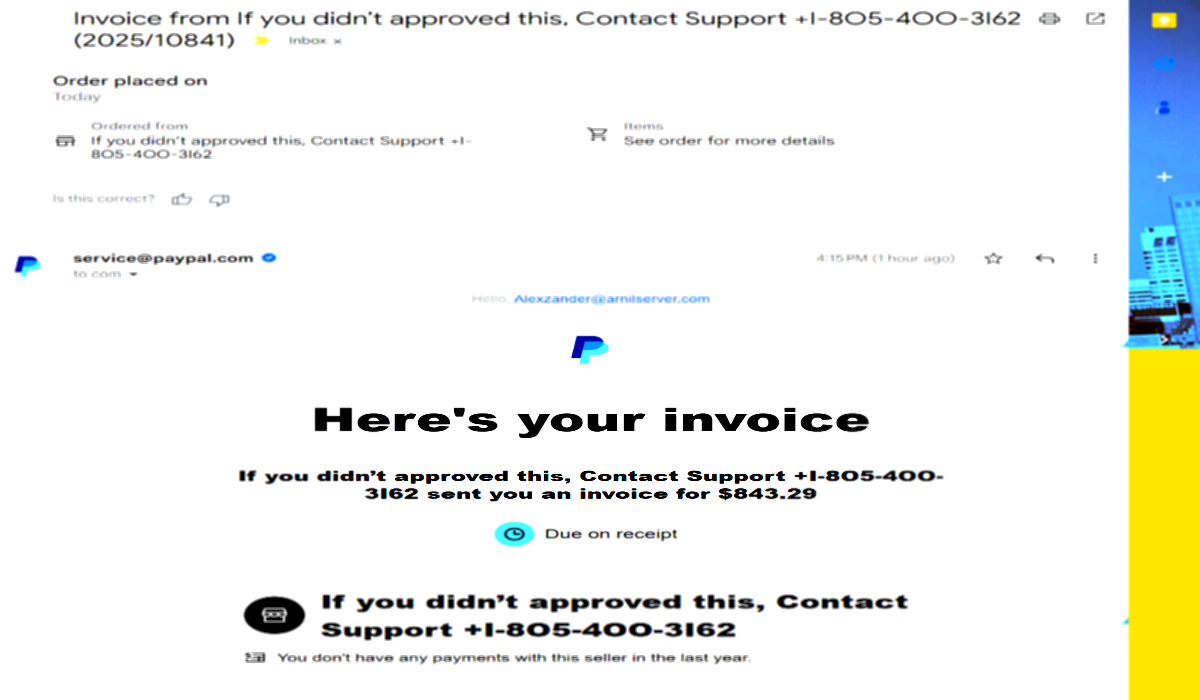
Hackread.com exclusive: Scammers are using verified PayPal invoices to launch callback phishing attacks. Learn how the “Alexzander” invoice bypasses Google filters.
A new phishing scam is leveraging PayPal’s legitimate invoice system to trick unsuspecting users, even appearing with the coveted “blue tick” verification mark in their inboxes. This sophisticated attack is bypassing traditional email security filters and leaving even tech-savvy individuals confused.
Hackread.com has obtained direct evidence of this escalating threat, confirming that attackers are exploiting PayPal’s own services to send fraudulent money requests, making them appear entirely authentic.
Full Story:
 
Full Story:
This matches a well-known “callback phishing” pattern: criminals abuse a legitimate platform’s messaging/invoice feature to deliver a real notification (from PayPal’s systems), but the content inside the invoice/message is the scam (fake charge + fake support number).

What’s really happening
PayPal invoices/money requests can be created by anyone with a PayPal account. If the attacker puts alarming text in the invoice notes (example: “You were charged $___, call support at ___”), the email itself can be legitimate PayPal mail, while the “support” details are fraudulent.

Also, Gmail’s “blue check/verified” indicators (when shown) are not a guarantee the message content is safe; they generally indicate the sender domain is authenticated (or meets certain brand/verification requirements), not that the invoice/request itself is trustworthy.

Safe way to verify (don’t use the email/invoice phone number)
  • Do not call any phone number or click “contact/support” details shown inside the invoice notes.
  • Log into PayPal by typing the address yourself (or using the official app), not via the email.
  • Check Activity, Wallet, and any open Invoices/Money requests. If it’s just a request/invoice you didn’t create or expect, it’s typically safe to ignore/decline/cancel (as applicable) inside PayPal.
  • If you see an actual unauthorized transaction (not just a request), report it immediately from within your PayPal account using PayPal’s official resolution/disputes flow.

What to do if you interacted with it
  • If you called the number: assume it was a social-engineering attempt. Do not install “remote support” tools they suggest (AnyDesk/TeamViewer/ScreenConnect, etc.). If you already installed something, disconnect the PC from the internet and remove the remote tool, then run reputable AV scans and change passwords from a known-clean device.
  • If you entered PayPal credentials after clicking links: change your PayPal password, enable 2FA, and review recent logins/authorized devices.
  • If you paid or sent money: report it inside PayPal right away and also notify your bank/card issuer if a card/bank account was involved.

Reporting
  • Forward the email to PayPal’s phishing reporting address (PayPal documents this on their site) and mark it as phishing in your email provider.
  • If the message came through a platform feature (invoice/request), also report the sender/request from within PayPal if that option is available.

Bottom line: treat the invoice as untrusted user-generated content even if the email delivery is “legitimate,” and only use PayPal’s official app/site (typed manually) to confirm whether any real charge exists.
 
Objective (Callback Phishing)

The phone number does not belong to PayPal, it routes to a scam call center.

Operators will attempt to coerce victims into installing Remote Access Trojans (RATs) like AnyDesk or TeamViewer, or trick them into logging into banking portals to "reverse" the transaction.

Recommendation / Remediation

Do Not Engage

DO NOT call the phone number listed in the invoice note (+1-805-400-3162 or similar). PayPal does not put support numbers in invoice memos.

DO NOT click "Pay" or "View Invoice" links if you are uncertain, even if they lead to the real PayPal site.

Verify Independently
Open a fresh browser window and navigate manually to paypal.com.

Log in and check your Activity or Resolution Center. If the invoice exists there, it is a real request from a fraudster.

Cancel and Report
Within the PayPal interface, locate the fraudulent invoice.

Select the option to Cancel the request (do not pay it).

Report the sender to PayPal by forwarding the email to phishing@paypal.com.

Endpoint Hygiene
If you called the number and allowed remote access, assume the device is compromised. Disconnect from the network immediately and initiate a password reset for all financial accounts from a different, clean device.

References

Hackread

New PayPal Scam Sends Verified Invoices

Technique

MITRE ATT&CK T1566.003

(Phishing: Spearphishing via Service)