


Najbrži's security configuration
- Thread starter Najbrži
- Start date
You are using an out of date browser. It may not display this or other websites correctly.
You should upgrade or use an alternative browser.
You should upgrade or use an alternative browser.
M
Manzai
Hi 
1. I you recommend to enable UAC. This is very important for safety.
2. Install Ccleaner, it will help to clean the browsing history and cookie.
3. Install Malwarebytes Anti-Malware. It works like a one demand-scanning.
4. I recommend μBlock for Opera and Chrome. For Firefox, I recommend AdGuard.
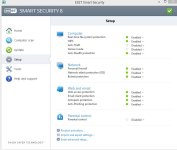
For ESET configuration

Enable PUP detection
Enable detection of potentially unsafe applications
Enable detection of potentially suspicious applications.
1. I you recommend to enable UAC. This is very important for safety.
2. Install Ccleaner, it will help to clean the browsing history and cookie.
3. Install Malwarebytes Anti-Malware. It works like a one demand-scanning.
4. I recommend μBlock for Opera and Chrome. For Firefox, I recommend AdGuard.
For ESET configuration
Enable PUP detection
Enable detection of potentially unsafe applications
Enable detection of potentially suspicious applications.
Hi
1. I you recommend to enable UAC. This is very important for safety.
2. Install Ccleaner, it will help to clean the browsing history and cookie.
3. Install Malwarebytes Anti-Malware. It works like a one demand-scanning.
4. I recommend μBlock for Opera and Chrome. For Firefox, I recommend AdGuard.
1. I don't like it's pop ups. I enabled 3rd option.
2. I'm using often Ccleaner for few years
3. I'm very know of Malwarebytes Anti-Malware software, but I don't need it. I'm using it for on demand-scanning on other people's computer.
4. Thx for that extensions, adblock works fine for FF (my main web-browser). I've installed μBlock for Opera and Chrome, thank you.
As for ESET I've disabled potentially unsafe applications beacuse of many false-positives.
PUP detection and detection of potentially suspicious applications are enabled.
Attachments
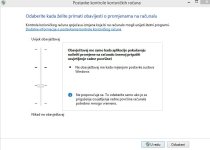

You should set UAC to: Always notify. On-demand scans should use other security solutions such as: Hitman Pro, Malwarebytes, Emisoft AntiMalwre for detecting, because if a virus will go undetected of your security solution that you use in real time it will not find the virus either on-demand scanning. I reccomend to use multiple accounts in your operating system if more people use your PC and to use a password manager like LastPass( Chrome , Firefox , Opera , Desktop ) Thanks for share your config.
Last edited:

Dosta brza konfiguracija 
Enable UAC
Use some backup in case of disaster
Password manager
Thx for sharing your configuration
Enable UAC
Use some backup in case of disaster
Password manager
Thx for sharing your configuration
By "multiple people" I mean on my family - father & younger brother. As for password manager I personally use KeePass. As for viruses etc. we are well know with computer technologies and also about our computer security. Thank you on advice, but for now WE don't need programs like that 'cuz I am the one who maintains computer, cleans & repairs it.You should set UAC to: Always notify. On-demand scans should use other security solutions such as: Hitman Pro, Malwarebytes, Emisoft AntiMalwre for detecting, because if a virus will go undetected of your security solution that you use in real time it will not find the virus either on-demand scanning. I reccomend to use multiple accounts in your operating system if more people use your PC and to use a password manager like LastPass
1. did but 3rd optionEnable UAC
Use some backup in case of disaster
Password manager
2. no need altough I know them
3. KeePass

2. no need altough I know them
Just invest an External HDD to save an important files.

I've 500GB extenal WD, it's enough ATM to storage family picsJust invest an External HDD to save an important files.

Its 'cuz of 15 years of experience on computer, since I was 10y old (year 2000) till now. Still I'm learning new stuff everyday like everyone else doesAs i read you have all options covered
You may also like...
-
 Serious Discussion TuxTalk - Eset Smart Security Premium Thread
- Started by TuxTalk
- Replies: 167
-
-
 Hot Take Windows defender with Antivirus
- Started by anirbandutta01
- Replies: 30
-
 Advanced Plus Security Divine_Barakah's PC Security Config 2026
- Started by Divine_Barakah
- Replies: 20
-
 App Review Battle: Bitdefender Total Security Antivirus vs ESET Smart Security Antivirus | 2025
- Started by NB InfoTech
- Replies: 4