

Network Activity Monitor

Ink

Administrator
Thread author
Verified
Jan 8, 2011
22,318
2
55,055
8,379
Network Activity Monitor ~laushung

Download & Extract: http://fav.me/d3ekd45 (no installation required)
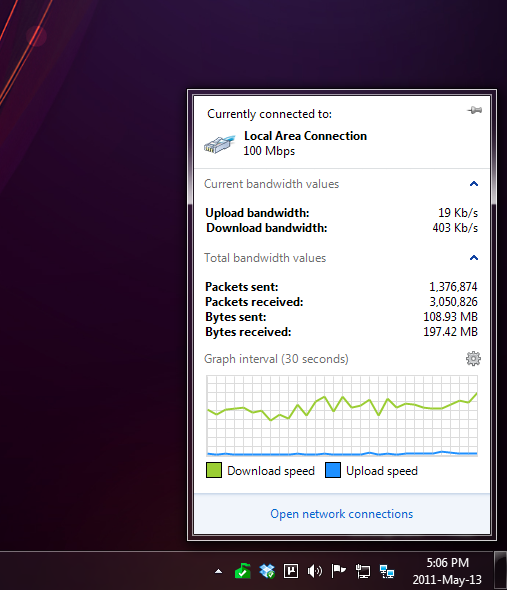
"Windows 7 did a lot of things right. One thing where that philosophy fell short was the network system tray.

In Windows XP, it would animate depending on whether there was activity on the network. This program bring this functionality back to Windows 7."​

network_activity_indicator_by_laushung-d3ekd45.png
 
  • Like
Reactions: Jack
You can select the Pin icon and it will stay displayed, it's great if you don't have 3rd-party software showing bandwidth data.

Definitely give this a go, if you don't use any 3rd-party Firewall. :D
 
Most Internet Security packages already allow you to see traffic information. You could also use the resource monitor in Windows 7 and click network and it gives you a detailed look at the network activity.
 
this looks really nice, thanks for sharing. gonna give it a try.

edit:too bad it was last updated in 2011
 
As far as I know I have seen that MrXidus uses this? but great find, I've been looking for this since MrXidus has closed his channel.
 
woomera said:
edit:too bad it was last updated in 2011

And? It still works with no bugs (or none that I have encountered).
 
muhammadariif said:
Any apps that allow to monitor Wifi from computer?

I'm using Networx; you can select which network adapter; it have a graph for DL/UL, speed meter, usage statistic, traceroute, Ping, netstat features.
 
Unfortunately, this app does not seem to change any files within C:\WINDOWS
It also does not remove the Standard WIFI-connection Monitor. It's silly to have two network monitors running.
I see more contras the pros.
But, thanks for sharing! Some people might find it useful! ^_^
 
Bump: Currently re-added to my Windows 8.1 PC. Works great, but you may need to configure it to monitor your Wi-Fi instead of LAN. No new updates since December 2011.

upload_2015-6-6_22-50-34.png


Should be compatible with Windows 10, although I haven't personally tried. Reminder of this great tool that you may want to use.