


Hello @NoVirusThanks
I think that's a false positive, when I click on HMPA to see the alerts, OSA blocks:
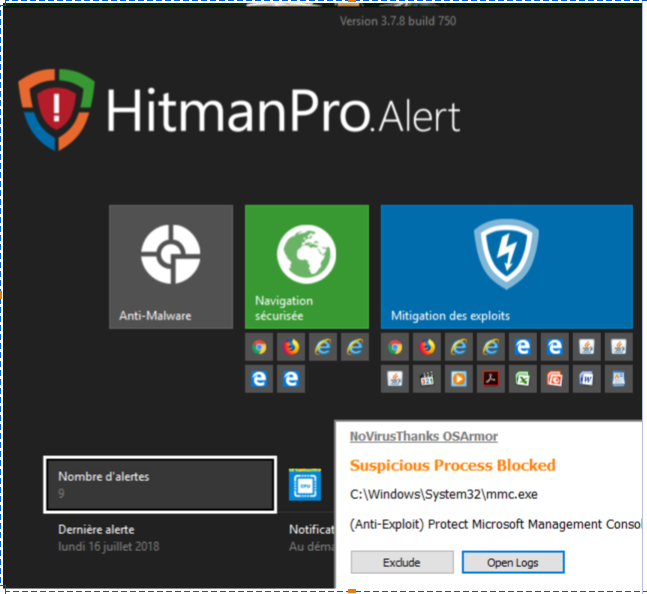
Date/Time: 16/07/2018 12:54:42
Process: [9876]C:\Windows\System32\mmc.exe
Process MD5 Hash: BA80301974CC8C4FB9F3F9DDB5905C30
Parent: [4720]C:\Windows\SysWOW64\mmc.exe
Rule: AntiExploitMicrosoftManagementConsole
Rule Name: (Anti-Exploit) Protect Microsoft Management Console
Command Line: "C:\WINDOWS\system32\eventvwr.msc" "C:\WINDOWS\system32\eventvwr.msc" /v:"C:\ProgramData\Microsoft\Event Viewer\Views\hmpalert.xml"
Signer:
Parent Signer:
User/Domain: Robert/ROBERT-PC
System File: True
Parent System File: True
Integrity Level: High
Parent Integrity Level: Unknown
Date/Time: 16/07/2018 12:54:42
Process: [4264]C:\Windows\System32\mmc.exe
Process MD5 Hash: BA80301974CC8C4FB9F3F9DDB5905C30
Parent: [2196]C:\Windows\SysWOW64\mmc.exe
Rule: AntiExploitMicrosoftManagementConsole
Rule Name: (Anti-Exploit) Protect Microsoft Management Console
Command Line: "C:\WINDOWS\system32\eventvwr.msc" "C:\WINDOWS\system32\eventvwr.msc" /v:"C:\ProgramData\Microsoft\Event Viewer\Views\hmpalert.xml"
Signer:
Parent Signer:
User/Domain: Robert/ROBERT-PC
System File: True
Parent System File: True
Integrity Level: High
Parent Integrity Level: Unknown
Date/Time: 16/07/2018 12:53:51
Process: [1284]C:\Windows\System32\mmc.exe
Process MD5 Hash: BA80301974CC8C4FB9F3F9DDB5905C30
Parent: [648]C:\Windows\SysWOW64\mmc.exe
Rule: AntiExploitMicrosoftManagementConsole
Rule Name: (Anti-Exploit) Protect Microsoft Management Console
Command Line: "C:\WINDOWS\system32\eventvwr.msc" "C:\WINDOWS\system32\eventvwr.msc" /v:"C:\ProgramData\Microsoft\Event Viewer\Views\hmpalert.xml"
Signer:
Parent Signer:
User/Domain: Robert/ROBERT-PC
System File: True
Parent System File: True
Integrity Level: High
Parent Integrity Level: Unknown
I think that's a false positive, when I click on HMPA to see the alerts, OSA blocks:
Date/Time: 16/07/2018 12:54:42
Process: [9876]C:\Windows\System32\mmc.exe
Process MD5 Hash: BA80301974CC8C4FB9F3F9DDB5905C30
Parent: [4720]C:\Windows\SysWOW64\mmc.exe
Rule: AntiExploitMicrosoftManagementConsole
Rule Name: (Anti-Exploit) Protect Microsoft Management Console
Command Line: "C:\WINDOWS\system32\eventvwr.msc" "C:\WINDOWS\system32\eventvwr.msc" /v:"C:\ProgramData\Microsoft\Event Viewer\Views\hmpalert.xml"
Signer:
Parent Signer:
User/Domain: Robert/ROBERT-PC
System File: True
Parent System File: True
Integrity Level: High
Parent Integrity Level: Unknown
Date/Time: 16/07/2018 12:54:42
Process: [4264]C:\Windows\System32\mmc.exe
Process MD5 Hash: BA80301974CC8C4FB9F3F9DDB5905C30
Parent: [2196]C:\Windows\SysWOW64\mmc.exe
Rule: AntiExploitMicrosoftManagementConsole
Rule Name: (Anti-Exploit) Protect Microsoft Management Console
Command Line: "C:\WINDOWS\system32\eventvwr.msc" "C:\WINDOWS\system32\eventvwr.msc" /v:"C:\ProgramData\Microsoft\Event Viewer\Views\hmpalert.xml"
Signer:
Parent Signer:
User/Domain: Robert/ROBERT-PC
System File: True
Parent System File: True
Integrity Level: High
Parent Integrity Level: Unknown
Date/Time: 16/07/2018 12:53:51
Process: [1284]C:\Windows\System32\mmc.exe
Process MD5 Hash: BA80301974CC8C4FB9F3F9DDB5905C30
Parent: [648]C:\Windows\SysWOW64\mmc.exe
Rule: AntiExploitMicrosoftManagementConsole
Rule Name: (Anti-Exploit) Protect Microsoft Management Console
Command Line: "C:\WINDOWS\system32\eventvwr.msc" "C:\WINDOWS\system32\eventvwr.msc" /v:"C:\ProgramData\Microsoft\Event Viewer\Views\hmpalert.xml"
Signer:
Parent Signer:
User/Domain: Robert/ROBERT-PC
System File: True
Parent System File: True
Integrity Level: High
Parent Integrity Level: Unknown


 Im really loving OSA, putting on all the pc's.


