NoVirusThanks OSArmor

I got the developers' reply on Wilders Security Forums

"We battle-test OSArmor with recent malware samples every two weeks, and it has consistently demonstrated strong protection in our tests, keeping up with new and emerging threats.

We recently added only small adjustements and a few new internal block rules.

No particular bugs have been reported, there was only a rare (small) issue on W11 that was reported by only one user, it has been fixed.

We have scheduled a major internal update for the coming months.

This recent version also fixed all FPs reported here and via email."
 
Sharing a quick test with OSArmor (basic protection) and a recent ClickFix sample:

win10-20h2v2-x64-2026-03-22-11-34-09.png


win10-20h2v2-x64-2026-03-22-11-34-16.png
 
Testing CL with OSArmor wow do you like punishment? Talk about overlap. But hell I'm keen, would love see such a test.
not necessarily WITH, I meant same test environment first with one then with the other, a result comparison if feasible. perhaps @Shadowra understood me the first time... or whatever testing procedure works... ;)
 
Last edited:
I had to disable during an uninstall / update, or it would often damage the installer just for an example, if I forgot on two occasions I had to actually image back to remove a program or update as I remember, I no longer need such things in my life - I first used it when it was free then I used the pay version for some time, whatever I did it to change things I eventually realised was more trouble than it was worth & I have to say in all honestly it never really helped anything - These are just my opinions & are fallible so I wont comment again as I'm not trolling, but as a long time user, does a person really need it?? Using it along with Cyberlock IMHO is overkill with bells on - If users wish to use it & find it helpful that's good myself I never did.:)
 
had to disable during an uninstall / update, or it would often damage the installer just for an example
I've set OSArmor on the higher protection (Maximum protection) and sometimes, when installing a new software, I preferred to disable OSArmor but once I added some exclusions and added some Trusted Vendors to the whitelist, the popup notices were reduced considerably. Anyway I respect your opinion, of course. Thank you for sharing your experience with OSArmor.
 
I find I need to set Cyberlock to its disable / install mode for installs & uninstalls
Then it's not best practice, if you need to disable security tools it defeats the purpose. That's why I started using ESET again, no need to disable.

It's a shame because CyberLock, AppGuard & OSArmor are really good tools and offer great protection when enabled. Problem is you can't install/update software.
 
Then it's not best practice, if you need to disable security tools it defeats the purpose. That's why I started using ESET again, no need to disable.

It's a shame because CyberLock, AppGuard & OSArmor are really good tools and offer great protection when enabled. Problem is you can't install/update software.
unclear to me how big an issue this is, assuming that the app being installed is screened / hash matched first, I use Eset too, and do not disable it for installs...
 
I don't get it? Why disable OSArmor during installs, whats the point of using it then?
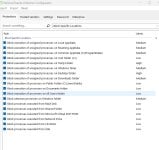
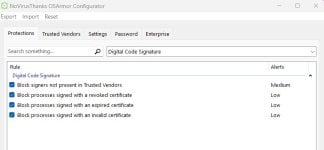
Hello, you have the point but sometimes I disabled OSArmor protection before installing new software because I knew that the software came from trusted sources. OSArmor rules blocks the execution of files from certain folders and / or from signers not present in Trusted Vendor's whitelist so the block can occur with some installers / updaters too. Over time I created a list of exclusions and I've manually added the missing vendor's digital signatures, relating to the software I use, to the whitelist of OSArmor Trusted Vendors, to reduce OSArmor warnings as much as possible. To maximize the protection I've enabled all OSArmor rules to block specific locations and to block signers not present in Trusted Vendor's whitelist.

OSArmor block specific locations.jpg
OSArmor block untrusted signers.jpg
 
I get it I do but in the end it defeats the purpose of using such software like OSArmor. Even trusted sources can be compromised.

That's why I rely on ESET/WD to do the dirty work, I don't need to disable it, it just works. I have little patience for apps that need constant tinkering.

+ with Andy Fuls tools it just blocks apps/services with a subtle alert, I like that and then you can whitelist too.

Saying that I still think $15 USD a year is worth the fee for admission with OSArmor.