


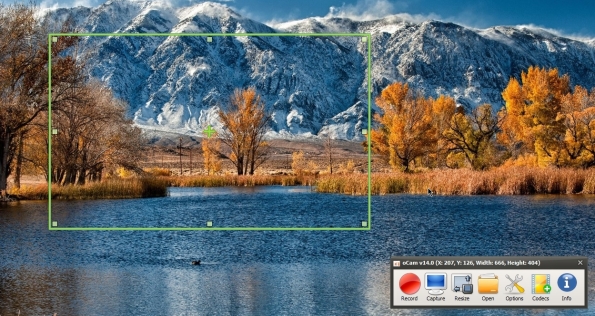
oCam is 100% free Screen Recorder for home and office.
Features of product
* Computer screen, video recording is possible.
* Recording using the built-in video codecs(AVI, MP4, FLV, MOV, TS, VOB) and audio codecs(MP3) and real-time audio encoding
* Can record you use the external VFW codec. * Have large video formats to support more than 4GB.
* Recording sound from your computer as you can.
* Audio recording is made possible without the stereo mix setting.(Windows 7, Vista SP1 or later)
* A variety of sound quality when recording can be selected.
* Screen capture is possible. Image Format(JPEG, GIF, PNG, BMP)
* Recording area of the keyboard can be easily controlled.
* Can record the full screen and window area.
* During recording, the mouse cursor can be set to be included.
* Bug reporting is available to developers.
* Record the results can be stored in a specific folder, you have the option.
* oCam dual-monitor support.
* Flash in the IE browser, the target area can be selected.
* Preferences from the FPS setting is possible.
* Recording schedule function is available.
http://ohsoft.net/product_ocam.php
http://cyberraiden.wordpress.com/20...reen-recorder-screenshot-for-home-and-office/
Features of product
* Computer screen, video recording is possible.
* Recording using the built-in video codecs(AVI, MP4, FLV, MOV, TS, VOB) and audio codecs(MP3) and real-time audio encoding
* Can record you use the external VFW codec. * Have large video formats to support more than 4GB.
* Recording sound from your computer as you can.
* Audio recording is made possible without the stereo mix setting.(Windows 7, Vista SP1 or later)
* A variety of sound quality when recording can be selected.
* Screen capture is possible. Image Format(JPEG, GIF, PNG, BMP)
* Recording area of the keyboard can be easily controlled.
* Can record the full screen and window area.
* During recording, the mouse cursor can be set to be included.
* Bug reporting is available to developers.
* Record the results can be stored in a specific folder, you have the option.
* oCam dual-monitor support.
* Flash in the IE browser, the target area can be selected.
* Preferences from the FPS setting is possible.
* Recording schedule function is available.
http://ohsoft.net/product_ocam.php
http://cyberraiden.wordpress.com/20...reen-recorder-screenshot-for-home-and-office/


