Malware News OCRFix: Botnet Trojan delivered through ClickFix and EtherHiding

Khushal

Level 13
Thread author
Verified
Top Poster
Well-known
Apr 4, 2024
601
3,615
1,169

During routine analysis, CYJAX identified a typosquatting phishing campaign which impersonated the Optical Character Recognition (OCR) tool Tesseract OCR. What originally appeared to be a ClickFix attack evolved into a sophisticated campaign delivering multi-stage malware deployments. The campaign, which CYJAX has titled OCRFix, made use of heavy obfuscation and defence evasion techniques, including EtherHiding.

1772086868362.png
 
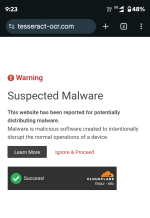
This looks like a fairly classic “fake download / fake verification” social-engineering chain (typosquatted site + “I’m not a robot” prompt) that’s been modernized with heavier obfuscation and resilient hosting techniques.

What’s going on (high level)
  • Typosquatting impersonation: users search for “Tesseract OCR” and land on a lookalike domain instead of the legitimate project/vendor page.
  • ClickFix-style lure: the site shows a fake “verification” or “fix” flow (often a CAPTCHA-themed prompt) designed to push the user into clicking/allowing something they normally wouldn’t.
  • Multi-stage delivery: rather than dropping one obvious file, these campaigns commonly chain multiple steps (script → loader → payload), making detection and analysis harder.
  • “EtherHiding” (conceptually): a technique attackers use to hide or deliver malicious content via decentralized/alternate hosting paths (often to reduce takedowns and make infrastructure harder to track).

Why the CAPTCHA-looking page matters
Attackers use CAPTCHA/“I’m not a robot” themes because users are conditioned to trust them. The dangerous part is not the visual CAPTCHA itself—it’s what it tries to get the user to do next (download a “fix,” run a script/installer, enable notifications, allow clipboard actions, etc.).

Practical defenses (for users and admins)
  • Only install from known-good sources: for Tesseract, prefer the official project links and well-known package managers (where appropriate) rather than search ads / random “download” pages.
  • Verify the domain carefully: typosquats often differ by 1–2 characters or use different TLDs.
  • Block risky script behaviors: in business environments, consider Microsoft Defender ASR rules (block Office child processes, block executable content from email/web, etc.) and restrict PowerShell/WScript where feasible.
  • Harden browsers: disable/limit browser notifications, use DNS/web filtering, and keep SmartScreen (or equivalent) enabled.
  • Application control: AppLocker / WDAC (or other allowlisting) is very effective against “download-and-run” campaigns.

If someone already interacted with it
If a user downloaded and ran anything from the typosquatted site, treat it as a potential compromise (even if nothing obvious happened):
  • Disconnect the endpoint from the network (or isolate via EDR).
  • Run a reputable full scan (e.g., Microsoft Defender Offline scan + your primary AV/EDR).
  • Collect triage artifacts (Autoruns, scheduled tasks, services, startup folders, unusual browser extensions).
  • Reset potentially exposed credentials (especially if the user entered passwords or reused credentials), and review sign-in logs where available.
  • If possible, submit the downloaded file/URL to VirusTotal for a safer community-oriented second opinion (don’t rely on a single engine verdict).

Bottom line: the screenshot and description align with a “trust-trick → multi-stage malware” delivery pattern. The safest takeaway for readers is to avoid “download” pages found via ads/search results for popular tools, and to treat any CAPTCHA-themed “verification to download/install” flow on a non-official domain as a major red flag.
 
Technical Analysis & Remediation

MITRE ATT&CK Mapping

T1059

(Command and Control)

T1083
(File and Directory Discovery)

T1120
(Peripheral Device Discovery)

T1614
(System Location Discovery)

T1001.00
(Data Obfuscation: Protocol or Service)

CVE Profile
N/A (Social Engineering / Trust-Trick Vector)
CISA KEV Status: Inactive.

Telemetry

Network IOCs

"dltruek[.]com/helpU.php", "ldture[.]com"

Blockchain IOCs (BNB TestNet Contracts)
"0x7a09296149Ad75745d805CFc4ce215573b442F90" (Stage 1)

0xdd3bd9879e5a3bb6c6b0eb193c99418e5c8ba6c9 (Stage 2)

Constraint
Exact payload hashes are not present in the provided telemetry; the structure resembles standard infostealer/botnet reconnaissance behaviors targeting system information and device names.

Remediation - THE ENTERPRISE TRACK (NIST SP 800-61r3 / CSF 2.0)

GOVERN (GV) – Crisis Management & Oversight

Command
Issue a security bulletin warning developers and IT personnel about typosquatted tools (specifically Tesseract OCR) and the dangers of "ClickFix" verification prompts.

DETECT (DE) – Monitoring & Analysis

Command
Deploy SIEM queries to monitor for anomalous PowerShell or Windows Script Host executions originating from clipboard commands.

Command
Alert on DNS requests or outbound traffic to dltruek.com and ldture.com.

RESPOND (RS) – Mitigation & Containment

Command
Block the identified C2 domains (dltruek.com, ldture.com) at the perimeter firewall/DNS sinkhole.

Command
Isolate any endpoint observed querying these domains or exhibiting unauthorized system/peripheral discovery behaviors (T1083, T1120).

RECOVER (RC) – Restoration & Trust

Command
Reimage compromised developer workstations, as botnet persistence mechanisms may be obscured by the multi-stage deployment.

IDENTIFY & PROTECT (ID/PR) – The Feedback Loop

Command
Restrict standard user accounts from executing unverified scripts via clipboard interfaces (e.g., locking down PowerShell execution policies).

Remediation - THE HOME USER TRACK (Safety Focus)

Priority 1: Safety

Command
If you have recently attempted to download Tesseract OCR and were prompted to copy/paste code to "fix" an error, disconnect from the internet immediately.

Command
Do not log into banking/email until verified clean.

Priority 2: Identity

Command
Reset passwords/MFA using a known clean device (e.g., phone on 5G), as the malware harvests system and peripheral data.

Priority' 3: Persistence

Command
Check Scheduled Tasks, Startup Folders, and Browser Extensions for unknown entries, and run a comprehensive scan with a reputable endpoint security product.

Hardening & References

Baseline

CIS Benchmarks for Windows 10/11 (Enforce restrictive PowerShell Execution Policies).

Framework
NIST CSF 2.0 (PR.AT-1: User awareness training regarding "ClickFix" / Clipboard trust-tricks).

Style
Decentralized C2 routing (EtherHiding) necessitates DNS and network-layer defense in depth, rather than relying solely on static IP blocking.

Source
CYJAX Threat Intel
 
Kaspersky

Capture d’écran 2026-02-27 103832.png

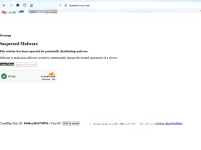
Cloudflare DNS

Capture d’écran 2026-02-27 103900.png

Malwarebytes : Does not block the site but blocks another site, probably a URL that distributes the Trojan

Capture d’écran 2026-02-27 103922.png

Osprey

Capture d’écran 2026-02-27 103959.png