

Solved onclickads redirection problem
- Thread starter Jazz Dave
- Start date
You are using an out of date browser. It may not display this or other websites correctly.
You should upgrade or use an alternative browser.
You should upgrade or use an alternative browser.

Hello,
They call me TwinHeadedEagle around here, and I'll be working with you.
Before we start please read and note the following:
 Rules and policies
We won't support any piracy.
That being told, if any evidence of illegal OS, software, cracks/keygens or any other will be revealed, any further assistance will be suspended. If you are aware that there is this kind of stuff on your machine, remove it before proceeding!
The same applies to any use of P2P software: uTorrent, BitTorrent, Vuze, Kazaa, Ares... We don't provide any help for P2P, except for their removal. All P2P software has to be uninstalled or at least fully disabled before proceeding!
Failure to follow these guidelines will result with closing your topic and withdrawning any assistance.
You run Zemana AntiMalware. Did it find any malware?
They call me TwinHeadedEagle around here, and I'll be working with you.
Before we start please read and note the following:
- At the top of your post, please click on the "Watch thread" button and make sure to check Watch this thread...and receive email notifications. This will send an email to you as soon as I reply to your topic, allowing me to solve your problem faster.
- Please do not install any new software during the cleaning process other than the tools I provide for you. This can hinder the cleaning process. Please do not perform System Restore or any other restore.
- Instructions I give to you are very simple and made for complete beginner to follow. That's why you need to read through my instructions carefully and completely before executing them.
- Please do not run any tools other than the ones I ask you to, when I ask you to. Some of these tools can be very dangerous if used improperly. Also, if you use a tool that I have not requested you use, it can cause false positives, thereby delaying the complete cleaning of your machine.
- All tools we use here are completely clean and do not contain any malware. If your antivirus detects them as malicious, please disable your antivirus and then continue.
- If during the process you run across anything that is not in my instructions, please stop and ask. If any tool is running too much time (few hours), please stop and inform me.
- I visit forum several times at day, making sure to respond to everyone's topic as fast as possible. But bear in mind that I have private life like everyone and I cannot be here 24/7. So please be patient with me. Also, some infections require less, and some more time to be removed completely, so bear this in mind and be patient.
- Please stay with me until the end of all steps and procedures and I declare your system clean. Just because there is a lack of symptoms does not indicate a clean machine. If you solved your problem yourself, set aside two minutes to let me know.
- Please attach all report using
button below. Doing this, you make it easier for me to analyze and fix your problem.

- Do not ask for help for your business PC. Companies are making revenue via computers, so it is good thing to pay for the repair.
We won't support any piracy.
That being told, if any evidence of illegal OS, software, cracks/keygens or any other will be revealed, any further assistance will be suspended. If you are aware that there is this kind of stuff on your machine, remove it before proceeding!
The same applies to any use of P2P software: uTorrent, BitTorrent, Vuze, Kazaa, Ares... We don't provide any help for P2P, except for their removal. All P2P software has to be uninstalled or at least fully disabled before proceeding!
Failure to follow these guidelines will result with closing your topic and withdrawning any assistance.
You run Zemana AntiMalware. Did it find any malware?
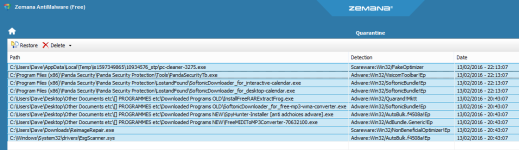
Is it happening in all browsers?
 Scan with ZOEK
Please download ZOEK by Smeenk and save it to your desktop.
Temporary disable your AntiVirus and AntiSpyware protection - instructions here.
Upload it in your next reply.
Please download ZOEK by Smeenk and save it to your desktop.
Temporary disable your AntiVirus and AntiSpyware protection - instructions here.
- Right-click on icon and select
Run as Administrator to start the tool.

- Wait patiently until the main console will appear, it may take a minute or two.
- In the main box please paste in the following script:
Code:createsrpoint; autoclean; emptyclsid; emptyalltemp; ipconfig /flushdns >>"%temp%\log.txt";b - Make sure that Scan All Users option is checked.
- Push Run Script and wait patiently. The scan may take a couple of minutes.
- When the scan completes, a zoek-results logfile should open in notepad.
- If a reboot is needed, it will be opened after it. You may also find it at your main drive (usually C:\ drive)
Upload it in your next reply.
I almost always use IE but I've just tried to replicate the problem on Chrome for about half an hour without anything suspicious showing up.Is it happening in all browsers?
Scan with ZOEK
Please download ZOEK by Smeenk and save it to your desktop.
Temporary disable your AntiVirus and AntiSpyware protection - instructions here.
- Right-click on
icon and selectRun as Administrator to start the tool.- Wait patiently until the main console will appear, it may take a minute or two.
- In the main box please paste in the following script:
Code:createsrpoint; autoclean; emptyclsid; emptyalltemp; ipconfig /flushdns >>"%temp%\log.txt";b- Make sure that Scan All Users option is checked.
- Push Run Script and wait patiently. The scan may take a couple of minutes.
- When the scan completes, a zoek-results logfile should open in notepad.
- If a reboot is needed, it will be opened after it. You may also find it at your main drive (usually C:\ drive)
Upload it in your next reply.
I've attached the ZOEK results as requested.
Attachments
I'm not at home right now so can't "test to destruction" - I'll have a good chance tomorrow when I get back and will reply again then - thanks for all your help so far. Dave
I've run IE for a few hours now and no sign of the redirection - I reckon you've done it!!! Thank you very much.
Since there are no more problems, we can declare this PC clean

Now, we can proceed with post-cleanup procedures. Let's remove my tools and create a new, non infected restore point concurrently deleting old ones.
Step 1. - Creation of system restore point and tools removal.
Download DelFix by Xplode and save it to your desktop.
Step 2. - Tips and tricks to keep your computer clean, safe and in a good shape.
Security tips - highly recommended reading:
Maintenance tips:
Additional software that I personally use and install on all my clients devices:
Stay safe,
TwinHeadedEagle
Now, we can proceed with post-cleanup procedures. Let's remove my tools and create a new, non infected restore point concurrently deleting old ones.
Step 1. - Creation of system restore point and tools removal.
Download DelFix by Xplode and save it to your desktop.
- Run the tool by right click on the icon and Run as administrator option.

- Make sure that these ones are checked:
- Remove disinfection tools
- Purge system restore
- Reset system settings
- Push Run and wait until the tool completes his work.
- All tools we used should be gone. Tool will create an report for you (C:\DelFix.txt). I don't need it for review.
Step 2. - Tips and tricks to keep your computer clean, safe and in a good shape.
Security tips - highly recommended reading:
Maintenance tips:
Additional software that I personally use and install on all my clients devices:
- Malwarebytes' Anti-Malware (paid version highly recommended) - to scan your system from time to time in search for malware.
- Malwarebytes' Anti-Exploit - to prevent plenty of mostly exploited vulnerabilities.
- McShield - to prevent infections spread by removable media.
- Unchecky - to prevent from installing additional foistware, implemented in legitimate installations.
- CryptoPrevent - tool for protection against Cryptolocker and similar ransomware infections.
- Adblock - to surf the web without annoying ads!
- Qualys BrowserCheck - cloud service that scans your browsers and plugins to see if they’re all up-to-date.
My help is free for everybody.
If you're happy with the help provided and/or wish to buy me a beer for the assistance you received, then you can consider a donation:
Thank you!
If you're happy with the help provided and/or wish to buy me a beer for the assistance you received, then you can consider a donation:
Thank you!
Stay safe,
TwinHeadedEagle

I'm sorry but I think I've sent the last message too soon! The redirection has just come back!!!!!
The redirection takes my browsing to a blank page on onclickads.net (also noticed that the button to return to previous page gets disabled). I am also getting suspicious in-line adverts appearing (hope that's the right terminology) trying to get me to install/upgrade progs such as flash. (see the attached picture)
Attachments

Not any more - last week it was numerous sites but since your help it's narrowed down to one or two. I'm trying to see if there is a pattern to the problem. I have noticed (although maybe just a coincidence) that it usually happens when I'm on a site and I click a link to go to a new page (sometimes that new page gets redirected - but not always and not immediately) -
The redirections happened about 5 or 6 time last night (much fewer than of late) - what is new to last night is that I'm now getting redirected to other sites (other than the usual onclickads site).
I said previously that I got a blank page (rather than actual content) when getting taken to onclickads - I think that is because I have that site listed in the IE's Internet Options -> Security -> Restricted Sites.
I ran a deep scan in Zemana today without anything showing up.
Nothing suspicious has shown up today but I doubt these things go away on their own.
Would it be worthwhile for me to do a complete run again of everything mentioned on the "How to remove Any Browser Redirect virus (Removal Guide)" page?
I said previously that I got a blank page (rather than actual content) when getting taken to onclickads - I think that is because I have that site listed in the IE's Internet Options -> Security -> Restricted Sites.
I ran a deep scan in Zemana today without anything showing up.
Nothing suspicious has shown up today but I doubt these things go away on their own.
Would it be worthwhile for me to do a complete run again of everything mentioned on the "How to remove Any Browser Redirect virus (Removal Guide)" page?
Can you first try to reset Internet Explorer?
Change or reset Internet Explorer settings - Windows Help
Change or reset Internet Explorer settings - Windows Help
I've reset IE and then I've tried the "How to remove Any Browser Redirect virus (Removal Guide)" page.
The only scan that seemed to show anything amiss was the JRT file (which I've attached). There were some tracking cookies showing in Hitman too.
I then opened a few windows in IE and clicked on some links within these sites, left it for about 15 mins and came back to find about a third of the pages had been redirected to other sites. I've attached a screenshot of the issue. (I've underlined the pages that had been affected) At least this time the "return to previous page" button is working!
Hmmmmm!!!

The only scan that seemed to show anything amiss was the JRT file (which I've attached). There were some tracking cookies showing in Hitman too.
I then opened a few windows in IE and clicked on some links within these sites, left it for about 15 mins and came back to find about a third of the pages had been redirected to other sites. I've attached a screenshot of the issue. (I've underlined the pages that had been affected) At least this time the "return to previous page" button is working!
Hmmmmm!!!
Attachments
You may also like...
-
 Malware News Fake “Mac Cleaner” Campaign Uses Google Ads to Redirect Users to Malware
- Started by Brownie2019
- Replies: 3
-
Trouble with redirection to addmitad.com
- Started by avatar8970
- Replies: 8
-
 Technology Google will soon redirect you to Google.com, no matter your country
- Started by Gandalf_The_Grey
- Replies: 4
-
 Trouble Removing a Chrome Redirecting Type Malware/Adware
- Started by Trustless
- Replies: 4
