
One bar, more space

I think it's Workspace. It was here, but I ended up removing it. If you want it, you have to customize it using the toolbar, but thanks for the tip. Thank you very much, and you too, @Parkinsond, from the bottom of my heart. I know about Chrome, but unlike Vivaldi, it doesn't offer much customization. (y)
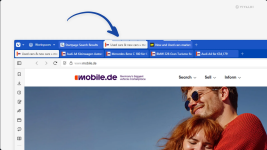
No, it's not a workspace, I always disable the workspace because I don't need to use it, I'm pretty sure it's the tabs feature, when you right-click on one tab, and you already have many tabs opened from the same site, it will show in the right menu options to move all tabs related to that site to a separate tab bar below the main tab bar, sorry I removed Vivaldi, so I can't determine the exact name of the option, but the end result will be as shown in the image below.

Screenshot 2025-10-09 at 02-21-06 Tip #727 - Tabs Vivaldi Browser.png

Note that the second tab bar contains tabs related to the same site, this helps me when I have for example many MT tabs open and start searching for answers to questions asked by members and the tabs get confusing, this feature will help me separate the MT tabs on a second tab bar and continue searching in the main tab bar which makes me manage tasks better.
 
Note that the second tab bar contains tabs related to the same site, this helps me when I have for example many MT tabs open and start searching for answers to questions asked by members and the tabs get confusing, this feature will help me separate the MT tabs on a second tab bar and continue searching in the main tab bar which makes me manage tasks better.
I've done that before, but I confess it was unintentional. When I moved one tab to another, it ended up looking like the image you shared. Now what I did was stack the tabs, as you can see in the image below, but the tabs are still hibernated.
1759972720652.png
 
I've done that before, but I confess it was unintentional. When I moved one tab to another, it ended up looking like the image you shared. Now what I did was stack the tabs, as you can see in the image below, but the tabs are still hibernated.
Well, I searched for it, and it is tab stacking, you need to select "Stack tabs by hosts" from the right click menu on a particular tab, and it will stack all the tabs from that site.
 
Well, I searched for it, and it is tab stacking, you need to select "Stack tabs by hosts" from the right click menu on a particular tab, and it will stack all the tabs from that site.
Okay, so that's it?
1759974729872.png

But I had to enable Two-Level because it was in compact mode.
1759974871274.png
 
Okay, so that's it?

But I had to enable Two-Level because it was in compact mode.
View attachment 291744
I really like Vivaldi, and it's my favorite Chromium browser, but I currently use Firefox, maybe Floorp will implement Vivaldi features on Firefox which will give me the best of both worlds.
 
I really like Vivaldi, and it's my favorite Chromium browser, but I currently use Firefox, maybe Floorp will implement Vivaldi features on Firefox which will give me the best of both worlds.
I am using Chromium-based Vivaldi because it was the only one I could install directly on my hard drive, and my profile and cache are all there. I only have the Vivaldi shortcut on my desktop. Vivaldi only takes a while to open if you have a lot of tabs open, but it runs in the background and then opens as quickly as EDGE. Since my hard drive isn't very slow, it was advantageous for me to keep it there. Now Firefox is slow, I've tried everything, it's very slow on the hard drive, only running on the SSD does it run more smoothly.
 
I am using Chromium-based Vivaldi because it was the only one I could install directly on my hard drive, and my profile and cache are all there. I only have the Vivaldi shortcut on my desktop. Vivaldi only takes a while to open if you have a lot of tabs open, but it runs in the background and then opens as quickly as EDGE. Since my hard drive isn't very slow, it was advantageous for me to keep it there. Now Firefox is slow, I've tried everything, it's very slow on the hard drive, only running on the SSD does it run more smoothly.
I switched back to Firefox because I can disable disk cache, otherwise I will continue using Vivaldi.
 
I am using Chromium-based Vivaldi because it was the only one I could install directly on my hard drive
Opera can be installed the same way, but I prefer Vivaldi; it is faster, less resource consuming, less privacy invasive, more customizable, and it has later version of chromium than Opera.
 
  • Like
Reactions: lokamoka820

You may also like...