silversurfer
Super Moderator
Thread author
Verified
Top Poster
Staff Member
Malware Hunter
Forum Veteran
- Aug 17, 2014
- 12,736
- 123,873
- 8,399
Source: Opera 74 adds Native Chrome Web Store extensions installation supportOpera 74 supports the native installation of Chrome extensions
- Launch Opera browser
- Visit opera:///flags page
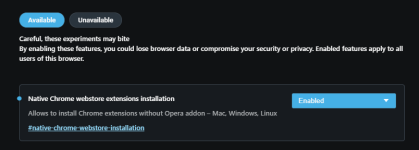
- Search for “Native Chrome webstore extensions installation”

- Select Enabled and restart the browser.
- Head over to Chrome Web Store Extensions repository and try to install an extension, when the “Add to Opera” button appears, click it.

Opera 74 adds Native Chrome Web Store extensions installation support
Opera has an add-ons store that contains very few extensions. Opera based on Chromium supports Chrome Extensions, but till now, to install extensions from Chrome Web Store in Opera, you must first install Opera addon named “Install Chrome extensions”. After that, you can install any Chrome...
 techdows.com