Troubleshoot Opt oup adware appearing on android screen!

Sangram200

New Member
Thread author
Jan 21, 2019
1
2
2
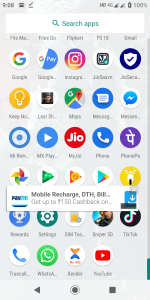
Suddenly ads started to show up on my android screen is there any way to detect the source?

The ad shows a opt out option and refers to Opt-out of mobile recommendations

Screenshot_20190121-210842.png
 
Last edited by a moderator:
Try the following apps (order of preference) if finding the adware is not obvious.
VirusTotal Mobile (returns verdict of detections from 60+ scanning engines)
AppBrain Ad Detector (returns the list of ad networks embedded for each Android application and can probably find the specific ad network that is causing the issue)
Dr. Web Antivirus Light (it can scan the system partition for malicious files)
Malwarebytes Free
BitDefender Free
Antiy AVL Pro (aggressive, ignore false positives for legitimate and generic ad networks, it can identify riskware and adware that other AV apps missed, use it as a last resort, make sure Adware detection is enabled in app settings)

 
Try the following apps (order of preference) if finding the adware is not obvious.
VirusTotal Mobile (returns verdict of detections from 60+ scanning engines)
AppBrain Ad Detector (returns the list of ad networks embedded for each Android application and can probably find the specific ad network that is causing the issue)
Dr. Web Antivirus Light (it can scan the system partition for malicious files)
Malwarebytes Free
BitDefender Free
Antiy AVL Pro (aggressive, ignore false positives for legitimate and generic ad networks, it can identify riskware and adware that other AV apps missed, use it as a last resort, make sure Adware detection is enabled in app settings)

Is that VT legit? It says the developer is FunnyCat. Just asking, wasn't aware VT had an Android app.
 
  • Like
Reactions: upnorth
Hello, could you please try to clear all your browsing data? Also, please try to go to Settings -> Apps -> All apps and post a screenshot here to view all installed apps to see if you have a suspicious app(s) installed?
Try also to go to Settings -> Google -> Advertisements -> Restore Advertisements ID
Now go to to Settings -> Google -> Disable Advertisements personalization.
Thank you.
 
  • Like
Reactions: harlan4096