

Troubleshoot Oracle Virtual box Installation error...Plzz Help!!!

Ajay123

Level 2
Thread author
Verified
Nov 12, 2014
89
93
64
32
Hello guys,
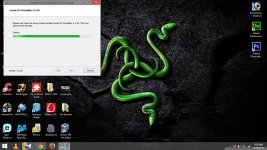
When i try to install Oracle Virtual box 4.3.2....The installation freezes after some time..I cant connect to the internet during that time...I had to restart my lap and uninstall virtual box to connect to the internet..I've tried 2-3 times installing virtual box but no hope...Plzz help me guys
I've attached a screen shot showing the point at which the installation freezes..Plzz take a look
 

Attachments

  • Screenshot (61).jpg
    Screenshot (61).jpg
    386 KB · Views: 470
I recommend temporarily disabling real-time monitoring software, as it could be conflicting and preventing the network driver installation.

Could you list any real-time security you have running?
 
Upvote 0
I recommend temporarily disabling real-time monitoring software, as it could be conflicting and preventing the network driver installation.

Could you list any real-time security you have running?
Thank you....I'm using Eset smart security 8 ...Do i need to disable real time protection while installing?
 
Upvote 0
Emsisoft is the one having problem with virtual box network adapter.
i've installed Virtualbox before wand used it with no problems at all....recently i've got emsisoft key and for using emsisoft i had to uninstall virtual box....after that virtual box freezes during installation.
 
Upvote 0
i've installed Virtualbox before wand used it with no problems at all....recently i've got emsisoft key and for using emsisoft i had to uninstall virtual box....after that virtual box freezes during installation.

Emsisoft has a conflict with the Oracle Virtual Box Bridged Network Adapter Driver. If you want to continue using Virtual Box you have to uninstall Emsisoft as it can/will eventually cause BSOD's leaving you with out a network connection in safe mode also.
If you want to use Emsisoft then you have to uninstall Virtual Box completely,however the Bridged Network Adapter Driver can only be uninstalled via the command prompt below.

sc delete VBoxNetFlt

If you are running Windows 7 SP1 then you need to run this Hotfix also for Emsisoft BSOD problems.This is not related to the Virtual Box BNA Driver problems

HotFix for Microsoft Windows (KB2958399)

http://hotfixv4.microsoft.com/Windows 7/Windows Server2008 R2 SP1/sp2/Fix499765/7600/free/474557_intl_x64_zip.exe
 
Upvote 0
Emsisoft has a conflict with the Oracle Virtual Box Bridged Network Adapter Driver. If you want to continue using Virtual Box you have to uninstall Emsisoft as it can/will eventually cause BSOD's leaving you with out a network connection in safe mode also.
If you want to use Emsisoft then you have to uninstall Virtual Box completely,however the Bridged Network Adapter Driver can only be uninstalled via the command prompt below.

sc delete VBoxNetFlt

If you are running Windows 7 SP1 then you need to run this Hotfix also for Emsisoft BSOD problems.This is not related to the Virtual Box BNA Driver problems

HotFix for Microsoft Windows (KB2958399)

http://hotfixv4.microsoft.com/Windows 7/Windows Server2008 R2 SP1/sp2/Fix499765/7600/free/474557_intl_x64_zip.exe
I've uninstalled emsisoft and currently using ESS 8...
 
Upvote 0
I've uninstalled emsisoft and currently using ESS 8...
Nice Choice :) Since I use Virtual box on my Windows 7 SP1 installations I had to abandon EIS 9 and went back to ESS 8. Since I have Windows 8.1 dual booted with Windows 7 SP1 on a couple machines I went with EIS 9 on the Windows 8.1 installations.
Kind of the best of both worlds :)
 
Upvote 0