

The MalwareTips app
Your community, one tap away.
Open MalwareTips from your Home Screen or desktop. Follow discussions, find answers and pick up where you left off.
- Home Screen access
- Optional push alerts
- Your community
You're ready to explore.Explore what's new
Installation instructions
iPhone & iPad
- Open MalwareTips in Safari and tap Share. You may need to open the Page Menu first.
- Choose Add to Home Screen. If it is not listed, use Edit Actions to add it.
- Keep Open as Web App enabled if shown, then tap Add.
Android
- Open MalwareTips in Chrome or another browser that supports app installation.
- Open the browser menu and look for Install app, Install and create shortcut, or Add to Home screen.
- Choose Install and confirm. Wording varies by browser.
Desktop
- Chrome: use the install icon in the address bar, or the menu under Cast, save and share.
- Edge: open the menu, then More tools, Apps and Install this site as an app.
- Safari on Mac: choose Share or File, then Add to Dock. Firefox on Windows: look for the web apps button in the address bar.
If you cannot find an install option, update your browser or use its bookmark option to keep MalwareTips close.
Keep up with your conversations
After installation, open the app and sign in. Enable push notifications in Preferences if you want alerts. On iPhone and iPad, push requires a Home Screen web app and iOS or iPadOS 16.4 or later.
Sign in to manage notificationsInstallation is optional. Your notification settings stay under your control.
You are using an out of date browser. It may not display this or other websites correctly.
You should upgrade or use an alternative browser.
You should upgrade or use an alternative browser.
Software Review Osprey Browser Protection Reviews
-
 Thread starter
Shadowra
Thread starter
Shadowra
- Start date
- 95 Replies
- 21,653 Views
Reviews reflect the reviewer's setup and methods. Check the evidence and limitations.
Thread details
- Content created by
- Shadowra


I didn't know about this issue, and I personally haven't been affected by it. I'll look into it.@Foulest I have a suggestion. It seems that whenever the Osprey extension is updated, every provider is checked. I only use a few of them, so it would be nice to have the option to just keep the existing selection, so I don't have to go through and unselect every one that I don't use again.

people can fork and add it back if they wantYes, I tried setting the extension folder in the browser profile to read-only to update it, but it didn't work. I liked it better when I had BD and Symantec, but what can you do? We have to accept it as it is.

Yes, but I didn't do it because I don't know how. And I also don't think it's cool to take it from @Foulest. Even though it's open source, it would be plagiarism. I can't bring myself to copy things that took a lot of work to develop.people can fork and add it back if they want

agree I haven't seen the issue mentioned by @roger_m, ie, post osprey updates the same engines are checked as before the updates, I even recall thinking this is nice...I didn't know about this issue, and I personally haven't been affected by it. I'll look into it.
As long as Osprey is available, there won't be any need to fork it. It'd be redundant.Yes, but I didn't do it because I don't know how. And I also don't think it's cool to take it from @Foulest. Even though it's open source, it would be plagiarism. I can't bring myself to copy things that took a lot of work to develop.

Shadowra
Level 42
Verified
Top Poster
Content Creator
Malware Tester
Well-known
High Reputation
Forum Veteran
Yes, I tried setting the extension folder in the browser profile to read-only to update it, but it didn't work. I liked it better when I had BD and Symantec, but what can you do? We have to accept it as it is.
GDATA's web filtering is equivalent to Bitdefender's.
Quick test on ConnectWise

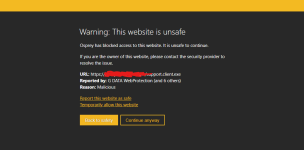
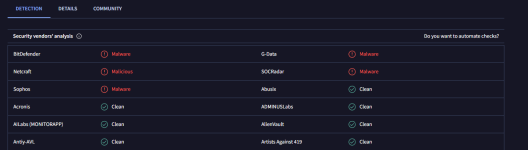

who is it and will it be applied on by default?Update 1.2.9 is in the works and should be released soon. A new partner is joining the project!
alphaMountain, and yes, it will.who is it and will it be applied on by default?
I'm not going to fork it, I never said that. The idea to fork Osprey came from @Vitali Ortzi, as you can read in this post -> #63 that he posted.As long as Osprey is available, there won't be any need to fork it. It'd be redundant.
I've got the new update. Nothing got reset, which is good. But I would like a way to stop new additions being enabled by default. I only use three providers and don't want to use anything else, as I find most providers to be too aggressive at blocking websites.alphaMountain, and yes, it will.
Unfortunately, that won't happen. New providers, especially official partners, will be enabled by default, unless concerns come up regarding false positives.I've got the new update. Nothing got reset, which is good. But I would like a way to stop new additions being enabled by default. I only use three providers and don't want to use anything else, as I find most providers to be too aggressive at blocking websites.
That's a shame, as many providers block websites I want to visit. I only want malicious websites blocked and not websites containing unwanted software.Unfortunately, that won't happen. New providers, especially official partners, will be enabled by default, unless concerns come up regarding false positives.
What provides block websites you want to visit? Any names of sites? Feedback is appreciated.That's a shame, as many providers block websites I want to visit. I only want malicious websites blocked and not websites containing unwanted software.
The following all block some websites.What provides block websites you want to visit? Any names of sites? Feedback is appreciated.
CERT-EE
CleanBrowsing Security DNS
Control D Security DNS
Norton Safe Web
AdGuard Security
alphaMountain
DNS4EU Security
G DATA Web Protection
CERT-EE, CleanBrowsing and Control D, block the most. All of the websites blocked contain downloads that are PUPs, but none contain malware. An example of a website that is blocked is driver-soft.com. By limiting the providers used, I can reduce the websites blocked, to pretty much zero. That is why I would like the option for new providers not to be enabled by default.
I don't think it's unreasonable to block websites that contain PUP downloads, I always treat PUPs as malware. 99% of this software you actually don't need. Driver updaters, registry optimizers and system cleaners are all redundant. Windows can take care of all that itself. Some third-party tools can cause more damage than good.The following all block some websites.
CERT-EE
CleanBrowsing Security DNS
Control D Security DNS
Norton Safe Web
AdGuard Security
alphaMountain
DNS4EU Security
G DATA Web Protection
CERT-EE, CleanBrowsing and Control D, block the most. All of the websites blocked contain downloads that are PUPs, but none contain malware. An example of a website that is blocked is driver-soft.com. By limiting the providers used, I can reduce the websites blocked, to pretty much zero. That is why I would like the option for new providers not to be enabled by default.
For many people that's true, but I spend a lot of time visiting random sites and testing software.I don't think it's unreasonable to block websites that contain PUP downloads, I always treat PUPs as malware. 99% of this software you actually don't need. Driver updaters, registry optimizers and system cleaners are all redundant. Windows can take care of all that itself. Some third-party tools can cause more damage than good.
Recently browsing
Members who viewed this thread in the last 5 minutes


