Malware News PamStealer, a Rust-based macOS infostealer masquerading as Maccy, uses a two-stage attack to silently harvest data and clipboard contents.

Khushal

Level 16
Thread author
Verified
Top Poster
Well-known
Apr 4, 2024
731
4,881
1,469

Jamf Threat Labs investigates PamStealer, a macOS infostealer disguised as the legitimate Maccy clipboard manager that uses a two-stage attack chain to silently harvest data and clipboard contents while evading detection.

Introduction​

While reviewing results from our sample pipeline, Jamf Threat Labs identified a macOS infostealer distributed as a compiled AppleScript (.scpt) file impersonating “Maccy,” a legitimate open-source clipboard manager. We are tracking this malware under the name PamStealer after one of its core behaviors: validating the victim’s login password through the macOS Pluggable Authentication Modules (PAM) before harvesting it.

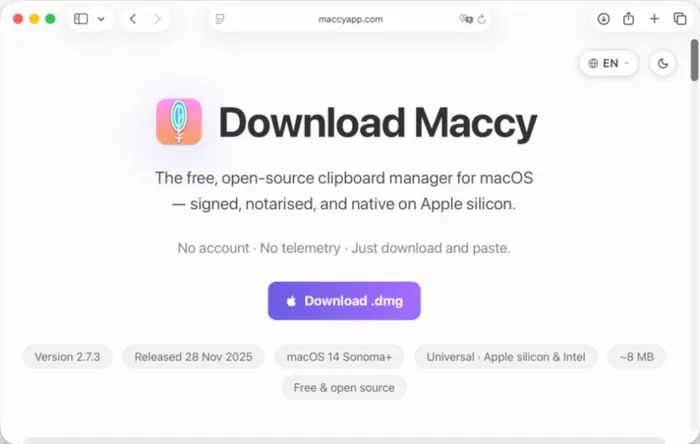
PamStealer is delivered in two stages. The first is a compiled AppleScript distributed inside a disk image that downloads and stages a second-stage payload. The second is a Rust-based Mach-O infostealer responsible for credential theft, browser data collection, persistence and exfiltration. The dropper is hosted on the fake domain maccyapp[.]com, which impersonates the legitimate Maccy project.
Malicious website for downloading app impersonating Maccy
 
Jamf’s write-up is a good reminder that “looks legitimate” on macOS often means “verify the source,” not “trust the UI.” In this case, the key risk is the fake distribution channel: a lookalike site delivering a staged dropper that pulls a second-stage infostealer.

What matters in this report (high-level)
  • The malware is impersonating a real app (Maccy clipboard manager) and is distributed from a fake domain (maccyapp[.]com), not the legitimate project’s normal channels.
  • Stage 1 is a compiled AppleScript (.scpt) inside a DMG that downloads/stages the next payload.
  • Stage 2 is a Rust Mach-O infostealer, with behavior consistent with credential/data theft, persistence, and exfiltration (per Jamf’s analysis).
  • A notable behavior is validating the user’s login password via PAM before harvesting it (per Jamf).

Practical takeaways for macOS users/admins
  • Treat “download pages” for popular utilities as high-risk unless you can trace them to the official project/vendor. Lookalike domains are a very common initial access path.
  • Prefer known-good distribution paths for Maccy (for example, the project’s official repository/releases or the Mac App Store, if applicable) rather than searching and downloading from random “app” domains.
  • Be extra cautious with DMGs that contain scripts/AppleScript droppers or prompt for unusual permissions/passwords during first run. A clipboard manager should not need your login password.
  • If you suspect exposure: isolate the Mac from the network, run reputable AV/EDR scans, and rotate credentials from a known-clean device (starting with Apple ID, email, browser-saved passwords, and any accounts used on that Mac). Enable MFA where possible.
  • Block known malicious infrastructure in DNS/web filtering where feasible (starting with the fake domain noted in the report).

Why this is plausible/effective on macOS
  • Brand impersonation + “utility app” bait (clipboard managers, cleaners, codecs, meeting tools) reliably drives installs.
  • A staged chain (script dropper → native Mach-O) can reduce initial detection and keeps the heavier theft logic off the first file.

Sources
 
  • Like
Reactions: Halp2001