Parkos's configuration

Parkos

Level 1
Thread author
Nov 1, 2015
5
20
27
Netherlands
After always using free antivirus software and only got infected a really long time ago, I recently decided to switch to a commercial package. The decision was made because of all the ads iand just because I didn't like the ad-free alternatives.

In my time using the free packages I also ran some trials of commercial ones. From those, Dr.Web was always my favorite but the price stopped me from getting a license. But I finally cave in and got one. So far I'm feeling confident that my current set-up will keep my pc clean!

In addition to the software on my pc, I'm also changed my DNS to OpenDNS.
 
As far as I know, the Security Space version has a feature called "Spider Gate".
It is the web protection module of Dr.Web.
Of course it can improve the protection capability, but some users complain that Gate will slow down the network speed significantly, and it has some false positive errors.
If you have such problem, you can do a customized installation -- the Spider Gate module could be unchecked during installation.

We often call Dr.Web "the one who kills all the others", because it does not have a good compatibility with the other security softwares.
Particularly, it will conflicts with Sandboxie in the 64-bit operation systems.
But I hear that there are some people using combo "Dr.Web + Spyshelter".
Maybe you can consider the free version or the premium version of Spyshelter if you are seeking some security products that can work with Dr.Web.
 
Dr.Web is totally good on most sophisticated threats with not so many database signatures since for sure spring cleaning to remove obsolete detections so you might consider to have a companion AV like Webroot or SecureAplus/Crystal Security.

You may add a backup browser for just in case of issues occur.
 
Approved by Staff

2s9jymOt.jpg


Use a backup (windows one or a 3rd party one)
 
I enjoyed your sharing, and how you came to choose Dr. Web's paid Security Space!

For privacy using Chrome, the following steps set 3rd party cookies to be blocked.;)
  1. Click the Chrome menu
    tgmsrPRh34tM4q0WYv7l-NNXDz7dqm7ftk8TyCEguoY30xkEg8lcw_ULI23ki9Q=w18-h18
    on the browser toolbar.
  2. Select Settings.
  3. Click Show advanced settings.
  4. In the "Privacy" section, click the Content settings button.
  5. In the "Cookies" section, you can change the following cookies settings to
    block cookies:
    • You'll see
      chrome_95647_blocked_cookie.gif
      in the address bar whenever a cookie has been blocked.
    • Select the "Block third-party cookies and site data" checkbox. Even if you've added a site to the Exceptions list and have chosen to allow its cookies, the site's third-party cookies won't be accepted if this checkbox is selected.
    • Additionally, browsing using "Incognito" may not make you invisible, but it is a worthwhile method of reducing the level with which we are all tracked.:)
 
Last edited:
I'll definitly going to start using the default windows backup solution, thank you all for the suggestions and tips.

@Online_Sword:
I don't really notice any slowdowns during browsing, Dr.Web security space 11 is probably one of the lightest Antivirus solutions i've used.

@jamescv7
That is something new for me to hear, as they cleary state on their website that they don't exclude older threats from their database.
Dr.Web - innovation anti-virus security technologies. Comprehensive protection from Internet threats.

@Cats-4_Owners-2
Thank you for the detailed explantion, going to check it out!
 
@Parkos: Its a part of assumption only, well its true that if older threats which are workable will not remove from database.

Of course possible of broken samples may sure to remove for optimization. Anyway number of database signatures is not a matter at all but for rest assurance to have another layer for possible bypass. ;)
 
  • Like
Reactions: Moose
Dr.Web security space 11 is probably one of the lightest Antivirus solutions i've used.

It is really amazing for me. Because I have seen many users complaining the high resource usage of Dr.Web v10...

Could you post the CPU usage and RAM usage in both the idle time and the busy time (like when you watch high resolution online videos on youtube) ?

Thanks.:)
 
  • Like
Reactions: Moose
@jamescv7 :
An extra layer of security can be benificial indeed, I'll keep it in mind. Thank you!

@Online_Sword
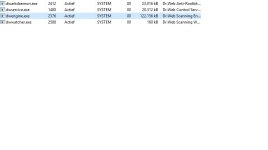
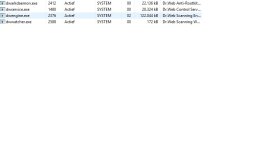
Ah, then maybe they optimized their engine in the 11.0 version. Like you asked I made a screenshot of the dr.web processes in idle and under load (FullHD Youtube).

Idle:
dwidle.jpg
Load:
drwebload.jpg

Dr.web still has two more processes the webfilter and the Spider Service.
The webfilter used 0 CPU and around 7.5mb RAM during Idle and 1% CPU and 12 to 13mb RAM during load.
The Spider service used 0 CPU and around 4mb RAM during idle and 0 CPU and 6mb RAM during load.

Sorry I didn't have the time to put those two processes in the screenshot.

edit: During updates the update process uses around 15mb ram and 3% CPU.
I also didn't install the dr.web firewall, parental control and mail scanning component.
 
Salutations,

How long does it take the PC to start up from a cold boot?

Kind regards,
 
  • Like
Reactions: Parkos

You may also like...