Battle Performance delta between ESET Premium and McAffee latest

Compare list
ESET, McAffe, Bitdefender, Norton, Kaspersky (with windscribe VPN)
Platform(s)
  1. Microsoft Windows

cartaphilus

Level 20
Thread author
Verified
Top Poster
Well-known
Mar 17, 2023
964
3,300
1,868
The N**i Base on the Moon
I wiped my system and started fresh just for shits and giggles; I was bored and it was the weekend. I have always wondered what's the AV impact on system performance of MY SYSTEM.

AMD 9800X3D
MSI 870e Tommahawk
92gb of ram
990 NVME

Fresh install with only Voodooshield being a constant thing as a security backup.
I did not do this to prove anything to anyone, I did this to prove things to myself and which AV engine I should use on this gaming PC.
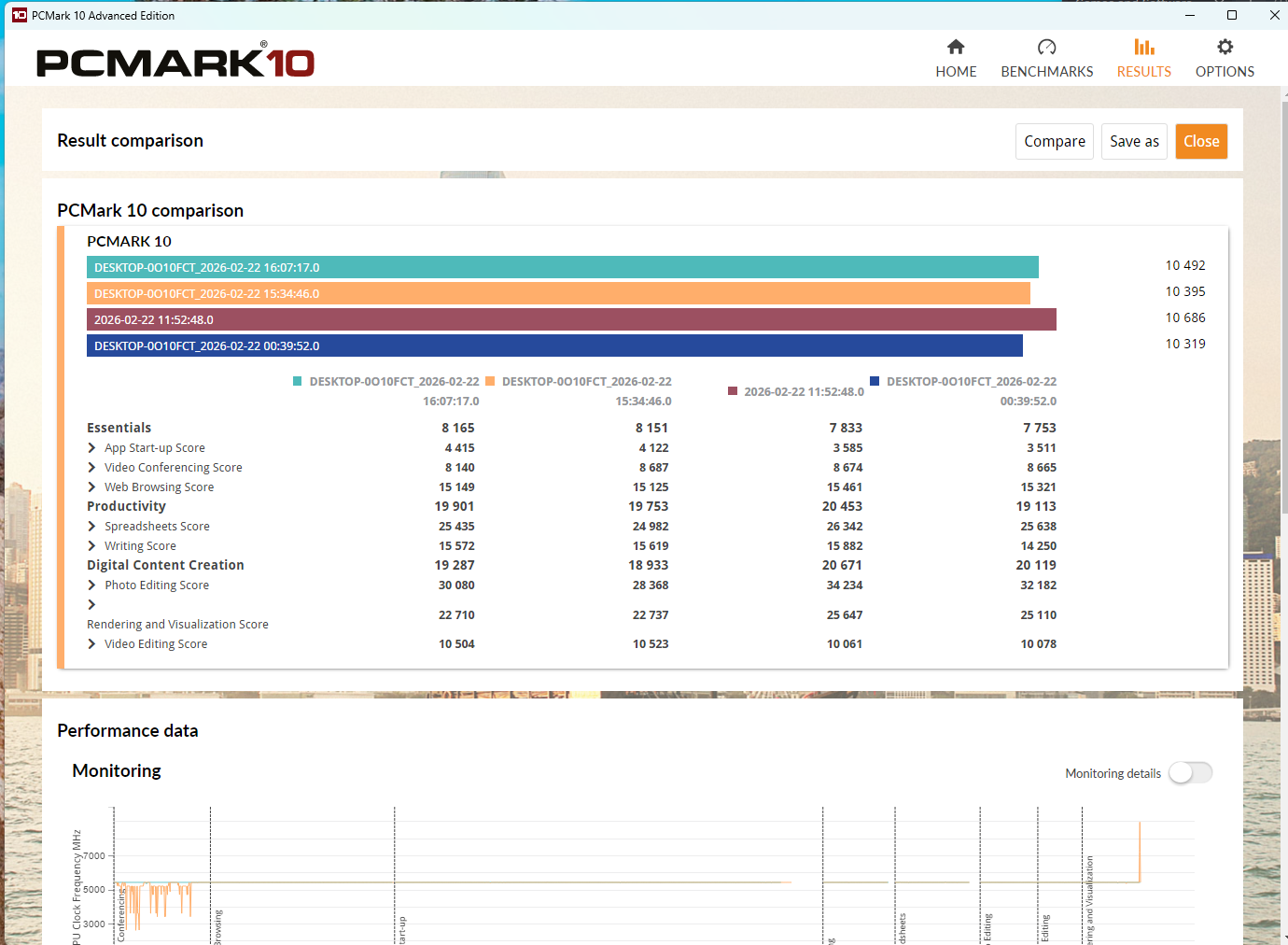
I used Macrium 8.1 to "snapshot" a VIRGIN install (besides voodooshield) and installed MCAffee first....ran PcMark 3 times.,
Then re-imaged back to Virgin Install and installed Eset Premium set on Aggressive and ran PcMark 3 Times. Here are the results. Take it or leave it; I don't care.
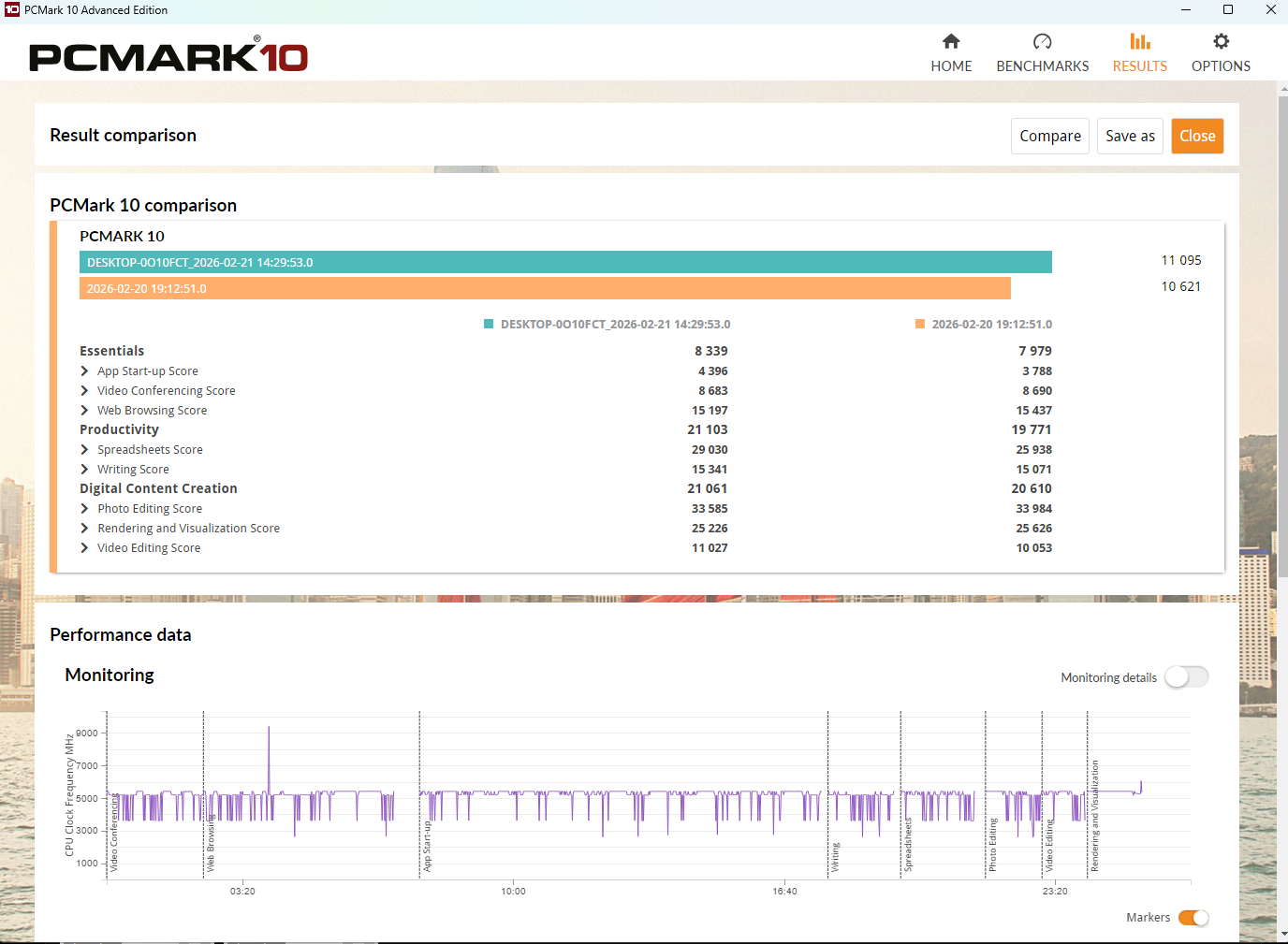
HIGHEST OF THE 3 RESPECTIVE RUNS
1771731674904.png


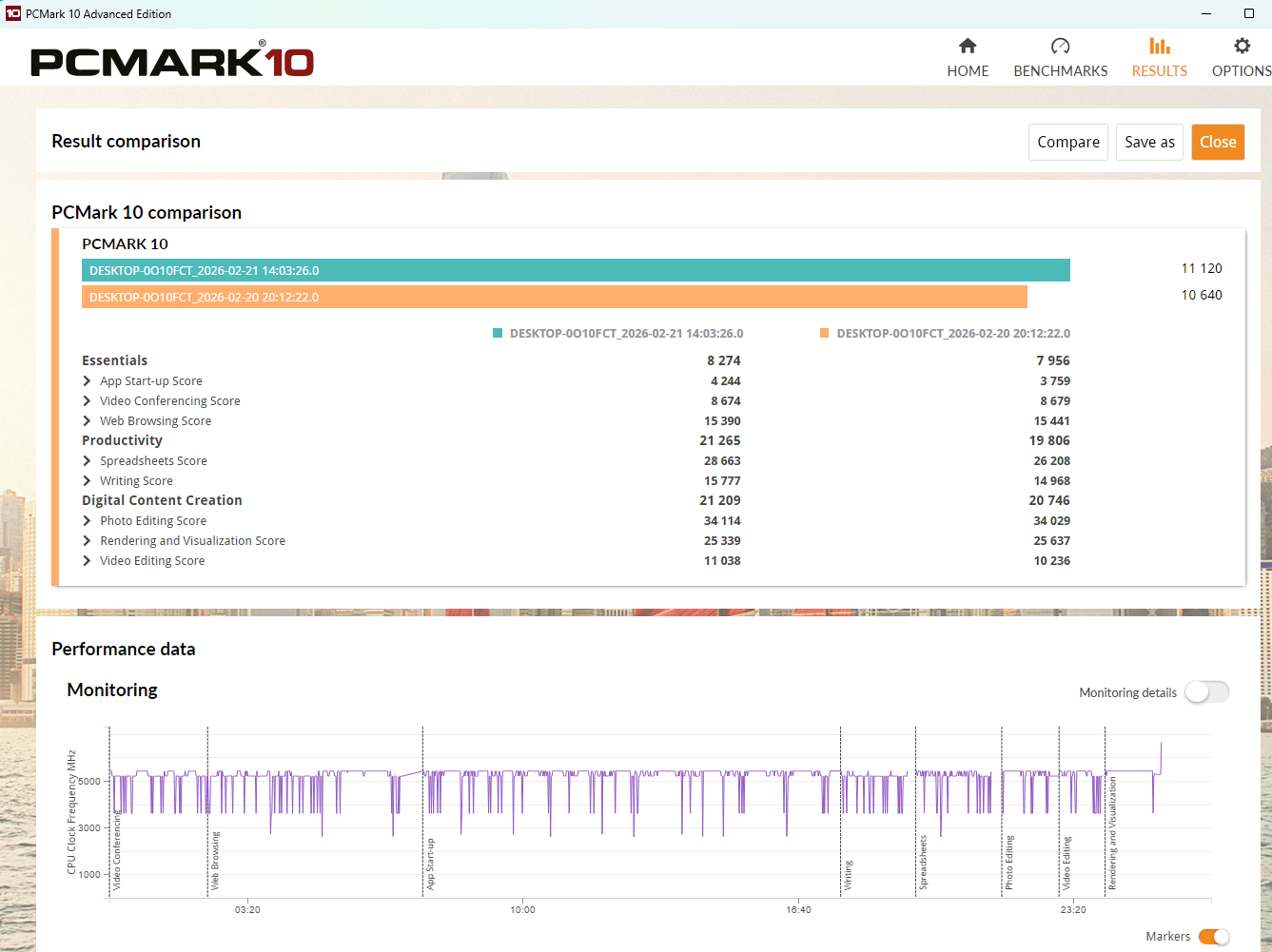
LOWEST OF THE 3 RESPECTIVE RUNS
1771731739279.png


AND THE MID

1771731790278.png

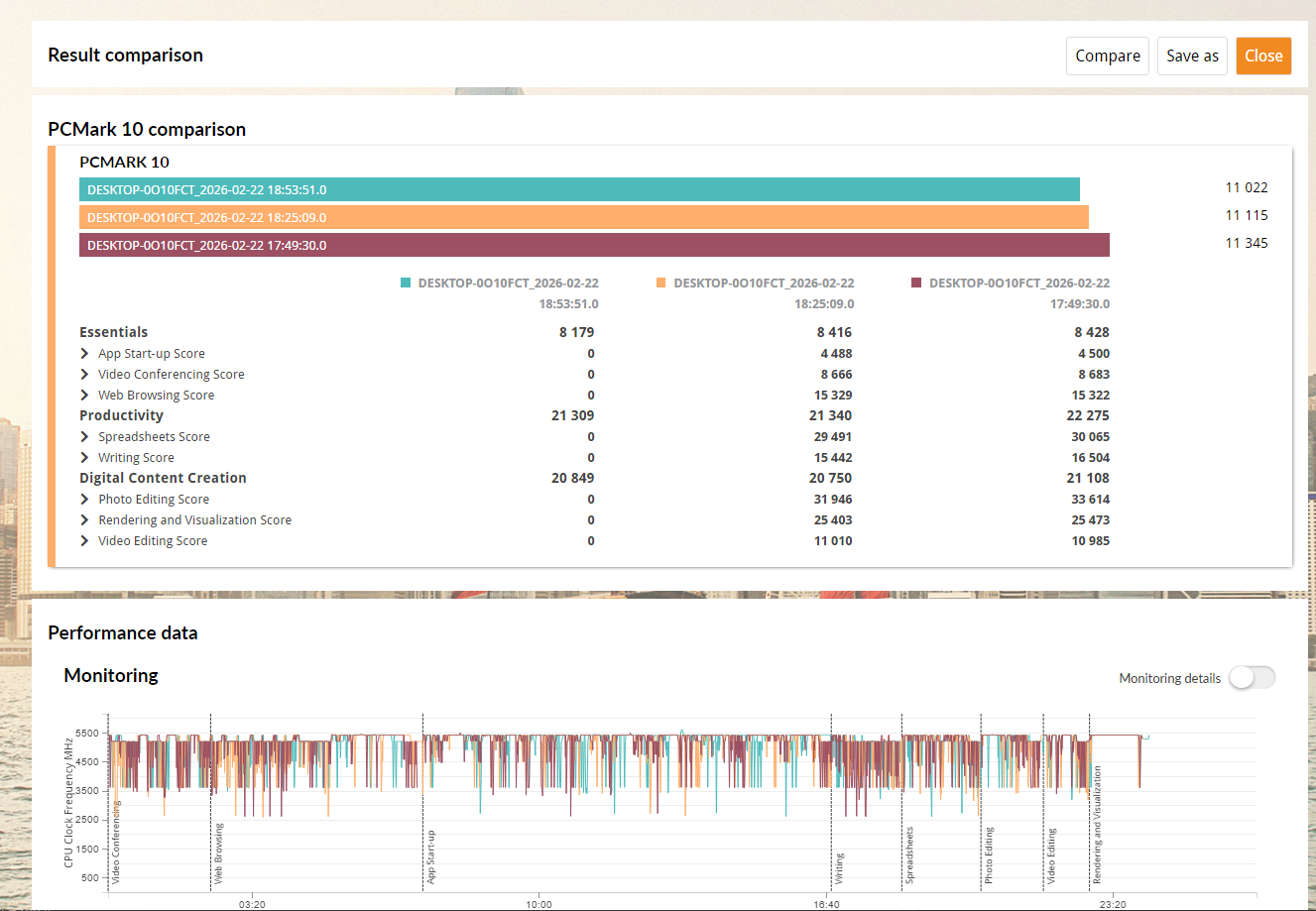
BITDEFENDER 4 RUNS
1771803224711.png


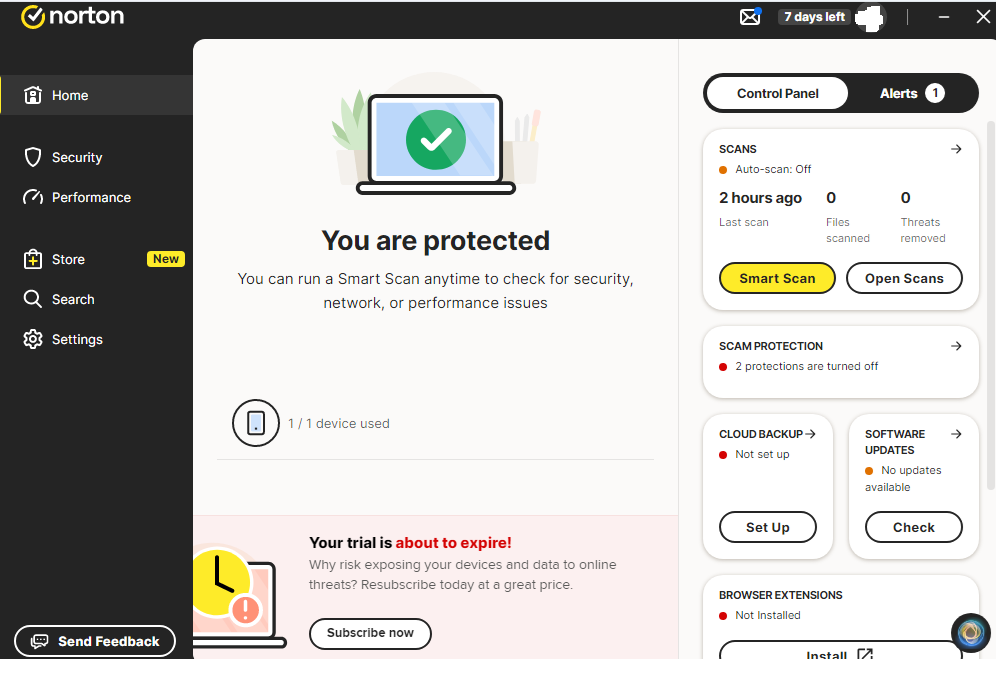
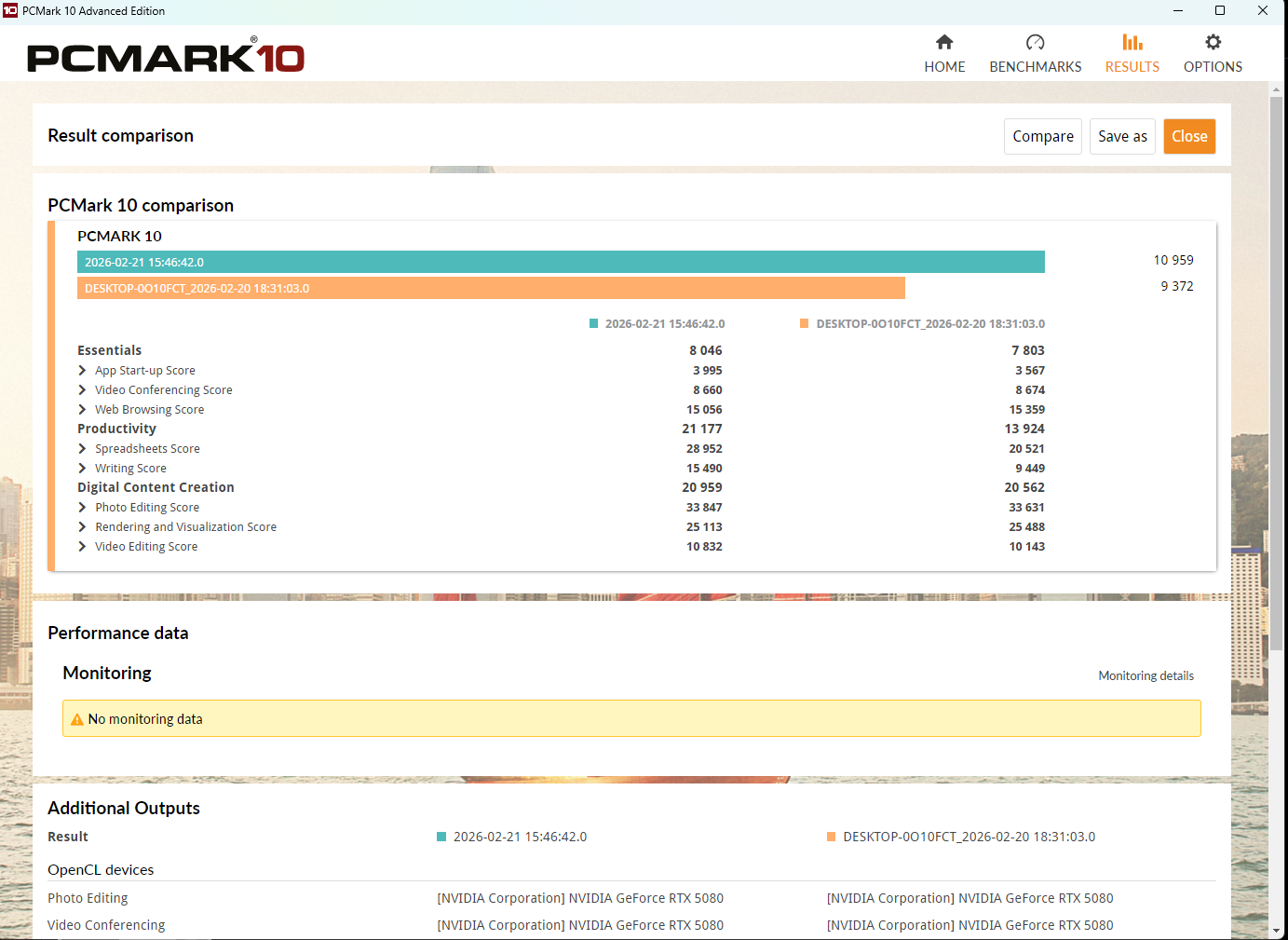
NORTON
1771813816984.png


1771814002624.png


Conclusion?

AVG of 3 Runs:

ESET: 11,058

Bitdefender: 10,473 (avg of 4 runs)

Norton: 11,161 (WINNER SO FAR)

McAfee: 10,211

I have tried to test Kaspersky; went on VPN but didn't want to do the extra hoops of trying to have my CC# verified for a KAV trial whilst vpning from Canada. So that was a no go. I am personally disappointed since I would have loved to have seen it's impact on my system. Alas, I will blame the government.

I might try Checkpoint or Zone Alarm I still have a 2 years of Checkpoint blade time but the system that ran it was scrapped.....I will update if I do.


EDIT: I've attempted to run MSDEFENDER i.e. VIRGIN OS AV to see it's impact but the test won't finish; it hangs up on one of the browser tests.

Edit 2: Personally I am shocked. I honestly didn't expect a delta and certainly not 5%. I considered McAfee to be quite light so no perceivable difference in everyday use. The only difference is seen is in the benchmark but all things being equal; there is an impact difference.

Edit 3: PLEASE READ: In reality it there is no difference. But by being pedantic based on numbers there is an impact but it wouldn't be felt by everyday users. Maybe maybe if you were using your PC to run some finate element computing then the impact would be felt (grander scale). I am just doing the runs to finally prove to myself which AV is fastest on my home configuration. Nothing more and nothing less. For everyday use this is meaningless and one should pick a solution that suits their needs the best and not what I show here.


EDIT 4: BITDEFENDER DONE; will re-image now and run Norton.

Edit 5: will Try Kaspersky


PLACE SOLDER FOR BITDEFENDER: Just paste dumping...I will run Bitdefender Overnight to scan the whole drive so it can tag every file. That way it will represent everyday performance vs just installed performance.

 
Last edited:
I wiped my system and started fresh just for shits and giggles; I was bored and it was the weekend. I have always wondered what's the AV impact on system performance of MY SYSTEM.

AMD 9800X3D
MSI 870e Tommahawk
92gb of ram
990 NVME

Fresh install with only Voodooshield being a constant thing as a security backup.
I did not do this to prove anything to anyone, I did this to prove things to myself and which AV engine I should use on this gaming PC.
I used Macrium 8.1 to "snapshot" a VIRGIN install (besides voodooshield) and installed MCAffee first....ran PcMark 3 times.,
Then re-imaged back to Virgin Install and installed Eset Premium set on Aggressive and ran PcMark 3 Times. Here are the results. Take it or leave it; I don't care.

HIGHEST OF THE 3 RESPECTIVE RUNS
View attachment 295840

LOWEST OF THE 3 RESPECTIVE RUNS
View attachment 295841


AND THE MID
View attachment 295842


Conclusion?

AVG of 3 Runs:

ESET: 11,058

McAfee: 10,211

Delta: 847 or ESET makes my PC 8% more responsive ON THIS SPECIFIC BENCHMARK and this is all I care about and I will not debate methods or styles or what have you. This is just to share what I did. If you compare just the two highest runs then the delta is only 4.5%; in the end the delta does exist. How much does 4.5% account for your productivity vs security that's up to you to decide.


EDIT: I've attempted to run MSDEFENDER i.e. VIRGIN OS AV to see it's impact but the test won't finish; it hangs up on one of the browser tests.

Edit 2: Personally I am shocked. I honestly didn't expect a delta and certainly not 5%. I considered McAfee to be quite light so no perceivable difference in everyday use. The only difference is seen is in the benchmark but all things being equal; there is an impact difference.


I might try bitdefender free tomorrow
Your conclusion is basically correct: on your specific build and with your specific setup, PCMark 10 is showing ESET having measurably less impact than McAfee (roughly ~8% by your 3-run average, or ~4–5% if you cherry-pick the best run). That’s a real-world result for your machine, even if it’s not a universal “ESET is always faster” statement.

Why a delta like this can happen
PCMark 10 “Essentials / Productivity” is very sensitive to anything that hooks into:
  • File I/O (real-time scanning on reads/writes, script scanning, archives, installers)
  • Browser-related components (web protection modules, HTTPS scanning, extensions, network filtering)
  • Background services/tasks (telemetry, update schedulers, initial post-install scans, reputation services)

Even when two products feel “light” in normal use, their background activity timing can land right on top of a benchmark run and move the needle more than people expect.

One important interpretation point
PCMark deltas don’t necessarily translate to “more FPS” in games.

They more often translate to “snappier” desktop behaviors (app launch, browser workloads, office-like tasks), and to performance hits during heavy disk activity (game installs/updates, shader cache building, game launch, unpacking, etc.).

If you want to make your numbers even more defensible (without changing your overall method)
Not debating your approach—these are just the two biggest “free” improvements if you ever repeat it:
  • After installing an AV, reboot, then let the PC sit idle a few minutes (so any first-run/background scan finishes) before starting the benchmark.
  • Alternate order (ABBA style): ESET -> McAfee -> McAfee -> ESET (still re-imaging between) to reduce “time-of-day / Windows background task timing” effects.

About Microsoft Defender hanging on the browser test
That’s usually not “Defender is slow” so much as “something is interfering with the automated browser workload” (Edge/WebView2 behavior, SmartScreen/network protection hooking, or a protection event blocking the benchmark component).

Low-risk things to try (in order):
  • Make sure Windows, Edge, and PCMark are fully updated, then reboot.
  • Check Windows Security -> Protection history to see if anything related to PCMark/Edge was blocked/quarantined during the run.
  • Try running PCMark once after a Clean Boot (to rule out a leftover service/driver or another security component hooking the browser stack).

If it still hangs, the practical takeaway is simply: “Defender + this PCMark browser test is not cooperating on this image,” so Defender won’t be comparable via that specific test unless you spend time isolating the conflict.

Practical takeaway for a gaming PC
Based on what you measured, ESET looks like the better fit if “lowest system impact in PCMark-style workloads” is your top priority.

If you do test Bitdefender, I’d recommend doing the same “idle time after install + reboot” routine before running PCMark, because Bitdefender (and some suites in general) can do a lot of background initialization right after install/first boot that can distort early runs.

Net: your data supports choosing ESET for this box if performance responsiveness is the deciding factor, and the Defender hang is most likely a compatibility/automation snag rather than a meaningful performance verdict.
 
Your conclusion is basically correct: on your specific build and with your specific setup, PCMark 10 is showing ESET having measurably less impact than McAfee (roughly ~8% by your 3-run average, or ~4–5% if you cherry-pick the best run). That’s a real-world result for your machine, even if it’s not a universal “ESET is always faster” statement.

Why a delta like this can happen
PCMark 10 “Essentials / Productivity” is very sensitive to anything that hooks into:
  • File I/O (real-time scanning on reads/writes, script scanning, archives, installers)
  • Browser-related components (web protection modules, HTTPS scanning, extensions, network filtering)
  • Background services/tasks (telemetry, update schedulers, initial post-install scans, reputation services)

Even when two products feel “light” in normal use, their background activity timing can land right on top of a benchmark run and move the needle more than people expect.

One important interpretation point
PCMark deltas don’t necessarily translate to “more FPS” in games.

They more often translate to “snappier” desktop behaviors (app launch, browser workloads, office-like tasks), and to performance hits during heavy disk activity (game installs/updates, shader cache building, game launch, unpacking, etc.).

If you want to make your numbers even more defensible (without changing your overall method)
Not debating your approach—these are just the two biggest “free” improvements if you ever repeat it:
  • After installing an AV, reboot, then let the PC sit idle a few minutes (so any first-run/background scan finishes) before starting the benchmark.
  • Alternate order (ABBA style): ESET -> McAfee -> McAfee -> ESET (still re-imaging between) to reduce “time-of-day / Windows background task timing” effects.

About Microsoft Defender hanging on the browser test
That’s usually not “Defender is slow” so much as “something is interfering with the automated browser workload” (Edge/WebView2 behavior, SmartScreen/network protection hooking, or a protection event blocking the benchmark component).

Low-risk things to try (in order):
  • Make sure Windows, Edge, and PCMark are fully updated, then reboot.
  • Check Windows Security -> Protection history to see if anything related to PCMark/Edge was blocked/quarantined during the run.
  • Try running PCMark once after a Clean Boot (to rule out a leftover service/driver or another security component hooking the browser stack).

If it still hangs, the practical takeaway is simply: “Defender + this PCMark browser test is not cooperating on this image,” so Defender won’t be comparable via that specific test unless you spend time isolating the conflict.

Practical takeaway for a gaming PC
Based on what you measured, ESET looks like the better fit if “lowest system impact in PCMark-style workloads” is your top priority.

If you do test Bitdefender, I’d recommend doing the same “idle time after install + reboot” routine before running PCMark, because Bitdefender (and some suites in general) can do a lot of background initialization right after install/first boot that can distort early runs.

Net: your data supports choosing ESET for this box if performance responsiveness is the deciding factor, and the Defender hang is most likely a compatibility/automation snag rather than a meaningful performance verdict.
Yeap each system was rebooted twice after install and after letting it settle for 5 min. Basically:

Install

Reboot

Log back into Windows ....wait 5 min....move the mouse around click on the tasbar menu and power off

Power back on

Log into Windows wait 5 min. Move mouse around and reboot

Log into Windows wait 5 min, load pcmark wait 5 min run pcmark.
 
Yeap each system was rebooted twice after install and after letting it settle for 5 min. Basically:

Install

Reboot

Log back into Windows ....wait 5 min....move the mouse around click on the tasbar menu and power off

Power back on

Log into Windows wait 5 min. Move mouse around and reboot

Log into Windows wait 5 min, load pcmark wait 5 min run pcmark.
That methodology is solid, and the extra “power off / cold boot” step actually helps because a lot of AV suites finish driver/service initialization and background cataloging in the first couple boots. If you’re doing that consistently for each image, then your delta is much more likely to be “real for your box” rather than just post-install churn.

A few small things that can still skew PCMark (even with your routine)
  • Definition/update timing: If one product updates immediately after the final reboot (or does a small “post-update optimization”), it can land inside the PCMark window. Best practice is to ensure both products are fully updated and then give them the same idle window after their last update event.
  • First full scan / background scan settings: Some AVs kick off an initial scan that might not finish within 5 minutes, or they might resume it later when the system goes idle (which PCMark sometimes triggers). If you can confirm “no active scan” right before starting PCMark (Task Manager + AV UI), it removes a lot of variance.
  • Your ESET “Aggressive” profile: Depending on what exactly you toggled (HIPS, advanced heuristics on execution, SSL/TLS scanning, etc.), some settings can affect different PCMark subtests disproportionately. It’s still a valid comparison, just worth noting that “ESET aggressive” being faster on your system makes the result even more meaningful (because you weren’t running it in a minimized config).
  • VoodooShield as a constant: Keeping it constant is good, but it can still interact differently depending on what the primary AV is doing (execution chain, reputation lookups, child process rules). That doesn’t invalidate anything—it just means you effectively tested “AV + VoodooShield” stacks, not AV alone.

If you want to tighten it one more notch (without changing the spirit of your test)
  • Right before you click “Run,” open Resource Monitor and confirm there isn’t sustained disk activity from the AV processes (or Windows Update/Indexer). A 30–60 second “quiet” period before the run can reduce run-to-run spread.
  • Make sure power plan and Windows security baselines are identical across images (same Game Mode, same Core Isolation/HVCI state, same Memory Integrity, same Smart App Control state if applicable). Those can move PCMark scores too.

About Defender hanging on the browser test
When PCMark’s browser workload hangs, it’s often due to a browser automation component getting blocked/redirected (SmartScreen, Network Protection, reputation checks) or Edge/WebView2 state. The most productive path is usually:
  • Verify Edge + WebView2 are current on the Defender image.
  • Check Windows Security -> Protection history for blocks around the timestamp of the hang.
  • If it still hangs, treat Defender as “not testable in this benchmark on this image” unless you want to spend time isolating the exact protection feature causing the stall.

Bottom line: with the boot/settle routine you described, your measured difference is credible for your exact gaming PC setup, and choosing ESET on performance grounds is a reasonable takeaway from your own data.
 
Oops forgot to add that I run quick scan for each respective product after the first reboot and power off cycle. I wanted to make sure that the AV is at least aware of the basic files so it can catalogue it.

Subsequently after waiting 5 min I made sure that no startup scan is running before executing PCMark and I waited on the PCMark main screen for few min before pressing start. That way anything and everything that needed to be loaded before the benchmark actually got loaded. If it didn't then well I figured 5 min is sufficient wait time.

Basically I kept myself busy between checking on the status of my brisket sitting in the smoker. Low and Slow 14 hour brisket
 
ESET is legendary for optimization. According to ESET's official Technology Whitepaper:
For many years, ESET’s performance was based on smart algorithms and manually-crafted assembly code to address performance bottlenecks caused by deep code analysis using the sandboxing technology integrated into the product. However, we have improved this approach. Now, for maximum performance, we use binary translation together with interpreted emulation.

With in-product sandboxing you have to emulate different components of computer hardware and software to execute a program in a virtualized environment. These components can include memory, the file system, operating system APIs and the CPU (central processing unit).

In the past, the CPU was emulated using bespoke assembly code. However, it was an “interpreted code,” which means that each single instruction had to be emulated separately. With binary translation you execute emulated instructions natively on a real CPU. This is many times faster, especially in the case of loops in the code: introducing multiple looping is a protective technique common to all executables where measures have been applied to protect them from analysis by security products and researchers.
I can believe that it turned out more efficient than McAfee, and that says a lot because the new McAfee made a lot of design decisions to avoid doing too much on your system.

ESET, McAfee, and Avast/AVG/Norton have all shown excellent performance for me. I look forward to your Bitdefender results.
 
I wiped my system and started fresh just for shits and giggles; I was bored and it was the weekend. I have always wondered what's the AV impact on system performance of MY SYSTEM.

AMD 9800X3D
MSI 870e Tommahawk
92gb of ram
990 NVME

Fresh install with only Voodooshield being a constant thing as a security backup.
I did not do this to prove anything to anyone, I did this to prove things to myself and which AV engine I should use on this gaming PC.
I used Macrium 8.1 to "snapshot" a VIRGIN install (besides voodooshield) and installed MCAffee first....ran PcMark 3 times.,
Then re-imaged back to Virgin Install and installed Eset Premium set on Aggressive and ran PcMark 3 Times. Here are the results. Take it or leave it; I don't care.

HIGHEST OF THE 3 RESPECTIVE RUNS
View attachment 295840

LOWEST OF THE 3 RESPECTIVE RUNS
View attachment 295841


AND THE MID
View attachment 295842


Conclusion?

AVG of 3 Runs:

ESET: 11,058

McAfee: 10,211

Delta: 847 or ESET makes my PC 8% more responsive ON THIS SPECIFIC BENCHMARK and this is all I care about and I will not debate methods or styles or what have you. This is just to share what I did. If you compare just the two highest runs then the delta is only 4.5%; in the end the delta does exist. How much does 4.5% account for your productivity vs security that's up to you to decide.


EDIT: I've attempted to run MSDEFENDER i.e. VIRGIN OS AV to see it's impact but the test won't finish; it hangs up on one of the browser tests.

Edit 2: Personally I am shocked. I honestly didn't expect a delta and certainly not 5%. I considered McAfee to be quite light so no perceivable difference in everyday use. The only difference is seen is in the benchmark but all things being equal; there is an impact difference.


I might try bitdefender free tomorrow
1771741581439.png
in line with AV comparatives results
 
ESET is legendary for optimization. According to ESET's official Technology Whitepaper:

I can believe that it turned out more efficient than McAfee, and that says a lot because the new McAfee made a lot of design decisions to avoid doing too much on your system.

ESET, McAfee, and Avast/AVG/Norton have all shown excellent performance for me. I look forward to your Bitdefender results.
Exactly that's what took me by surprise. I've honestly thought that McAfee would take the crown
 
Hi,

I tried these apps on an Android phone (Samsung A56,8 GB RAM): Eset Mobile Security,Bitdefender Mobile Security.
The maximum RAM usage was these: Eset-250MB,Bitdefender 950MB.
I read that Bitdefender also uses very high RAM on a computer.
I think this is a very high value on a phone. 950MB.
I think I'll stay on the phone for now: Eset Mobile Security.
 
These infos are from Big Brother AI:

While independent labs like AV-Comparatives provide valuable data, their "System Impact" and "Performance" scores can be a bit like judging a car's fuel efficiency based on a laboratory treadmill—it doesn't always reflect how it feels when you're driving to work.

Here are the top 5 reasons why these specific tests can be misleading for the average consumer:


1. The "Synthetic" Gap​

Test labs often use automated scripts to open files, install apps, or browse websites in rapid succession. While this is scientifically repeatable, it isn't how humans use computers.

  • The Reality: A lab might penalize an AV because it adds 0.2 seconds to a file copy of 10,000 tiny items. In the real world, you rarely copy 10,000 items at once; you're more likely to feel the "micro-stutter" when opening a single heavy app like Photoshop, which labs might weight differently.

2. The "Clean State" Fallacy​

Most labs test on a freshly installed OS with no other software "bloat."

  • The Reality: Consumers have dozens of background processes running—Steam, Discord, Chrome tabs, and printer drivers. An AV that performs beautifully on a "clean" system might clash with other background tasks on a "messy" real-world PC, leading to performance degradation that the lab never saw.

3. Hardware Sensitivity​

Performance tests are usually conducted on specific tiers of hardware (often a "high-end" and a "low-end" rig).

  • The Reality: Anti-malware impact is highly dependent on disk speed (SSD vs. HDD) and RAM. An AV that ranks #1 on an NVMe SSD might be absolutely agonizing on an older laptop with a mechanical hard drive. The "Gold Award" doesn't guarantee it will feel fast on your specific machine.

4. Ignoring "First-Run" vs. "Steady State"​

Many modern AVs use caching and cloud-indexing. The first time you scan a folder, it’s slow; the second time, it’s instant because the AV "remembers" the files are safe.

  • The Reality: Some tests emphasize the "first-run" impact, which makes an AV look heavy. Others focus on the "cached" state, which makes it look light. If a lab doesn't clearly distinguish between these, a consumer might buy a "fast" AV that actually chugs every time a new update is downloaded.

5. Features vs. Engine​

Labs often test the "out-of-the-box" configuration.

  • The Reality: Most "Performance Impact" comes from supplementary features (like VPNs, password managers, or system "tune-up" tools) rather than the core scanning engine. A consumer might see a high impact score and avoid a brand, not realizing that the "slowness" was caused by a backup feature they would have turned off anyway.

Peer Insight: Don't just look at the final "Impact Score." Look for the "File Copying" and "Launching Applications" sub-scores. Those are the two metrics that actually determine whether your PC feels "snappy" or "sluggish" during daily use.
 
Last edited by a moderator:
These infos are from Big Brother AI:
I really hope your post will get more future affirmation, I personally Bookmarked it.

For AV malware tests, I absolutely understand using a VMware environment, but for everyday assessments at times posted here, I don't think is gives a full picture of a AV's performance and system impact without all of the other variables mentioned in point #2 as well as not using all the PC's RAM and CPU resources. Even though the difference may be negligible, I still like "real world use" feedback better, but, I understand for general test driving of the AV's settings, malware protection etc. there is no better option but from within a VMware workstation.

But granted, everyone is using a different device set up (RAM/CPU, running software etc.) so that can be a factor in how it may perform differently on our personal devices.
 
Last edited: