Advice Request Phishing Prevention

Please provide comments and solutions that are helpful to the author of this topic.

Estioo

Level 1
Thread author
Jul 7, 2020
22
46
28
Malaysia
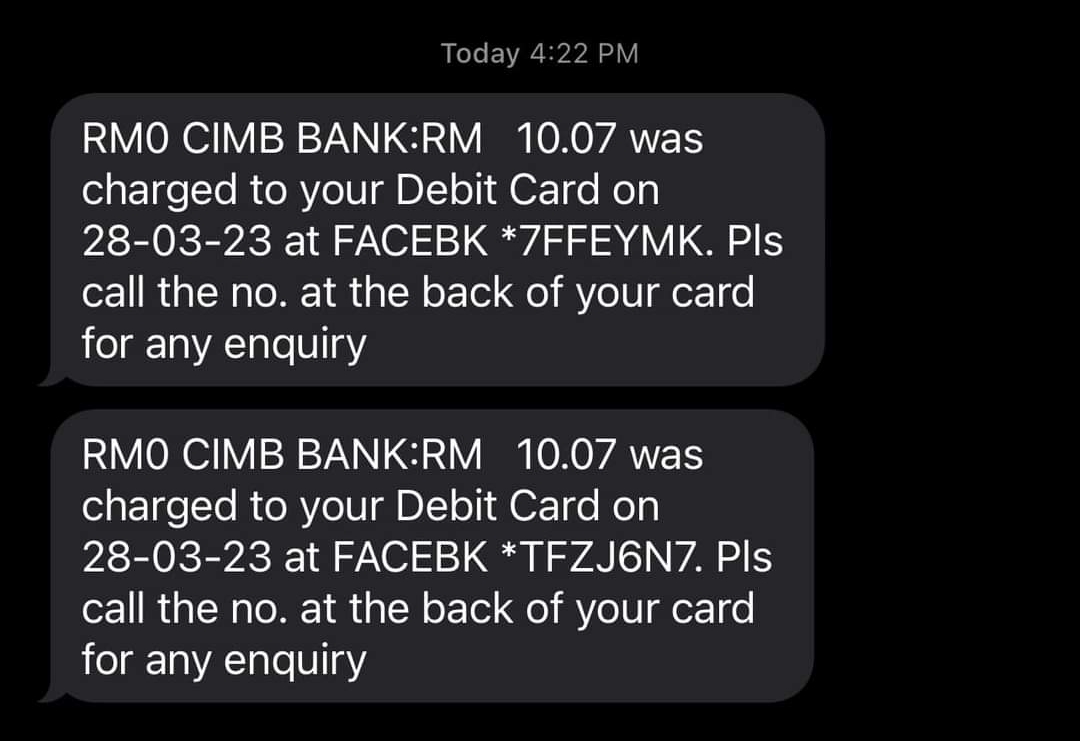
Hello, recently many people in my country have experienced unauthorized charges made by Facebook. I am also one of the victims. According to Facebook support, there was suspicious payment activity in my account. Is there any way for me and my family to protect ourselves from these phishing attacks?

Screenshot_2023-03-30-15-10-47-491_com.facebook.katana-edit.jpg
 
Last edited by a moderator:
I'm sorry to hear that you and your family have been affected by unauthorized charges on Facebook. Here are some tips to keep yourselves protected from phishing attacks:

1. Enable two-factor authentication (2FA) for all your online accounts, including Facebook. This will provide an additional layer of security to your accounts.

2. Be vigilant of emails or messages that ask for your personal or financial information, especially if they come from unknown sources. Do not click on links or download attachments from such emails.

3. Always verify the legitimacy of a website before entering your login credentials or other sensitive information. Look for the "https" at the beginning of the website's URL and the padlock icon in the address bar.

4. Regularly monitor your online accounts for any suspicious activity, such as login attempts or changes in personal information.

5. Educate yourself and your family members about common phishing tactics and how to identify them, such as misspellings, fake URLs, or urgent requests for personal information.

Remember to stay alert and cautious when it comes to online security. If you notice any suspicious activity or receive any phishing emails, report them immediately to the relevant authorities.
 
Your debit card details have been stolen. Report the transactions to your bank and get a replacement card quick. Usually in most cases, your bank will refund the fraudulent transactions. You should also reset your phone to factory defaults if you can (backup your contacts first) and change your passwords immediately on a non-compromised device to be safe. There is not much else you can do sadly except wait for your bank to refund the bogus transactions and hope the malware that was on your phone/PC/Laptop/Tablet can't survive a reset or fresh install.
 
I'm sorry to hear that you and your family have been affected by unauthorized charges on Facebook. Here are some tips to keep yourselves protected from phishing attacks:

1. Enable two-factor authentication (2FA) for all your online accounts, including Facebook. This will provide an additional layer of security to your accounts.

2. Be vigilant of emails or messages that ask for your personal or financial information, especially if they come from unknown sources. Do not click on links or download attachments from such emails.

3. Always verify the legitimacy of a website before entering your login credentials or other sensitive information. Look for the "https" at the beginning of the website's URL and the padlock icon in the address bar.

4. Regularly monitor your online accounts for any suspicious activity, such as login attempts or changes in personal information.

5. Educate yourself and your family members about common phishing tactics and how to identify them, such as misspellings, fake URLs, or urgent requests for personal information.

Remember to stay alert and cautious when it comes to online security. If you notice any suspicious activity or receive any phishing emails, report them immediately to the relevant authorities.

Thanks bot
 
  • Like
Reactions: Dave Russo
Your debit card details have been stolen. Report the transactions to your bank and get a replacement card quick. Usually in most cases, your bank will refund the fraudulent transactions. You should also reset your phone to factory defaults if you can (backup your contacts first) and change your passwords immediately on a non-compromised device to be safe. There is not much else you can do sadly except wait for your bank to refund the bogus transactions and hope the malware that was on your phone/PC/Laptop/Tablet can't survive a reset or fresh install.
Thanks for your advice. I already do that but I curious where the malware came from because I never click suspicious link or anything. For ads I already use adguard desktop and nextdns.
 
  • Like
Reactions: Zero Knowledge
Thanks for your advice. I already do that but I curious where the malware came from because I never click suspicious link or anything. For ads I already use adguard desktop and nextdns.
Your card may have been stolen through a credit card skimmer when you shopped locally or by a online skimmer (Magcart?) when you bought something online. Also, the bank may have been breached or hacked but you would never know unless the information somehow leaked publicly.

Credit/Debit cards are sold and traded in the underground for little money, somehow somewhere they got your details through a breach or hack.

Change your card with your bank is your number #1 priority, and make sure you reset all passwords on a clean device to be sure, especially your online banking passwords.
 
Your card may have been stolen through a credit card skimmer when you shopped locally or by a online skimmer (Magcart?) when you bought something online. Also, the bank may have been breached or hacked but you would never know unless the information somehow leaked publicly.
One tactic I use is to have a debit card in a separate account which I recharge with $$$ as needed. It's completely separate from my main bank and never has much cash in it. This has worked well for me though most folks couldn't bother with the banking gymnastics.

The best insurance against skimmers, etc. is cash, which is also inconvenient for most folks, but is "Still accepted at most locations". ;):D
 
The best insurance against skimmers, etc. is cash, which is also inconvenient for most folks, but is "Still accepted at most locations".
Yes, but cash is dying in 1st world countries, you will never have trouble in 3rd world countries where cash is king but in 1st world it's getting dicey to find atm's or branches to withdraw money. And then you have to deal with change and some shops don't have a lot of spare cash on hand and prefer cc/dc even cafe's/coffee shops prefer card especially with contactless payment because of COVID.

Your strategy is good but if there is fraud on your credit cards or debit cards the bank will refund in 99% of cases even in 2nd/3rd world countries. VISA/MC/AMEX are pretty ruthless when it comes to fraud and basically force banks to refund fraudulent purchases under the threat of withdrawing credit services.
 
I had the same problem. I believe i was victim of skimming. Anyway, i have a few suggestions to you:

1) Add Bitdefender Trafficlight and/or Malwarebytes Browser Guard to your browser. Alternatively, you can add netcraft.

2) Scan with your PC with second opinions scans as soon as possible. I suggest: Emsisoft Emergency Kit; HitmanPro; Malwarebytes, at least. You can add Eset online scan and TrendMicro Housecall too

3) Use online credit card for online purchase. My bank have the option to create on-line disposable credit card. It will expire after 1 purchase, or after a predetermined amount of time. So you can keep creating online credit cards for each purchase you want.

4) Use some DNS with security protection. Cloudflare option is 1.1.1.2 and 1.0.0.2 if i'm not wrong. You could try NextDNS too.

Good lucky