


Security Concepts
To do solid security we have to be mindful of a few concepts. Practice defense in depth and implement several different layers ofsecurity.
The first mission is to protect, then detect, then recover. The tools I recommend below does these 3 things.
Practice Least Privilege and Least Functionality. Least privilege means make the user account only capable of doing things essential toyour job at hand. And there can be many different ‘jobs’ and ‘tasks’ accounts from managing the home budget and banking, to playing games,to aimless surfing, to administering the PC. So do not use the adminaccount for non PC administrative use like browsing or answering email. And setup accounts for different task categories. Leastprivilege allows you to minimize your losses if an attack occurs, anda lso make sure that the attacker do not obtain admin rights over your PC. The attacker gains the privileges of in use account when he landson your machine. Least privilege is practiced in organizations ranging from DoD (department of defense) to banks. And your PC is a piggy bank

Least Functionality means configuring your PC so that it does only the things that are necessary. So if you don’t use Powershell then disable it. (Hackers love Powershell, it is so powerful) If youdon’t use a default app that comes along with Windows you uninstall it, so that future vulnerabilities that arise from it doesn’t concern you. Security vulnerabilities are discovered every week, that is why Microsoft gives us Windows Update – to patch those vulnerabilities every month.
Network Segmentation is separating your devices and PCs with different security capabilities and security needs into separate networks. So that one compromise does not lead to another. For example your teenagers may download things indiscriminately and have a higher chance of getting infected. If your router has VLAN capability, you can separate their PCs from yours.
Secure Configuration
Right click - download this page for reference when installingWindows offline.
If at all possible, start from a fresh Offline Installed Windows.(You press Shift-F10 and type in ‘oobe\bypassNRO’ at the Configure Region + Keyboard phase, then choose ‘I don’t have internet’.) We will be doing a snap shot of your clean uninfected PC and defining what’s should run and what shouldn’t. If the snapshot is taken while you are infected, then the infection will continue and will be treated as ‘normal’.
Having a 'clean' PC to start is a critical step. If you have noticed anything 'funny' in your PC like UAC prompts not appearing when they usually do. Or Defender has a small red icon in your systray. Or some security feature just won't turn on as before. Then there is chance you maybe infected/hacked already. Some attackers are loud, and some attackers try to hide in plain sight. But what they All do is turn off security for their own convenience. So if you have been putting off fixing your PC, now is the time to fix it. And using the free drive image backup software as shown below you won't ever have to do it again. All is not lost, you get up, go to your corner, drink some Gatorade, refresh yourself, and prepare for the next round. Fix your PC, secure it as per below, follow the procedures and let's see what they've got.
The following sections list the configuration and tools that the writer uses. I use several tools, some commercial and some free. And each handle different kinds of attacks. It is important to have layers of defense. I can do some of the protections without the tools, but explaining them would make this page much longer and complicated. I am not affiliated with any of the tool vendors/authors.
Turn off UPNP, Remote Management, WPS, Block SMB and RPC on the Router and Patch it.
UPNP allows applications like games to punch firewall holes.Remote management enables router management from the outside. WPS allows easier WiFi connections for new devices but has exploitable hacks (not commonly available nowadays). Go to your router’s web page and make sure they are all off.
If your router has configurable firewall rules, block Remote Procedure Call & SMB: explicitly block 135, 137-139, 49152-65535 from reaching your PCs. These are strictly LAN protocols, trafficshould not arrive from the internet. Blocking it on the router firewall does not affect local traffic inside the LAN/switch.
If your router and or modem can be patched then do that. Most people are not aware that routers need patching.
Move your IoT Devices to the Guest WiFi network
Internet of Things devices like your smart TV or smart fridge or Amazon Echo typically are small and does not have much built-in security. As such they are easily attacked and taken over. And attackers can then launch further attacks to your PCs inside the network. Most routers have a guest network nowadays. Make your IoT devices use the guest network.
Registry Guard by Appsvoid
This program monitors the registry and forbid changes to crucial registry items which allows the adversary to restart their hackware when you reboot your PC. Their hackware has to restart every time your reboot, or else they lose control of your PC.
Cost USD 18/yr. 30 days trial..
Forbid Standard User Accounts from Scheduling Tasks
Attackers also use the built in Scheduler to make their hackware wake up whenever you reboot your machine or login. Non-admins usually do not need to schedule repetitive tasks. An attacker may not want / need to obtain admin privileges and just live in your standard account.
# Connect to Task Scheduler
$svc = New-Object -ComObject "Schedule.Service"
$svc.Connect()
$root = $svc.GetFolder("\")
# Backup current root-folder SDDL (so you can revert)
$backupPath = "$envUBLIC\TaskSchedulerRootFolder.sddl.txt"
$root.GetSecurityDescriptor(0) | Set-Content -Encoding ASCII $backupPath
# Admin-only registration:
# BA = Built-in Administrators (full)
# SY = Local System (full) <-- do not remove
# BU = Built-in Users (read-only)
$new = "D
$root.SetSecurityDescriptor($new, 0)
# Show current descriptor (sanity check)
$root.GetSecurityDescriptor(0)
"Backup saved to: $backupPath"
Next step:
# Connect to Task Scheduler
$svc = New-Object -ComObject "Schedule.Service"
$svc.Connect()
$root = $svc.GetFolder("\Microsoft\Windows\SyncCenter")
# Backup current root-folder SDDL (so you can revert)
$backupPath = "$env
$root.GetSecurityDescriptor(0) | Set-Content -Encoding ASCII $backupPath
# Admin-only registration:
# BA = Built-in Administrators (full)
# SY = Local System (full) <-- do not remove
# BU = Built-in Users (read-only)
$new = "D
$root.SetSecurityDescriptor($new, 0)
# Show current descriptor (sanity check)
$root.GetSecurityDescriptor(0)
"Backup saved to: $backupPath"
Save these two scripts as forbidsched-1.ps1 and forbidsched-2.ps1 respectively and run them from your admin Powershell. They remove the rights of the standard user to schedule things.
CyberLock by VoodooShield
This is the program that does the snap shot of your PC so that new software/malware/hackware can be detected and be scrutinized on. Know that you cannot see what a hacker is doing in that you won’t see a Powershell window with him typing all his commands. Nor will you be able to see that he is setting up a backdoor. But CyberLock detects what is being run in the background, and if it is new, not seen before, it will let you know so you can block it. If you are away from your PC or don’t respond, it blocks.
Upon finishing install, wait 3-10 secs, and you will be presented with a choice, choose the white list side on the right. (blue background)
CyberLock has a blue shield systray icon. And from there you should change it to ‘Always ON mode / Aggressive’. And make sure you see that icon present at all times. There is also a tiny notifier above the systray that should say ‘locked’ .
CyberLock has AI capabilities and analyzes new software to see what Windows functions it uses, if it is suspiciously encrypted obfuscated, among other things. If it finds trouble you will be shown a big dialog box to ask you if you want to allow or block the program. If you aren’t installing or trying out new software this is suspicious and you shouldn’t allow it to run. Be careful, once you allow a program CyberLock usually won’t ask about it again.
Cost: USD $30/yr. 30 days trial.
Hard_Configurator
H_C is a system hardening app. It does Least Functionality. It turns off Powershell for standard user accounts (because they aren’t admin and should have no business fiddling with Powershell) It also turns off various scripting languages built into Windows that aren’t popularly used anymore but are still powerful and dangerous in the wrong hands. (like cscript, mshta) It also does Least Privilege; it turns off the standard user account’s UAC prompt, so that they cannot do dangerous things like editing the system registry. This means the attacker also cannot do that. Because the attacker gets the rights and permissions of the user’s account at the time of attack.
The goal is to trap the attacker in that least privileged accountso he can’t gain admin permissions to take over the PC. So use a standard account for daily work. This is an operational thing that no security program can enforce, it’s up to you. Know that convenience is at odds with security all the time. If you think it’s too inconvenient to have to log out log in to admin, the attacker thanks you.
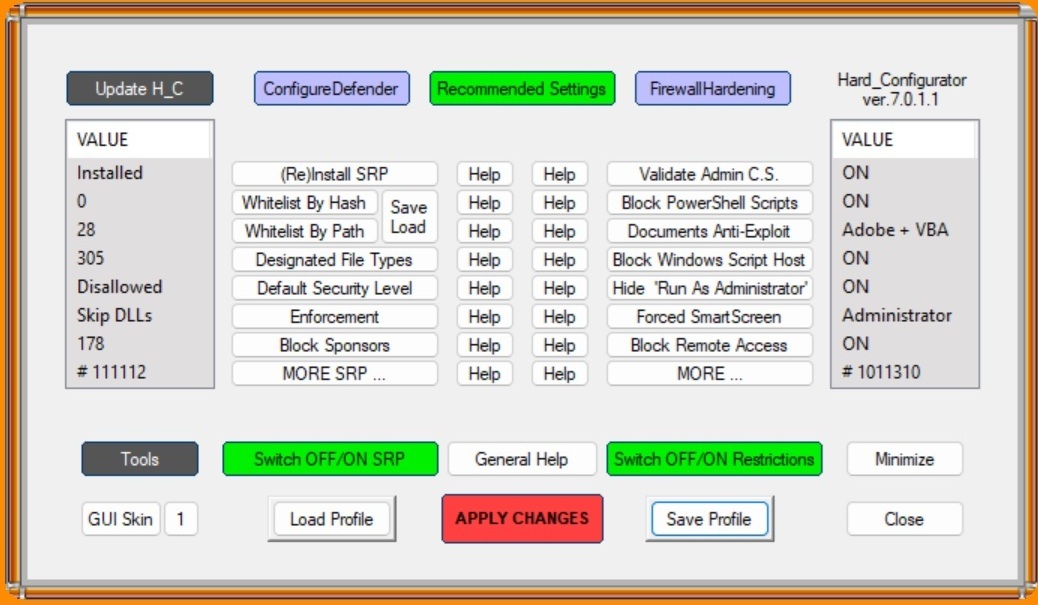
Note for 'Block Sponsors': I chose 'enable all'. As these are LoLBins (living off the land binaries) files attack tools. They are all part of Windows, but can be used by attackers to execute theirtools under a familiar windows name, or to download hack tools unnoticed.
Blocking all those built in LoLBins does disable some features,'MMC.exe' is used for gpedit, services, device manager and eventviewer. Regedit is also blocked. Simply unblock mmc.exe andregedit and hit Apply to use them. And don't forget to toggle them back on after use.
Note for 'Block Powershell Scripts': This item block running.ps1powershell script files. It does not block running single commands.And in 'Block Sponsors' you will see the option to block Powershell entirely. The Terminal (Admin) is never blocked for admin accounts.The terminal / powershell is very powerful and can disable all security, AV and firewall. So you want to stop the attacker from reaching it.
Under the 'MORE' button you will find the 'Disable Elevation on SUA'. SUA stands for standard user account. And this choice allows one to disable UAC for standard user accounts so that they can neverelevate to admin. This is a prudent move. It does mean you would have to login to the admin account to manage the computer, make networking changes etc. Know that once an attacker enters your machine and if you are using admin they will gain admin too. That means they will be able to configure your machine, disable security and wreck havoc. You want them trapped in the least privilege standard user account without the means to obtain admin. And know that Microsoft has said again and again that UAC is NOT A SECURITY BARRIER. It is not the job of UAC prompt to stop attackers from gaining admin. UAC's only job is tomake you aware that you are doing a PC administrative task and togive you a chance to back out. The only secure method of reachingadmin is via login. There are countless publicly documented ways of bypassing UAC documented at the UACme website and MS is slow at fixing them. Hackers of course know the website. So the safest thingto do is not show the UAC to standard accounts at all.
After installing H_C, you won’t be able to run anything except from \program files, \program files (x86) and \Windows. In Downloads folder, you have to right click on a setup/installer program and choose Run By Smartscreen,
Hard_Configurator : free
Harden Services
Services are a hot item for attackers because they typically enable them to gain high privileges and then they can take over your PC. Your PC has internal accounts besides the one you have setup. For example ‘SYSTEM’ and ‘Trusted Installer’. Some internal programs run using the system account. One way to hack a PC is to take over an internal program and gain it’s permissions. The current focus is on disabling services that need a server to work,services that interact with the network (some networking services cannot be disabled and thus not chosen below) , services that goes against least functionality principle and services that runs with high privilege. MS enables a LOT of services because they want a good easy ‘out of box’ experience without you needing to do anything.Instead, they should turn on services only as when needed, especially the ones reachable via networking.
Recommended approach: go through the list below several at a time(10 is a good number) noting down before values stop the service, and then check if your applications are still working, do the next batch and test again. Because I do not know what applications you use.These settings work for me.
Note: Settings > Personalization > Background, and LockScreen stalls a bit and resume when these services are disabled.
Run “services.msc” and set the following services to Manual (Manual means it can start automatically on demand or be manually started by you. Disabled means it will not start). On my system I set the services below to Disable because I know that they don’t affect anything useful. But on first try it is safer to set them to Manual,and see if your applications or Settings start them up again.
- Application Management
- AssignedAccountManager service
- Auto Time Zone Updater
- Branch Cache
- Cellular time
- Connected Device Platform service
- Connected Users Experience and Telemetry
- Data Sharing Service
- Data Usage
- Device Management Wireless Application Protocol (WAP) Push message routing service
- Device Setup Manager
- DHCP Client, Before you disable this, you have to go to Settings > Network & Internet > Ethernet or WiFi . And edit your IPv4 address, keep the first 3 groups of digits, and change the last group to any number between 1 and 254. The gateway address uses 1 as the last group. For DNS servers, use malware site blocking Quad9’s server addresses: 9.9.9.9 and 149.112.112.112 .
- DialogBlockingService
- Display Policy service
- Distributed Link Tracking Client
- Distributed Transaction Coordinator
- Downloaded Maps Manager
- Function Discovery Provider Host
- Function Discovery Resource Publication
- Human Interface Device service
- IKE and AuthIP Ipsec Keying Modules
- Internet Connection Sharing
- IP Helper
- IPSec Policy Agent
- KtRm for Distributed Transaction Coordinator
- Link-Layer Topology Discovery Manager
- Microsoft App-V Client
- Microsoft Cloud Identity Service
- Microsoft Keyboard Filter
- Microsoft Storage Spaces SMP
- Netlogon
- Network Connected Devices Auto Setup
- Network Connectivity Assistant
- Offline Files
- OpenSSH Authentication Agent
- Performance Counter DLL Host
- Portable Device Enumerator Service
- Print Device Configuration Service. You might need this if you use a printer.
- Program Compatibility Assistant Service
- Quality Windows Audio Video Experience
- Radio Management Service
- Remote Access Auto Connection Manager
- Remote Access Connection Manager
- Remote Desktop Configuration
- Remote Desktop Services
- Remote Desktop Services UserMode Port Redirector
- Remote Registry
- Retail Demo Service
- Routing and Remote Access
- Secondary Logon
- Secure Socket Tunneling Protocol Service
- Server
- Shared PC Account Manager
- SMNP Trap
- SSDP Discovery
- TCP/IP NetBIOS Helper
- Themes
- UPNP Device Host
- User Experience Virtualization Service
- Web Client
- Windows Camera Frame Server
- Windows Camera Frame Server Monitor
- Windows Connect Now – Config Registra
- Windows Font Cache Service
- Windows Health and Optimized Services
- Windows Management Service
- Windows Mobile Hotspot Service
- Windows Push Notifications System Service
- Windows Remote Management
- WLAN AutoConfig. Only disable if you don’t use WiFi and use Ethernet cable
- Workstation
- WWAN AutoConfig
- Xbox Accessory Management Service
- Xbox Live Auth Manager
- Xbox Live Game Save
- Xbox Live Networking Service
Check these Settings :
- MS Defender > Device Security > Core-isolation = ON
- MS Defender > Device Security >Secure boot = enabled
3rd Party Anti-malware & Process Injection attacks
Process injection is an attack technique which loads malware into a trusted application’s memory space and run. Thus you won’t see any new exe’s running in Task Manager. Picus’s Red Report 2026reports that this technique has been found in 28% of malware in 2025.Many anti-malware has detection for this. And H_C’s ConfigureDefender configures Defender’s ASR (attack surface reduction) rules to protect against this. However a section of process injection ASR rules only work for MS Office. If you use LibreOffice or any other open source office suite, you need a third party anti-malware to cover this attack technique.
Stop Windows Driver Updates (optional)
The moment you first connect your WiFi or Ethernet, Windows willattempt driver updates. Most of the default drivers that came with the Windows installation are fine. If you don’t like the screen refreshing that goes on while the drivers are updating you can stopit.
If you have Windows Pro. You can run ‘gpedit’ and navigate to
- Computer Configuration > Administrative Templates > Windows Components > Windows Update > Do not include drivers with Windows Update = enabled
- Start and close H_C
SysInternals Sysmon
Sysmon is a supplemental event logging module. It logs all foreground & background program starts, and it gives user understandable messages of suspicious things that hackers do.
First download and extract the zip file. Then make a folder under\program files named Sysmon. Then copy the extracted files into that folder
Next go to GitHub - SwiftOnSecurity/sysmon-config: Sysmon configuration file template with default high-quality event tracing. And download sysmonconfig-export.xml When you click on that link,it will bring you to a page that has line numbers on the left. Find and click on “Raw” button on the right side. Then the numbers will disappear and you can save the page to the sysmon directory.
Next open a admin command prompt. Type in:
- cd “\program files\sysmon”
- sysmon64 -i sysmonconfig-export.xml
Sysmon is now initialized.
To find these "suspicious things" in practice, navigate in the Event Viewer to Applications and Services Logs > Microsoft> Windows > Sysmon > Operational. This log is your primary hunting ground; use the "Filter Current Log" feature to isolate specific Event IDs. By searching for that "nearness"between an ID 1 (Process Create) and an ID 3 (Network Connection) for rundll32.exe, or checking for unauthorized ID 10 requests against lsass.exe, you can reconstruct an attacker's timeline and see exactly how they moved through your system using legitimate tools as a smokescreen.
Apart from starting at Event Viewer as you first try. You canstart H_C, click on the black Tools button, then click on Blocked Events / Security Logs at the top. This allows you to see when theuse of a forbidden Sponsor was attempted. Then note that time and go to Event Viewer Sysmon > Operational and Filter for the same time to see the Parents of the command and also the command parameters.Look back and forward 5 mins of the event to see what else was happening around the same time. It might reveal the source of the intrusion.
Separately go tp Event Viewer > Application and filter forevent ID 1000. It indicates a crash. Many times a buffer overflow attack will cause the application to crash. And then the attacker gains it’s privileges.
Check your Installer Signatures before Installing
You would have saved your installer/setups apps for applications that you use. Check each setup program’s signatures before usingit. (right click on file, click on properties, signatures tab,details button and make sure the signature is valid; if signature isn’t valid discard it). Smart attackers would modify your setup programs to include what they want to ensure that your machine staysinfected. Note that the signature does not ensure that the file is unmodified. To do that you need to check the Hash, using Powershell's get-filehash command - if the file publisher publishes the hash.
Google for “<app name> offline installer” so that youcan install all your apps while offline.
Smart App Control
Smart App Control blocks untrusted code from running. MS has a lot of telemetry to enable them to detect untrusted code. Go to Defender> App & browser control > Smart App Control = enable. Ifyou use a lot of unsigned apps then you may want to turn it off.
Encrypted DNS
DNS is the address book of the internet translating friendly names like www.google.com into numerical ip address so computers can send traffic with the ip. The latest Windows has offered Encrypted DNS for a while now. And it can be helpful to foil MITM attacks. Go to Settings > Network & internet > Wifi or Ethernet and Edit your DNS server assignment. I use Quad9 DNS servers which filter out known malware, their addresses are 9.9.9.9 and 149.112.112.112 . Or you can use Google's 8.8.8.8 and 8.8.4.4 . And enable encryption.
HasLeo Backup Suite
This allows you to make a backup drive image. It backs up yourwhole drive, including your settings, applications and data files.This allows you to recover from an attack in one swoop. Do it Beforeyou go online so that you have a non-altered pristine image. HasLeo can also do file based backups, depending on how much data you modifyper day, set a schedule to do regular backups.
For my 512 GB drive it created a ~40GB file. So go buy a 128 GB USB thumb drive and save the image there. You also need a smaller capacity USB stick to store a bootable copy of HasLeo, so that you boot up Hasleo and insert the restore stick with the data to start restoring.
Backup Suite: Free
USB 128GB thumb drive: $22
What to Expect
Hackers are a difficult cybersecurity problem because a human attacker can adapt in ways that ordinary automated malware cannot.When one path is blocked, he can look for another, or change to a different hacking tool.
By following this guide, you have to acknowledge that this is transparent security. As the attacker may also duplicate the configuration laid out here and try to break or bypass the security.And just as you benefit from the free 30 day trials, so can he. The security is only partially derived from the tools we use, but also from our practices and administrative procedures. We check our security configuration regularly, we check the logs, we do our vulnerability scans, and we do our patching. We upload new downloads to VirusTotal, we do our backups and we don't click on email attachments or emailed links. The upkeep of our security is as important as the tools themselves. Transparent security or not, the control strategy is sound. When we do our due diligence in addition to the tools chosen here, breaking through the defenses is hard. Attackers tend to choose low hanging fruit rather than tackle layers of defense.
People tend to put off implementing controls citing cost and effort problems. If you don't implement controls, you suffer incidents more often, and the damage is greater - the blast radius could affect multiple laptops.
According to police records in 2023, there were 48,371 reported cybercrimes reported. And there normally are huge un-reported incidents. That is no small number. So consider your chances carefully.
Our goal is to contain the attacker inside a least-privileged,task-specific standard account so he cannot take over the machine. Weblock untrusted applications from being brought onto the system with CyberLock, which alerts us when a new executable tries to run. We remove access to PowerShell, cmd, and some built-in Windows toolsthrough Hard_Configurator so the attacker has fewer local toolsavailable. We remove easy paths to administrative action by tightening UAC elevation and Secondary Logon exposure. We protect important registry locations so scripts cannot easily establish longevity and survive reboots. We also disable unused services to reduce attack surface. And we have our image backup in case we get hacked so bad that we can't repair or when we encounter ransomware which encrypts our data. Added all together, the layers make up a strong defense.
That does not mean the machine can be ignored after hardening.Attackers adapt, new vulnerabilities are discovered, and sometimes security products themselves can have weaknesses. So periodically check the logs – as some hackers lie low and avoid detection while others enjoy wrecking things so you would notice. Being able todetect an intrusion is as important as setting up defenses.
Patch your Windows, browsers, applications and security diligently. Do backups as scheduled. There is no permanent cure.Security is an ongoing process, not a project with an end date.
Once you are online
Go do Windows Update for the current month. DO NOT BEGIN SURFING until update is done. Then update your browser by going toHelp>About.
Use a VPN
A virtual private network builds a encrypted tunnel to their server, and then goes to your destination, so your browsing cannot be seen by the attacker. When facing a MITM attack you have to protect your internet travels.
I use ProtonVPN, a Swiss VPN company. They have a free tier.
Run Vulnerability Checkers weekly
Security vulnerabilities are software bugs that allow hackers toattack. And new vulnerabilities are discovered continuously (like the recent adguard vulnerability CVE-2026-32136). The standard old time vulnerability scanner is Nessus.
And then there are patching utilities like PatchMyPC which brings down patches for some popular software.
Administrative Controls
Procedures, what we manually do, matters as much as technical controls like AV's and CyberLock. Here are the basics;
- After downloading software, upload it to VirusTotal.com to have their 60+ virus engines do a check before you run it. If you want to be extra safe, wait a day and check again in case the virus is brand new; usually AV's will catch up with new detection signatures after a day.
- You schedule on your calendar to do Windows Update on the second Tuesday of the month.
- You schedule a day every month to check for updates for your router (the brands Asus and Mikrotik provides frequent 2-month and monthly updates respectively)
- You schedule a day every 3-6 months to change your WiFi password if you use WiFi.
- You schedule a day to run nmap to scan your LAN for unknown PCs.
- You schedule a day to download EICAR the test-virus to ensure your defenses are working.
- You schedule a day to run your secondary 'second opinion' AV like Emsisoft Emergency Kit, Trend Micro Housecall,MalwareBytes Free.
- Using a second PC, you bring up your drive image offline and update it with any new software and save it again every few months
- You schedule a day(s) of the week to check your defense config and event viewer logs. Attackers often modify your security config to makelife easier for themselves; and if you notice gaps in your logs it maybe due to the attackers erasing the logs to cover up their intrusion. Remmber, first Protect, then Detect. This is the manual part of Detect.
- You avoid going online with your admin account as much as possible because that is when you are most vulnerable. Exceptions are when you must use an online-download-installer
- You use a password generator site to generate random passwords for ALL web sites, and Never reuse any password - using the same key for your house, car, safe and office doesn't work. Save your passwords to a Password Manager like BitWarden free.
- You setup multi-factor login (2FA) whenever a website supports it. Install MS Authenticator on your cell and scan that provided QR code.
- You schedule a day to patch/update your applications
- You schedule regular backups of your data. Depending on how much data you usually create. Arrange a second copy of it to be stored off site (maybe a friend's house or at work) Backups are no good if they burn up along with your home.
- Disconnect your backup storage after performing a backup. Ransomware knows to hunt for backups and encrypts them as well
Report Intrusions to the Police
Cybercrime happening to ordinary folks are hugely under-reported. Do report computer intrusions to the Police, it is illegal to access a computer without authorization in most jurisdictions. They may not have enough man-power to properly look after your case, but the event needs to be logged, reported, and added to government statistics. When there is a sizable number of hackings, either the government or industry will respond.
Last edited:


