

Advice Request Protection against viruses and threats

Please provide comments and solutions that are helpful to the author of this topic.

JB007

Level 26
Thread author
Verified
Top Poster
Well-known
Forum Veteran
May 19, 2016
1,567
1
6,553
2,469
France
Hello
Today I got a repetitive alert message (12 times) from Windows Defender.
I was not working on my PC when the massage happened.
When I click on this message I am directed to this site : Activer la fonctionnalité Bloquer à la première consultation pour détecter les programmes malveillants en quelques secondes
I don't understand what this is about?
Can you help me ?

*In French:
"Protection contre les virus et les menaces
Analyse de sécurité requise
Votre administrateur informatique demande une analyse de sécurité de cet élément.
L'analyse peut prendre juqu'à 10 secondes."
*In English:
"Protection against viruses and threats
Security analysis required
Your IT administrator requests a security scan for this item.
Analysis can take up to 10 seconds."
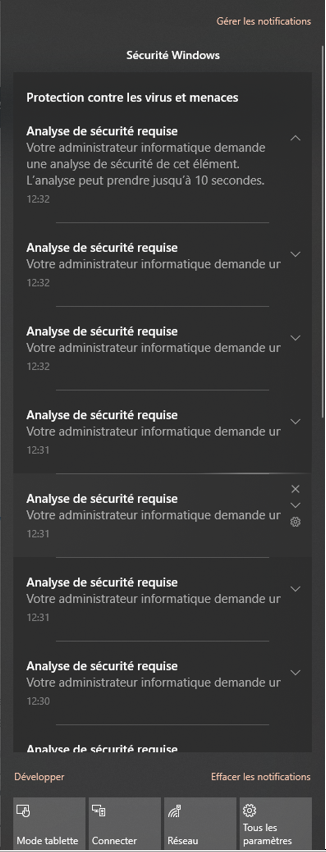
sw.PNG
 
I believe that's Windows Defender Block at First Sight / Block At First Seen in action, as configured by Configure Defender.
Some info found here:
 
I believe that's Windows Defender Block at First Sight / Block At First Seen in action, as configured by Configure Defender.
Some info found here:
Thanks @Gandalf_The_Grey (y)
But I had not modified Windows Defender parameters:rolleyes:
 
Thanks @Gandalf_The_Grey (y)
But I had not modified Windows Defender parameters:rolleyes:

BAFS is still operative by default, with a 10 second cloud-check time out. That is the time it will block a file while doing a cloud check. Scanning in the coud is one of WD's strong points, since its local signatures are not the best.
 
we usually get this message when something related to scripts or surface attack reduction

I highly recommend you to check if your computer is potentially infected
You can post some screenshots of Process Explorer and Autoruns, both with virustotal enabled so we can help you to analyze what happened

furthermore, you should open ConfigureDefender and export Defender Logs and upload it here. It helps a lot
 
BAFS is still operative by default, with a 10 second cloud-check time out. That is the time it will block a file while doing a cloud check. Scanning in the coud is one of WD's strong points, since its local signatures are not the best.

Thanks @oldschool
But hw can I know what is the file checked ?

we usually get this message when something related to scripts or surface attack reduction

I highly recommend you to check if your computer is potentially infected
You can post some screenshots of Process Explorer and Autoruns, both with virustotal enabled so we can help you to analyze what happened

furthermore, you should open ConfigureDefender and export Defender Logs and upload it here. It helps a lot

Thanks @Evjl's Rain
I run Autoruns and Proces Explorer with VT
Auto1.PNG
Auto2.PNG
Auto3.PNG
Auto4.PNG
Auto5.PNG
Auto6.PNG
Sys1.PNG
 
it seems like you just changed your AV to Kaspersky
I would like to see the full screenshot of "Everything" tab of Autoruns
I don't really see anything too suspicious besides missing driver files (.sys) which look suspicious

please open ConfigureDefender -> click on defender log and upload it here so we can diagnosis
 
it seems like you just changed your AV to Kaspersky
I would like to see the full screenshot of "Everything" tab of Autoruns
I don't really see anything too suspicious besides missing driver files (.sys) which look suspicious

please open ConfigureDefender -> click on defender log and upload it here so we can diagnosis
Thanks @Evjl's Rain
I reinstalled Kaspersky Total Security 3 months ago... but there was an automatic update for patch (g) some days ago...
I posted the full screenshot of "Everything tab of Autoruns:unsure:
Oups I'm not able to find "ConfigureDefender" and defender log:confused: Can you explain to me how I can do ?
Also do you think it would be better to delete the "missing driver files (.sys)" ?
 
I'm not able to find "ConfigureDefender" and defender log:confused:

Your OP was about an alert from Windows Defender. If you did not install ConfigureDefender then you would need to check Event Viewer for WD logs. Did you have Kaspersky + WD on periodic scanning only? I'm confused...
 
Thanks @Evjl's Rain
I reinstalled Kaspersky Total Security 3 months ago... but there was an automatic update for patch (g) some days ago...
I posted the full screenshot of "Everything tab of Autoruns:unsure:
Oups I'm not able to find "ConfigureDefender" and defender log:confused: Can you explain to me how I can do ?
Also do you think it would be better to delete the "missing driver files (.sys)" ?
Can you run Autoruns with Administrator privileges and post the result of the Everything tab again? Sorry, I forgot about this. Autoruns is quite useless without Admin's right

you should also run Process Explorer with admin privileges, too.

you can download ConfigureDefender here and export defender log -> upload it to somewhere and post here

before correctly identifying the problem, I suggest you not to do anything with those missing .sys entries. I used to have trouble on my laptop because I deleted a missing entry -> turns out the driver was Not missing but autoruns reported it was missing -> error
 
Last edited:
Your OP was about an alert from Windows Defender. If you did not install ConfigureDefender then you would need to check Event Viewer for WD logs. Did you have Kaspersky + WD on periodic scanning only? I'm confused...
Hello @oldschool
Thanks for your help.
I have Kaspersky Total Protection enabled for real time protection but I just discovered that I have also WD enabled for real time protection and also for cloud protection. I am extremely surprised because until now I thought that installing Kaspersky automatically disabling WD:oops:
wd1.PNG
 
Hello @oldschool
Thanks for your help.
I have Kaspersky Total Protection enabled for real time protection but I just discovered that I have also WD enabled for real time protection and also for cloud protection. I am extremely surprised because until now I thought that installing Kaspersky automatically disabling WD:oops:
View attachment 231437
It should,@harlan4096 can confirm!
 
Can you run Autoruns with Administrator privileges and post the result of the Everything tab again? Sorry, I forgot about this. Autoruns is quite useless without Admin's right

you should also run Process Explorer with admin privileges, too.

you can download ConfigureDefender here and export defender log -> upload it to somewhere and post here

before correctly identifying the problem, I suggest you not to do anything with those missing .sys entries. I used to have trouble on my laptop because I deleted a missing entry -> turns out the driver was Not missing but autoruns reported it was missing -> error
Hello @Evjl's Rain
I finally managed to understand why I had so few elements on the result of "Everything tab". You just had to uncheck "Hide VirusTotal Clean Entries".

ar1.PNG
ar2.PNG
ar3.PNG
ar4.PNG
ar5.PNG
ar6.PNG
cd1.PNG
cd2.PNG
 

Attachments

Hum, I don't understand why WD is enabled on my PC ?
you should disable WD
sometimes, it turns on automatically while you have other AVs
this to make sure it won't turn in anymore

 
With Kaspersky installed WD should have turned itself off. I wonder if Kaspersky didn't register with the security center properly when it was being installed? I know that after a new AV installation, sometimes it takes a min for WD to see it and turn off, but other than that it stays off. I haven't ran into an issue were WD turned itself back on when I installed a 3rd party AV, but I hear it happens at times. You could always try to uninstall Kaspersky, run their uninstall tool to make sure there aren't any leftovers and reinstall it to see if that fixes it. If it does, then it was something with the previous Kaspersky install, if it doesn't then there may be a setting or corrupted file which is causing WD to behave this way.
 

You may also like...
