Quihoo 360 Total Security 6.2.0.1030 Sys Backup Cleaner

Status
Not open for further replies.

marg

Level 13
Thread author
Verified
Forum Veteran
May 26, 2014
603
945
1,167
49
Can some Tech Guru tell me if its safe to use the system backup cleaner.? It found 1.8 GB to be cleaned. What to do..???
 
I'm no computer expert, but I have a feeling these system backups have a reason to be. For example, when an update goes wrong, and the system needs to go back to an earlier state in order to work. Am I right, true experts?
 
  • Like
Reactions: LabZero and viktik
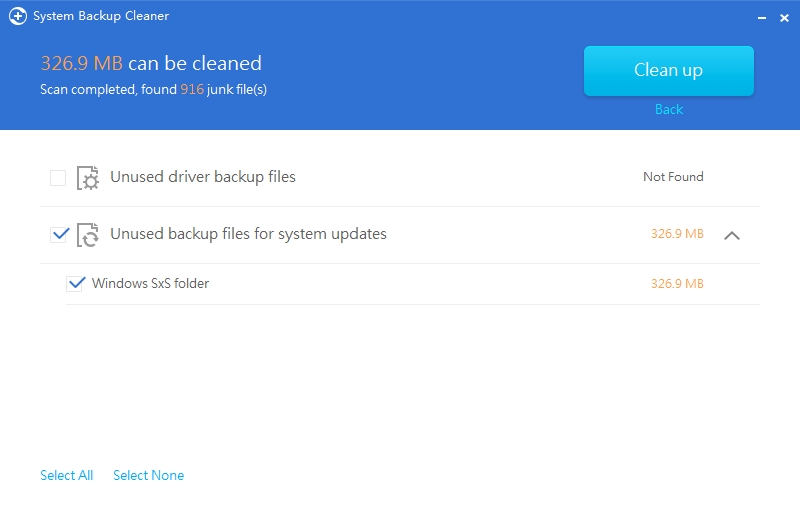
According to the image taken from this link: https://cyberraiden.wordpress.com/2014/05/06/360-total-security-review-settings/

360-total-security-6-system-backup-cleaner-_18-03-2015_16-02-12.jpg


Its targeting the location of Windows SxS, but what is this?

When Windows installs updates, it drops the new Windows component in the WinSXS folder and keeps the old component in the WinSXS folder. This means that every Windows Update you install increases the size of your WinSXS folder. This allows you to uninstall operating system updates from the Control Panel, which can be useful in the case of a buggy update — but it’s a feature that’s rarely used.

https://cyberraiden.wordpress.com/2014/05/06/360-total-security-review-settings/

One commonly asked question is can I delete the WinSxS folder to regain some disk space? The short answer is no. However, there are ways to reduce the size of the WinSxS folder.

https://technet.microsoft.com/en-us/library/dn251565.aspx

So technically you may use the disk cleaner built in from Windows to delete the copies of updates that stores longer to your hard drive.
 
Information:

On my other PC with Win 8.1 sometimes Disk Cleanup takes a long time to clean up, I recommend not to interrupt the process.
 
  • Like
Reactions: frogboy and viktik
I cleaned it & everything seems to be working fine. It targeted windows SXS folder & unused backup files for system updates.
 
Status
Not open for further replies.