

It's okay ? Or recommend an adjustment. Thank you.
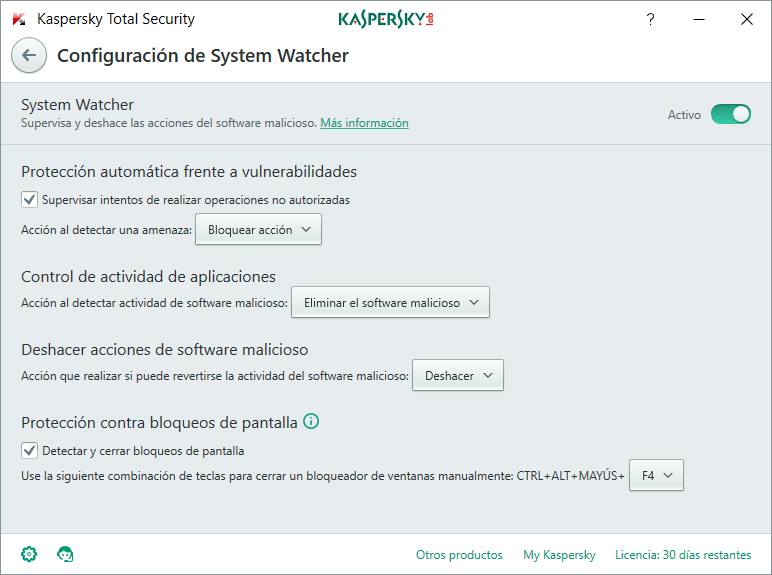
Recommended setting for System Watcher in Kaspersky Total Security
- Thread starter Artificial intelligence
- Start date
You are using an out of date browser. It may not display this or other websites correctly.
You should upgrade or use an alternative browser.
You should upgrade or use an alternative browser.
- Status
- Not open for further replies.

Hello,
I cannot understand Spanish but it looks good. To really improve your system security you should look at Kaspersky's Application Control settings, that's were you can do the most work, here is a guide to help you - How to setup Kaspersky Internet Security 2016 for Maximum Protection (Guide) - it's for KIS 2016, but it should work for 2017 as well!
@harlan4096 may also give you some great tips on how to better configure Kaspersky.
I cannot understand Spanish but it looks good. To really improve your system security you should look at Kaspersky's Application Control settings, that's were you can do the most work, here is a guide to help you - How to setup Kaspersky Internet Security 2016 for Maximum Protection (Guide) - it's for KIS 2016, but it should work for 2017 as well!
@harlan4096 may also give you some great tips on how to better configure Kaspersky.
I already made the settings described, it's the first thing I did. Thanks.Hello,
I cannot understand Spanish but it looks good. To really improve your system security you should look at Kaspersky's Application Control settings, that's were you can do the most work, here is a guide to help you - How to setup Kaspersky Internet Security 2016 for Maximum Protection (Guide) - it's for KIS 2016, but it should work on 2017 aswell!

I missed that, thanks @Jack! Awesome guide in case I will switch to Kaspersky 
I have to say that my indicators are pointing towards that direction
I have to say that my indicators are pointing towards that direction

- Apr 28, 2015
- 9,386
- 1
- 84,789
- 8,389
In case of module "System Watcher", defaults settings are ok and should not be changed...

@harlan4096, what about the idea of using Application Control to put script interpreters in the High Restricted category? What do you say about that kind of a tweak?In case of module "System Watcher", defaults settings are ok and should not be changed...
I even put cmd.exe in High Restricted, and everything still works fine, and my apps that use cmd.exe are still able to function normally.
- Apr 28, 2015
- 9,386
- 1
- 84,789
- 8,389
@shmu26: I guess You did that because the last special sample I tested yesterday night that tried to Exploit cmd.exe. We have been testing at MWHub lately some similar/variants samples (usually .doc) that tried the same.
As You can see, in every case KTS2018 (and I guess also K2017 would do the same) in default settings detected the attack and blocked it without having signatures...
If that "strong tweak" is working fine for now for You, that's great... anyway I'm not sure whether You will have any issue in future with any other applications or Windows working, please let us know...
As You can see, in every case KTS2018 (and I guess also K2017 would do the same) in default settings detected the attack and blocked it without having signatures...
If that "strong tweak" is working fine for now for You, that's great... anyway I'm not sure whether You will have any issue in future with any other applications or Windows working, please let us know...
Last edited:
I'm scared, do I return it to the default configuration?@shmu26: I guess You did that because the last special sample I tested yesterday night that tried to Exploit cmd.exe. We have been testing at MWHub lately some similar/variants samples (usually .doc) that tried the same.
As You can see, in every case KTS2018 (and I guess also K2017 would do the same) in default settings detected the attack and blocked it without having signatures...
If that "strong tweak" is working fine for now for You, that's great... anyway I'm not sure whether You will have any issue in future with any other applications or Windows workings, let us know...
- Apr 28, 2015
- 9,386
- 1
- 84,789
- 8,389
As I already said before in post#5, I would stay at default settings in "System Watcher" module in general, although I have all those settings in "Prompt for Action" in my working system, because I am in "Interactive Mode"@Jack @Winter Soldier @harlan4096 @shmu26 Something in English so they can understand.View attachment 144595
Last edited:
Returning to the default setting. ThanksAs I already said before in post#5, I would stay at default settings in "System Watcher" module, anyway I have all those settings in "Prompt for Action" in my working system, because I am in "Interactive Mode"
- Apr 28, 2015
- 9,386
- 1
- 84,789
- 8,389
Thanks, and it wasn't because of your latest test, it is just my general paranoia about script interpreters. Whatever my security config may be, I always try to get them under control.@shmu26: I guess You did that because the last special sample I tested yesterday night that tried to Exploit cmd.exe. We have been testing at MWHub lately some similar/variants samples (usually .doc) that tried the same.
As You can see, in every case KTS2018 (and I guess also K2017 would do the same) in default settings detected the attack and blocked it without having signatures...
If that "strong tweak" is working fine for now for You, that's great... anyway I'm not sure whether You will have any issue in future with any other applications or Windows working, please let us know...
Almost all users could block or restrict wscript and cscript and powershell without any issues, and that will make it really hard for malware to download and run payloads, or hack the registry etc.
The touchy process is cmd.exe. So far, I haven't had any problems, but potentially, it could cause issues.
- Status
- Not open for further replies.
You may also like...
-

-
 AI Assist Driver version for Kaspersky Anti-Ransomware Tool
- Started by RRlight
- Replies: 12
-
Question I had to use a few second opinion scanners alongside Kaspersky premium. Any chance of Kaspersky corruption.
- Started by nonamebob567
- Replies: 18
-
-
