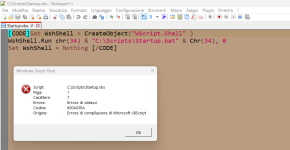
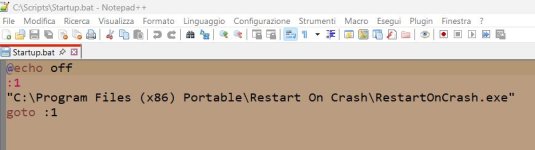
I just discovered this freeware application called Restart on Crash, which keeps configured process running even if they have been terminated. It seems to work really well. I can but things like the Windows Firewall Control GUI in there, or it's service, the Sandboxie GUI process, or it's service, Cyberlock, etc. You get the point. I can manually terminate every process that Restart on Crash is configured for and those process will restart. That's awesome! However, me being the nerdy idiot that I am, I started wondering what would happen if the Restart on Crash process itself was terminated. In that case no other process on the list would be safe. Here's my attempted solutions to this problem, none of which have been successful.
1. I tried using sc.exe to create a service based on the RestartonCrash.exe. sc.exe create RestartonCrash binPath= "C:\Windows\RestartonCrash\RestartonCrash.exe" In this case the create service never successfully starts.
2. I tried using the NSSM (Not Sucky Service Manager). "nssm install RestartonCrash" then in the resulting GUI point to to the RestartonCrash.exe, then create the service. This time the resulting service runs; RestartonCrash.exe does run. And if I terminate that process it, well, essentially won't let me. RestartonCrash is always in the task manager. If I kill one of the process that Restart on Crash is supposed to restart that process will restart, I think. I say I think because the terminated process will be shown in the task manager again, but it is no longer visible from the taskbar. Those processes are not functional if I cannot see them in the taskbar.
EDIT - I Solved it. Unfortunately, MalwareTips thinks I'm trying to destroy it and won't let me post the solution here. The best I can do is this pastebin. I think some could find this extremely useful for preventing apps from being terminated.
1. I tried using sc.exe to create a service based on the RestartonCrash.exe. sc.exe create RestartonCrash binPath= "C:\Windows\RestartonCrash\RestartonCrash.exe" In this case the create service never successfully starts.
2. I tried using the NSSM (Not Sucky Service Manager). "nssm install RestartonCrash" then in the resulting GUI point to to the RestartonCrash.exe, then create the service. This time the resulting service runs; RestartonCrash.exe does run. And if I terminate that process it, well, essentially won't let me. RestartonCrash is always in the task manager. If I kill one of the process that Restart on Crash is supposed to restart that process will restart, I think. I say I think because the terminated process will be shown in the task manager again, but it is no longer visible from the taskbar. Those processes are not functional if I cannot see them in the taskbar.
EDIT - I Solved it. Unfortunately, MalwareTips thinks I'm trying to destroy it and won't let me post the solution here. The best I can do is this pastebin. I think some could find this extremely useful for preventing apps from being terminated.