They're not giving it up on this.In principle, they don't seem to give up on this at all, but they doubt the possibility of uninterrupted operation of this function, which is why they opened a vote whether they need to do this or not.
They're not giving it up on this.In principle, they don't seem to give up on this at all, but they doubt the possibility of uninterrupted operation of this function, which is why they opened a vote whether they need to do this or not.

Just contact SpyShelterCarl on the Official Forum My old lifetime licenseTried out the beta with the lifetime license of my father, but it was not recognized, so their customer service policy is a bit disappointing.
Contact technical support and they will send you a new key for the new version of the program. The license for the old version of the program is not suitable for the new version.Tried out the beta with the lifetime license of my father, but it was not recognized, so their customer service policy is a bit disappointing.
Thanks, I was directed to to the forum when I searched for Spyshelter support and was confused. I will use the info of @ShantirContact technical support and they will send you a new key for the new version of the program. The license for the old version of the program is not suitable for the new version.


please report back about your experience running SS 15 beta.@Shantir thanks, received a new license key, playing with SpyShelter now
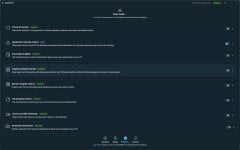
Runs without any issues. I knew the old Spyshelter (a HIPS with FW and Spyware protection), this one seems to protect important registry keys and windows files and has application launch control (but not on parent - child level). This is a bit speculation of my side, because it seems to be a rather user friendly application control program (and also seems to have some sort of blacklist). Feels light also. Would be nice to see this one tested with a pure blacklist free AV like Bitdefender free (@Shadowra could you test such a combo?)please report back about your experience running SS 15 beta.

Looking at the history of SS we perhaps have more than 10 years of development but everything depends of computer technology that appears in next yearsThe new owner didn't stop development, they rather worked in 2023 to release this new version 15 Beta. Very long time but better late release than never
Of course, we never know what happens with SpyShelter's userbase in the future, but as said by @Shantir it is the same case even for other software...
I tried to inform you earlier in this thread. Spyshelter's Application Control makes it's different from basic AVs like the free ones Avira, Avast, Bitdefender Free, MD.
If you are using CyberLock and paid for your license, then you don't need Spyshelter, otherwise all would be "overkill".
Regarding the upcoming test by @Shadowra I doubt Spyshelter is able to protect fully the system, manually user intervention is required to block or quarantine threats.
As recommended, Spyshelter should be used together with an basic AV, in combo it's more likely to be protected.
More advanced paid AVs has enough protection features, e.g. Kaspersky, Bitdefender, F-Secure and others...



 forum.spyshelter.com

SpyShelter 15.0.2.503
SpyShelter 15.0.2.503 now available - what's new?
We’ve just released SpyShelter 15.0.2.503. Download it now - if you’re a previous SpyShelter user you’ll be alerted to update, or you can install it now by installing it over your previous version of SpyShelter. No need to uninstall anything first. What’s new? SpyShelter 15 is now no longer...
What’s new?
- SpyShelter 15 is now no longer in beta testing. Thank you for all your feedback via our helpdesk and forum so we could improve SpyShelter! Please keep providing feedback in our public forum so we can keep improving.
- SpyShelter now supports PUP protection. PUP means “Potentially Unwanted Programs” and was requested by many SpyShelter fans. To turn this on, go to the Protection tab “Threat Protection” area (click the right side arrow), or leave it turned off if PUPs aren’t an issue for you. SpyShelter will now stop unwanted programs before they can even launch. If SpyShelter catches a program you want to install, just unquarantine it to use it by going to the Rules tab.
- Now when threats or PUPs are quarantined, SpyShelter shows you an alert on the desktop, and an event. Previously you could only see this under SpyShelter’s Rules.
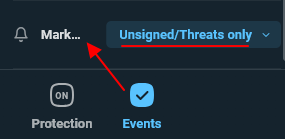
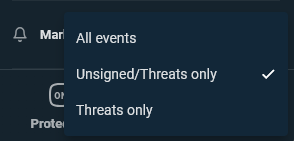
- Go to SpyShelter’s settings to only show red dots and red event alerts for threats only, or unsigned executables and threats only.
- SpyShelter has had many UI fixes and enhancements due to user reports and feedback.
- The SpyShelter software already doesn’t collect any identifiable information, but for those who want an extreme level of privacy, SpyShelter now has a built-in extreme privacy mode for all free or paid users. A SpyShelter fan requested this mode via a private message in our forum, so we built it for that person. To use this mode, install SpyShelter from the Windows Terminal with the command /privacy. Now SpyShelter Threat Detection, Insights, and any other features that may send data (that’s already non-identifiable as is) are disabled from SpyShelter’s installation. Therefore, now even non-identifiable data isn’t sent anywhere when using SpyShelter while in /privacy mode. Unfortunately this causes you to miss out on any threat detection or insights, to it’s not recommended for most people. However, this mode may be useful for some work environments or IT requirements. To leave this privacy mode you have to uninstall SpyShelter and reinstall it with the /clean command.
- SpyShelter yearly subscriptions are now live. Thanks for considering supporting our work on this project so we can keep building new features and improving SpyShelter! Unlike many subscription companies we make it easy to cancel your subscription. You can purchase, then immediately click “unsubscribe” in your email to cancel rebills if you prefer. We don’t make you have to contact us to cancel subscriptions.
 forum.spyshelter.com
Download SpyShelter 15.1.0.567 now!
What’s new?
- SpyShelter now detects Mic and Webcam activity, then allows you to terminate that activity in real-time. You can also make rules for webcam/mic activity, and see that activity on SpyShelter’s Events, Activity Screen, and Rules Screen.
- We’ve redesigned SpyShelter’s Activity and Rules tab, where they are much easier to operate and understand. It’s now much easier to create and control custom SpyShelter security and application control rules.
- It’s now possible to see the country code of where an executable came from. For example any Microsoft executable will show “US” as the country. This will appear under any executable information when clicking its icon in SpyShelter.
- Tired of the same old executable sitting in your SpyShelter rules? Due to your feedback, older executables will now be automatically removed when SpyShelter detects those executables are no longer present on your PC.
- We’ve updated our driver to work in a more efficient and stable way.
- Fixed an issue with SpyShelter’s installation under a standard Windows user account.
- We’ve included more Microsoft processes that shouldn’t be terminated by SpyShelter, to avoid SpyShelter causing a system instability.
- SpyShelter also has many other small fixes and improvements due to feedback from - SpyShelter users. Did we miss something? Let us know in the SpyShelter forum so we can keep improving.
forum.spyshelter.com
In Free mode you can enable only the Application Security Control module. Better than nothingHow much of this really workd in free version?
15.2.0.712 (09/Aug/2024)
- SpyShelter now natively supports ARM devices!
- UI enhancements due to user feedback.
- Stability improvements due to user feedback and reports.
forum.spyshelter.com
SpyShelter Change List – SpyShelter Help15.2.0.722 (27/Aug/2024)
- Minor UI fixes due to user feedback.
Source: SpyShelter Change List – SpyShelter Help15.2.0.781 (30/Sep/2024)
- Go to SpyShelter's settings to choose how long you want to keep SpyShelter Events.
- SpyShelter now shows "First time seen" and "Hash changed" data in the app sidebar.
- Fixed a bug that caused auto-update to re-download the update on computer restart for some SpyShelter users.
- Added a new animation that appears on first launch. The first launch after this new version may have a short delay as your database is converted to a more efficient format.
Source: SpyShelter Change List – SpyShelter Help15.2.0.801 (09/Oct/2024)
- Fixed a bug that could cause SpyShelter to not work correctly for non-admin Windows accounts.
- Made a change so paid users won’t accidentally lose some event history in case of an accidental or unexpected deactivation to a free user.
- Improved support for Windows 11 Version 24H2.
Source: SpyShelter Change List – SpyShelter Help15.3.0.898 (12/Mar/2025)
- Added a quarantine button in the UI on the left of the app name to make it easier to quickly quarantine apps.
- Removed the registry protection module due to user feedback.
- Updated app insights with more recent data.
- Fixed a bug where cameras and mics would show they were in constant use, when they were not.
- Fixed a bug for SpyShelter Pro and Ultimate rebills that could cause the activation code to stop working.