

Hi @Jack,
thanks for that great feature, it makes the reports look awesome!
Two difficulties could be solved however, to make the creation of reports faster and way more user-friendly (if possible to solve):
*Option to edit more than one field (e.g. for center alignment, colour change for system status) - the options are greyed out once more than one field is active
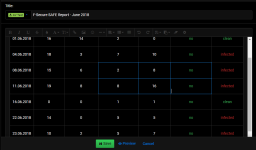
*once the text in one box is completely removed, the column will lose one box, you cannot restore it (but drop another column before or after, and need to fill out all the fields again)
When I tried editing, the issue is gone. Seems to appear only on creation of a new table. Once published, the issue seems to be gone.
If someone else found anything, feel free to join in!
Thanks in advance!
thanks for that great feature, it makes the reports look awesome!
Two difficulties could be solved however, to make the creation of reports faster and way more user-friendly (if possible to solve):
*Option to edit more than one field (e.g. for center alignment, colour change for system status) - the options are greyed out once more than one field is active
*once the text in one box is completely removed, the column will lose one box, you cannot restore it (but drop another column before or after, and need to fill out all the fields again)
When I tried editing, the issue is gone. Seems to appear only on creation of a new table. Once published, the issue seems to be gone.
If someone else found anything, feel free to join in!
Thanks in advance!


