TairikuOkami's Android Config 2020

Last updated
Dec 12, 2020
Mobile brand
Samsung
Mobile model
Galaxy A3 (2017)
Phone OS
Phone OS Updates status
Automatic updates
Phone unlock
Biometric security
    • Fingerprint(s)
Stolen Device Protection
Security & Privacy Apps
Browser
[URL='https://play.google.com/store/apps/details?id=com.brave.browser&hl=en_US']Brave Private Browser[/URL]
[URL='https://play.google.com/store/apps/details?id=org.torproject.torbrowser&hl=en_US']Tor Browser[/URL]
File and Photo backup
What files, lol.
Notable changes
2020-12-12 Switched to Quad9
2020-10-18 Installed DNS Changer

TairikuOkami

Level 40
Thread author
Verified
Top Poster
Content Creator
Well-known
Forum Veteran
May 13, 2017
2,948
14,870
3,880
FEMatrixAge43
github.com
I was gifted this phone, so here it is. I plan to use it only at home for Fitbit sync, but I might take it out for a walk occasionally.
This is my first android smartphone, so please go easy on me. The other one is MS Lumia 650, but Windows is pretty familiar.
I do not want to run any realtime apps, like antivirus, taking battery life. I have uninstalled all core apps and I keep only basics.
File transfer does not work via cable, so I had to copy/paste passwords using googledrive, but I somehow got it working at last.

P.S.: Avira Home Guard reports, that ports 22/80 on the router are opened. That is nice, but like what am I supposed to do about it?! 😅
 
I was gifted this phone, so here it is. I plan to use it only at home for Fitbit sync, but I might take it out for a walk occasionally.
This is my first android smartphone, so please go easy on me. The other one is MS Lumia 650, but Windows is pretty familiar.
I do not want to run any realtime apps, like antivirus, taking battery life. I have uninstalled all core apps and I keep only basics.
File transfer does not work via cable, so I had to copy/paste passwords using googledrive, but I somehow got it working at last.

P.S.: Avira Home Guard reports, that ports 22/80 on the router are opened. That is nice, but like what am I supposed to do about it?! 😅
Hi, We have something in common, I have ditched Bitdefender(only on my Android) and Purchased Dr.WEb Security Space Lifetime subscription. so thumbs up!
 
  • Like
Reactions: [correlate]
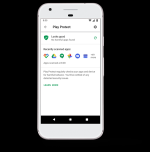
@TairikuOkami: why Play Protect disabled
There is no Play Protect in store or in settings, so I guess it is disabled?
@TairikuOkamiand not using 2-Step Verification?
I login to gmail, gdrive regularly on desktop and 2FA is PITA, SMS takes long to receive and I do not want google cookies saved in my browser.
Besides I consider gmail as a spam email. Samsung has 2FA enabled by default and creating an account took days, SMS almost never arrives.

P.S.: Now I am wondering, does Account security applies to Samsung or to Google Play Store? FindMyPhone is Samsung, then I guess it is enabled?
How did you make file transfer working at last? I had similar problems in the past.
Sorry, I meant, I got logins working via google drive. File transfer still refuses to work, I tried multiple cables. :(
 
  • Like
Reactions: Protomartyr
Last edited:
There is no Play Protect in store or in settings, so I guess it is disabled?
1600503424259.png

It is integrated in Google Play Store settings...