

B
Brandon LeBlanc
Hello Windows Insiders, today we are beginning to roll out an update to Notepad to Windows Insiders in the Canary and Dev Channels on Windows 11.
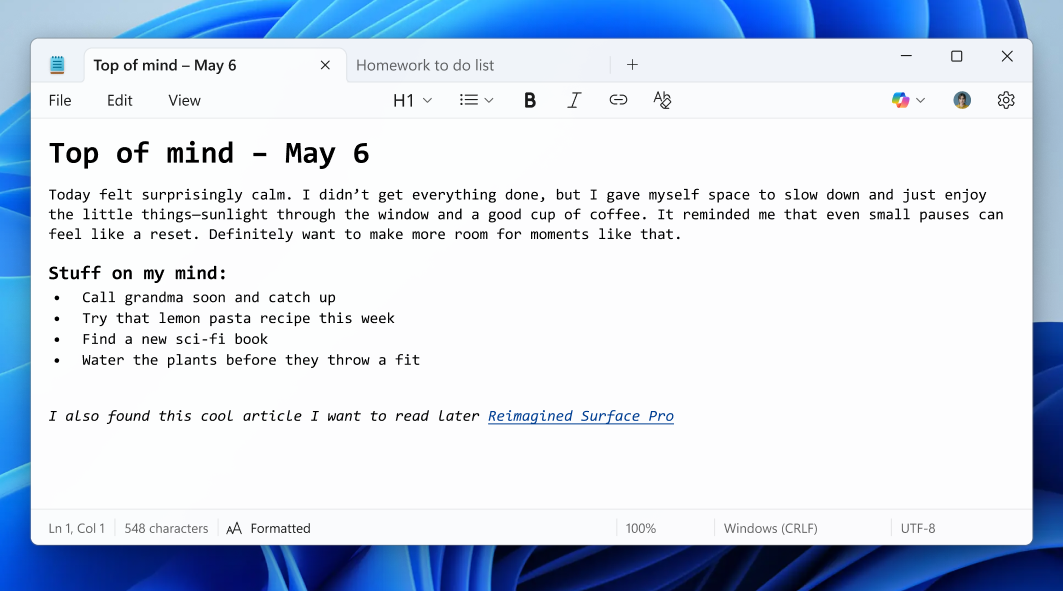 Notepad window open showing formatted content.[/caption] With this update, we are introducing lightweight formatting in Notepad, providing additional flexibility in how you structure content across your files. The experience supports Markdown style input and files for users who prefer to work directly with the lightweight markup language. To get started, use the new formatting toolbar to apply formatting as you type or to selected text, including bold and italic styling, hyperlinks, and support for simple lists and headings. If at any point you want to return to plain text, you can clear all formatting from the formatting toolbar or from the edit menu. You can switch between formatted Markdown and Markdown syntax views in the view menu or by selecting the toggle button in the status bar at the bottom of the window. If you prefer, you can disable support for formatting entirely in app settings. FEEDBACK: Please share your feedback in Feedback Hub (WIN + F) under Apps > Notepad. As always, we love getting feedback from the community and we will be looking out for your thoughts and suggestions on this update! Thanks, Dave Grochocki, Principal Group Product Manager – Windows Inbox Apps
Source: Text Formatting in Notepad begin rolling out to Windows Insiders
Notepad (version 11.2504.50.0)
[caption id="attachment_177924" align="alignnone" width="1063"] Notepad window open showing formatted content.[/caption] With this update, we are introducing lightweight formatting in Notepad, providing additional flexibility in how you structure content across your files. The experience supports Markdown style input and files for users who prefer to work directly with the lightweight markup language. To get started, use the new formatting toolbar to apply formatting as you type or to selected text, including bold and italic styling, hyperlinks, and support for simple lists and headings. If at any point you want to return to plain text, you can clear all formatting from the formatting toolbar or from the edit menu. You can switch between formatted Markdown and Markdown syntax views in the view menu or by selecting the toggle button in the status bar at the bottom of the window. If you prefer, you can disable support for formatting entirely in app settings. FEEDBACK: Please share your feedback in Feedback Hub (WIN + F) under Apps > Notepad. As always, we love getting feedback from the community and we will be looking out for your thoughts and suggestions on this update! Thanks, Dave Grochocki, Principal Group Product Manager – Windows Inbox AppsSource: Text Formatting in Notepad begin rolling out to Windows Insiders


 activity"

