No problemMy bad, apologies

Firefox is sadly just too slow. I'd like to use it, but everytime when I compare it to Chromium based browsers its so slow, especially on mobile.
For me Firefox is fast as Edge. But I've never tried on mobile.
No problemMy bad, apologies
Firefox is sadly just too slow. I'd like to use it, but everytime when I compare it to Chromium based browsers its so slow, especially on mobile.
I tried Firefox mobile yesterday and ran Octane and other benchmarks. On my Galaxy S21 Ultra (enhanced processing not enabled), Chrome scored 21K on Octane, Ff scored 13K. On other benchmarks there was a big difference too...No problem
For me Firefox is fast as Edge. But I've never tried on mobile.

 malwaretips.com
I can recommend "Foobar2000 mobile" from Windows Store.AIMP

check port 53 and 5353 too, its unencrypted dns traffic. (pktmon filter add -p 53, pktmon start --etw -m real-time)Now I'm using NextDNS iIPv4 config with linked IP instead of the native app.
Also blocked port 80 for testing purpose. I can see only port 443 in the connection viewer.
I don't need VPN because it seems everything is encrypted, so public wifi couldn't be a problem.
of course some program like AIMP can't communicate with the update server but I don't care.


I can block additional files like bat, reg, ps1 in syshardener. (I already did it)You have to be careful with BAT, CMD, LNK, and CHM files. They are often used in fileless attacks.
But, you will probably never see such attacks and many of them will be stopped by your current setup on the later stages of the infection chain.
From the usability viewpoint, there can be potential problems with scripts, because the user/system scripts cannot be whitelisted.
It is a very strong setup, almost as strong as tweaked KIS with blocking executables unknown to KSN.I can block additional files like bat, reg, ps1 in syshardener. (I already did it)
LNK, CHM can be blocked by SRP but I don't use it currently.
As you said I can have problems that's why I prefer OSA over syshardener. But either SWH, OSA or syshardener I use I feel much more secure than with any AV suite.
When using SWH and FH you should look from time to time into the Logs created by them.No problem with syshardener but I replaced with SWH, FH, and SRP..
Also I made a copy of the previous setup in the first post.
I'm gonna stick to this setup for the rest of the year. I'm just gonna improve the settings.
Suggestions are welcome!
SWH (Simple Windows Hardening)
Default settings
Firewall Hardening
Added Recommended Rules
Added LOLBin rules
SRP is ON
Default
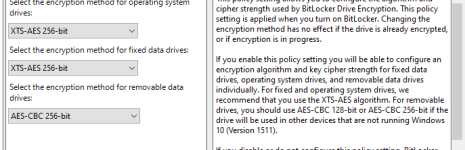
Out of curiosity, is there a special reason you chose CBC instead of XTS, and specifically CBC without the elephant diffuser?
- Cypher strenght -> AES CBC 256
I didn't. Just for the removable media. This is a misspellingOut of curiosity, is there a special reason you chose CBC instead of XTS, and specifically CBC without the elephant diffuser?
My KeePass setup run with key file, stored in UAC protected folder while the KeePass database is on Onedrive and defender ransomware protection is enabled.Removed Enpass (paid) and back to Keepass combined with Windows Hello. No problem with Enpass but I gave another try to Keepass (original) and I prefer the database style view that Keepass provides.
No browser extension because I don't need it and it also reduces the attack surface.
I rarely need to log in to websites because I don't delete cookies.
Currently no keyfile. Also I have plaintext backup (psw protected) saved to multiple locations.
It is not complicated.