Okay, I stand corrected. Not sure why MX describes themselves as middle-weight, though, when they pride themselves on running well on weak computers.What no....https://embeddedinventor.com/lightweight-vs-heavyweight-distros-a-comparison/



Open MalwareTips from your Home Screen or desktop. Follow discussions, find answers and pick up where you left off.
If you cannot find an install option, update your browser or use its bookmark option to keep MalwareTips close.
After installation, open the app and sign in. Enable push notifications in Preferences if you want alerts. On iPhone and iPad, push requires a Home Screen web app and iOS or iPadOS 16.4 or later.
Sign in to manage notificationsInstallation is optional. Your notification settings stay under your control.
 Thread starter
Gandalf_The_Grey
Thread starter
Gandalf_The_Grey
Okay, I stand corrected. Not sure why MX describes themselves as middle-weight, though, when they pride themselves on running well on weak computers.What no....https://embeddedinventor.com/lightweight-vs-heavyweight-distros-a-comparison/


If we talk about Pentium 2, it may be short to install MX Linux.I believe what people refer to weak computers are subjective. The minimum & recommended system requirements might be an ideal case scenario here. MX doesn't work that well on older computers.
Dedoimedio wrote an enthusiastic review about MX 18 working wonderfully on an ancient computer.I believe what people refer to weak computers are subjective. The minimum & recommended system requirements might be an ideal case scenario here. MX doesn't work that well on older computers.
 www.dedoimedo.com
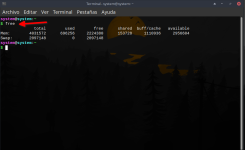
Sometimes I use the "free" command (without the quotes)I must admit that measuring RAM usage on Linux is a tricky business, because there are many different task managers and other tools to do it, and each one gives a different output, which has a lot to do with methodology: whether to count shared RAM, cached RAM usage, etc.
use -h for human readable outputSometimes I use the "free" command (without the quotes)

I don't understand your command.use -h for human readable output

Systemd-shim is used.This is because MX does not use systemd.
IIRC this is what a default Ubuntu (GNOME) install uses on idle (~1.2GB according to htop) but Kubuntu (KDE) uses the same with Brave opened on MT
View attachment 247342
free with the -h argument produces an output in GiBI don't understand your command.
But, free in English works on Debian-based distributions.
-h, --human
Show all output fields automatically scaled to shortest three
digit unit and display the units of print out. Following
units are used.
B = bytes
Ki = kibibyte
Mi = mebibyte
Gi = gibibyte
Ti = tebibyte
Pi = pebibyte

Ubuntu based distros are pretty much straightforward for installing propietary drivers and codecs,GPU drivers!!! And plug & play
ahora te entiendo. = now I understand you.
Thanks for the tip!use -h for human readable output
I would completely disagree...i didn't know linux was worse on battery life. i just presumed that since is ran lighter, it used less juice. the wifi limit is interesting as well!!
Have you ever tried elementayOS or POP_OS?With Windows my non gaming battery life it's 2 hours and 1:40 hours for Linux. Yesterday I tried the Intel only graphics mode on the Nvidia control panel, this actually power offs the dedicated GPU on the next reboot, I squashed more than 3 hours of battery using VAAPI enabled Brave and VirtualBox (running MS Excel) CPU usage was like 26% and 5% with the VM turned off and the temperature was almost cold to touch.
This mode fixed my laptop's battery at the cost of having to enable the GPU and rebooting before playing a game.
I agree... that is why I mentioned POP_OS. They have developed even an open source BIOS software for INTEL CPUs. This OS is maintained by famous System76... which is the Apple of Linux world!On most distros, your discrete graphics will not be used unless you expressly set it to be used. By default, the integrated graphics of the CPU is used, resulting in great battery life and poor graphics performance.
Have you ever tried elementayOS or POP_OS?
And also the kind of apps which you use in your Linux plays a huge role.
On most distros, your discrete graphics will not be used unless you expressly set it to be used. By default, the integrated graphics of the CPU is used, resulting in great battery life and poor graphics performance.
Members who viewed this thread in the last 5 minutes