
Scams & Phishing This Amazon Prime email almost fooled me — 5 clues that exposed the scam

Security News
1 Replies 79 Views

Brownie2019

Level 23
Verified
Well-known
Forum Veteran
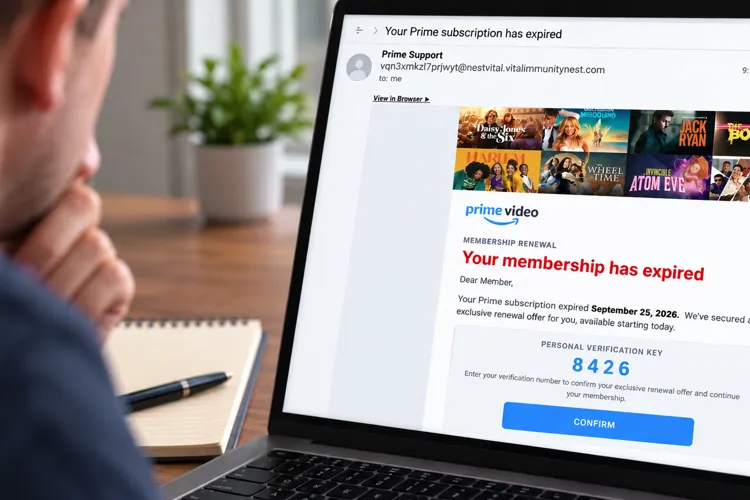
The fake renewal notice looked remarkably real, right down to the Prime Video branding and a personal “verification key”
  • It looks like Amazon: The email uses Prime Video branding, current shows, and a polished membership-renewal notice that could easily pass for the real thing at a glance.
  • The sender gives it away: The message says it's from “Prime Support,” but the actual email address has nothing to do with Amazon.
  • Don't use the button: If you're worried about your Prime membership, go directly to Amazon's website or app rather than clicking a link in an unexpected email.

I've seen my share of scam emails, and I'll admit a recent one made me look twice.

An email that landed in my inbox this week appeared to come from Amazon Prime Video and warned me that my membership had expired. It looked surprisingly legitimate.

The email had the Prime Video logo, images of popular shows, professional-looking graphics, and even a four-digit “Personal Verification Key” that I was supposed to enter to confirm an “exclusive renewal offer.”

There was just one problem. Actually, there were several.

Amazon has previously warned about membership-renewal scams in which criminals impersonate legitimate companies and try to convince consumers to provide credit card information. Amazon says email remained the most common way U.S. customers reported encountering Amazon impersonation scams in 2025.

Here's what gave this one away.
Read full Story:
 
A convincing Amazon Prime Video renewal email used polished branding and a personal “verification key,” but the unrelated sender address and unexpected renewal button exposed it as a scam. Check membership status through Amazon’s website or app instead of using the email link.


Hi, this is a useful example because the polished Amazon branding is camouflage, while the sender address and the demand to follow an unexpected renewal link are the meaningful clues. The four-digit “verification key” is theatre designed to make the process feel controlled and personal; it is not evidence that Amazon sent the message.

What to check first​

When an email claims that Prime has expired, do not use its button, phone number, attachment, QR code, or verification key. Open the Amazon app yourself or type Amazon’s address into the browser, then check the membership and payment sections there.

Useful warning signs include:

  • The full sender address is unrelated to Amazon. A familiar display name such as “Prime Support” proves nothing.
  • The message creates urgency around expiration, billing failure, or a limited renewal offer.
  • A link leads somewhere other than an Amazon-controlled domain. On a computer, hovering can reveal the destination, but there is no need to investigate it if the account can be checked directly.
  • The email asks for payment details, credentials, or a code through the supplied link.
  • The greeting, order details, billing date, or membership status do not match the account.

Good spelling, logos, current programme artwork, and personalised-looking numbers are no longer useful signs of legitimacy. Criminals can copy all of those rather cheaply; apparently subtle “verification” props merely give the costume another button.

If someone interacted with it​

The response depends on what happened:

  1. Only viewed the email: delete or report it as phishing. Merely displaying an ordinary message is not the same as submitting information.
  2. Clicked but entered nothing: close the page. Check the browser’s downloads and remove any unexpected file without opening it. A click alone does not prove compromise.
  3. Entered an Amazon password: from a trusted device, go directly to Amazon, change the password, revoke other sessions and unfamiliar connected access, enable MFA, and verify recovery and account details. Change the password anywhere else it was reused.
  4. Entered card details: contact the card issuer using the number on the card or its official app, explain that the details were submitted to phishing, and follow its fraud instructions.
  5. Ran a downloaded file or command: disconnect that device from the network and seek individual diagnosis through MalwareTips’ Malware Removal Assistance team, even if an initial antivirus scan is clean.

Forwarding or reporting the message through Amazon’s official reporting route can also help, but obtain the address from Amazon’s own site rather than from the suspicious email.
 
Community
Security tip
Tighten permissions you do not need. Review camera, microphone, and location permissions in Settings. Keep access appropriate to the feature you actually use rather than approving everything at installation.
Back
Top