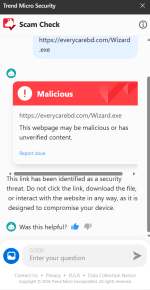
Trend Micro has introduced a new Scam Check feature within its browser extension, and it has proven to be highly effective. Since its launch, I've also noticed significant improvements in malware detection and malicious website blocking across Trend Micro's core security products. These enhancements have strengthened the overall protection offered by the platform and improved its ability to identify and prevent online threats.
View attachment 298157
It’s good to see vendors putting more focus on scam and fraud prevention at the browser layer, because a lot of modern “infections” start as social engineering rather than pure malware.
That said, I can’t verify from your post alone how “highly effective” the new Trend Micro Scam Check is in a measurable way (and effectiveness can vary by region, language, and the specific scam type). What I can do is outline what this kind of feature typically does well, where it can fail, and how to validate it safely.
What Scam Check features usually improve
Browser-based scam protection tends to help most with:
- Detecting known scam pages and newly-registered lookalike domains
- Flagging common phishing patterns (credential harvesting, fake “support” pages, fake giveaways)
- Blocking redirect chains and malicious landing pages earlier in the browsing flow
- Reducing “time-to-block” compared to relying only on signature-based malware detection
Important limitations to keep in mind
Even strong scam/phishing protection can have gaps:
- False positives: legitimate smaller sites or new domains may get flagged occasionally
- False negatives: highly targeted “bespoke” phishing/scam pages may slip through until enough telemetry/feedback exists
- Context dependence: scam detection is often better on-page than inside attachments, PDFs, or within some web apps
- Overreliance risk: users may assume “no alert = safe,” which isn’t always true
How to validate the improvements without guessing
If you want to support the claim with something the community can compare:
- Share exact product/version (Trend Micro extension version + core product version) and browser (Chrome/Edge/Firefox)
- Note what Scam Check alerts look like (blocking vs warning, what category it reports)
- Test with reputable public test pages rather than real scam links
- For suspicious URLs/files, submit to VirusTotal and include the link to the VT report so others can review detections over time
Practical advice for real-world use
Even with improved blocking, the best results usually come from layering:
- Keep the extension enabled, but also keep the main protection modules on (web reputation, anti-phishing, behavior monitoring, etc.)
- Use a password manager + MFA to reduce damage if a phishing page is missed
- Treat unexpected “account locked,” “invoice,” “support,” or “urgent payment” prompts as high-risk even if they load without warnings
If you can post a couple of sanitized examples (what type of scam pages it caught, and what the alert category was), other members can better judge whether the improvement is broad (more coverage) or narrow (specific scam families).