Solved Trojan.BitcoinMiner

Status
Not open for further replies.

AntonioPas

New Member
Thread author
Apr 25, 2015
8
0
3
35
Hello,
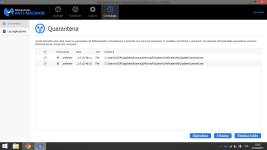
MalwareBytes has detected two malware:

Trojan.BitCoinMiner, C:\Users\ACER\AppData\Roaming\Microsoft\SystemCertificates\My\Updater\svchost.exe
Trojan.BitcoinMiner, C:\Users\ACER\AppData\Roaming\Microsoft\SystemCertificates\My\Updater\jusched.exe

What should I do? (Sorry for my english)
 
Click the Apply Actions button. You will now be prompted to reboot. Click Yes.
 
  • Like
Reactions: AntonioPas
There isn't any Apply Actions button, I've clicked on Remove All and reeboted manually but the problem persists.
 

Attachments

  • MWB.PNG
    MWB.PNG
    69 KB · Views: 47
Download
51a5f31352b88-icon_MBAR.png
Malwarebytes Anti-Rootkit to your desktop.
  • Double-click the icon to start the tool.
  • It will ask you where to extract it, then it will start.
  • Warning! Malwarebytes Anti-Rootkit needs to be run from an account with administrator rights.
  • Click in the introduction screen "next" to continue.
  • Click in the following screen "Update" to obtain the latest malware definitions.
  • Once the update is complete select "Next" and click "Scan".
  • When the scan is finished and no malware has been found select "Exit".
  • If malware was detected, make sure to check all the items and click "Cleanup". Reboot your computer.
  • Open the MBAR folder and paste the content of the following files in your next reply:
    • "mbar-log-{date} (xx-xx-xx).txt"
    • "system-log.txt"
 
  • Like
Reactions: AntonioPas
ESETOnline.png
Scan with ESET Online Scanner

This step can only be done using Internet Explorer, Google Chrome or Mozilla Firefox.
Temporary disable your AntiVirus and AntiSpyware protection - instructions here.
Please visit ESET Online Scanner website.
Click there Run ESET Online Scanner.

If using Internet Explorer:
  • Accept the Terms of Use and click Start.
  • Allow the running of add-on.
If using Mozilla Firefox or Google Chrome:
  • Download esetsmartinstaller_enu.exe that you'll be given link to.
  • Double click esetsmartinstaller_enu.exe.
  • Allow the Terms of Use and click Start.
To perform the scan:
  • Make sure that Remove found threats is unchecked.
  • Scan archives is checked.
  • In Advanced Settings: Scan for potentially unwanted applications, Scan for potentially unsafe applications and Enable Anti-Stealth technology are checked.
  • Click Start
  • The program will begin to download it's virus database. The speed may vary depending on your Internet connection.
  • When completed, the program will begin to scan. This may take several hours. Please, be patient.
  • Do not do anything on your machine as it may interrupt the scan.
  • When the scan is done, click Finish.
  • A logfile will be created at C:\Program Files (x86)\ESET\ESET Online Scanner. Open it using Notepad.
Please include this logfile in your next reply.Don't forget to re-enable previously switched-off protection software!
 
  • Like
Reactions: AntonioPas
ESET Online Scan

ESETSmartInstaller@High as downloader log:
all ok
# product=EOS
# version=8
# OnlineScannerApp.exe=1.0.0.1
# OnlineScanner.ocx=1.0.0.7623
# api_version=3.0.2
# EOSSerial=9d4c7cf82a71124f98f2428a15004ad8
# engine=23561
# end=finished
# remove_checked=false
# archives_checked=true
# unwanted_checked=true
# unsafe_checked=true
# antistealth_checked=true
# utc_time=2015-04-25 07:23:57
# local_time=2015-04-25 09:23:57 (+0100, ora legale Europa occidentale)
# country="Italy"
# lang=1033
# osver=6.2.9200 NT
# compatibility_mode_1=''
# compatibility_mode=5893 16776573 100 94 31751 7072229 0 0
# scanned=621963
# found=25
# cleaned=0
# scan_time=18653
sh=FA279C68EDE85C0F34C92DFD172A605A7554C317 ft=1 fh=90dbe5962eef9675 vn="a variant of Win32/BitCoinMiner.BS potentially unsafe application" ac=I fn="C:\Users\ACER\AppData\Local\Microsoft\Windows\INetCache\IE\MEDQ2DRH\jusched[1].exe"
sh=A346A6B146567F6B831DDC3231DC9C5A148CE9EF ft=1 fh=c742a78dc05df8ed vn="multiple threats" ac=I fn="C:\Users\ACER\AppData\Local\Microsoft\Windows\INetCache\IE\MEDQ2DRH\SearchIndexer[1].exe"
sh=880D809B13BA283B2CAD14E4CD025EC7CCE09CCF ft=1 fh=01841900280a2ebf vn="Win32/Autoit.NPY trojan" ac=I fn="C:\Users\ACER\AppData\Local\Microsoft\Windows\INetCache\IE\VZIRSRZJ\ssl[1].exe"
sh=370E3F682102C7EF7A1613A39DB5B0870307B036 ft=1 fh=f9edc87215a0ee48 vn="a variant of Win32/BitCoinMiner.BY potentially unsafe application" ac=I fn="C:\Users\ACER\AppData\Local\Microsoft\Windows\INetCache\IE\VZIRSRZJ\svchost[1].exe"
sh=A346A6B146567F6B831DDC3231DC9C5A148CE9EF ft=1 fh=c742a78dc05df8ed vn="multiple threats" ac=I fn="C:\Users\ACER\AppData\Roaming\Microsoft\SystemCertificates\My\Updater\SearchIndexer.exe"
sh=880D809B13BA283B2CAD14E4CD025EC7CCE09CCF ft=1 fh=01841900280a2ebf vn="Win32/Autoit.NPY trojan" ac=I fn="C:\Users\ACER\AppData\Roaming\Microsoft\SystemCertificates\My\Updater\ssl.exe"
sh=8CC2C7F495FB3B94F60088D49D6CA9DEE17CD73A ft=1 fh=3ecac130108804f9 vn="Win32/TrojanDownloader.Autoit.NLZ trojan" ac=I fn="C:\Users\ACER\AppData\Roaming\Microsoft\SystemCertificates\My\Updater\updater.exe"
sh=A1E817237A3769BCEA96D2C7030605AC340EB5C2 ft=1 fh=62e7be1cf54f7e8c vn="a variant of Win32/Bundled.Toolbar.Ask.G potentially unsafe application" ac=I fn="C:\Users\ACER\Desktop\Programmi\FreeHideIP-3-8-7-2-Setup.exe"
sh=6890A4FCDEBE79286D246C1EF179E93F9A162206 ft=1 fh=c59b5e7515eb22e4 vn="a variant of MSIL/RiskWare.HackAV.C application" ac=I fn="C:\Users\ACER\Desktop\Programmi\New folder\LBA_2.0BETA5.exe"
sh=95515E5CD54F8D3B375FAFB34E53C0C1D2E7C344 ft=1 fh=00a7bfbc17a0357b vn="Win32/Bundled.Toolbar.Google.D potentially unsafe application" ac=I fn="C:\Users\ACER\Downloads\ccsetup504.exe"
sh=7D4887117E5FAEC4FDEA1410DBE924027F532352 ft=1 fh=3279bed39d0d4e4e vn="a variant of Win32/HackTool.Patcher.AD potentially unsafe application" ac=I fn="C:\Users\ACER\Downloads\Jdownloader\Nero 2014 Platinum 15 0 02200 Final (Patch Kindly) [ChingLiu]\Nero 2014 Platinum 15.0.02200 Final (Patch Kindly) [ChingLiu]\Patch Kindly\nero.14.platinum.v15.0.02200_patch.exe"
sh=826E9B3FC1626171151917513AA3B13A0534943D ft=0 fh=0000000000000000 vn="Win32/TrojanDownloader.Autoit.NLZ trojan" ac=I fn="C:\Users\ACER\Downloads\Jdownloader\[PC] Adobe Photoshop CS6 13 0 1 Final Multilanguage Eng Fra Esp Ita (cracked dll) [ChingLiu]\[PC] Adobe Photoshop CS6 13.0.1 Final Multilanguage Eng Fra Esp Ita (cracked dll) [ChingLiu].zip"
sh=4B4A4011537CCA817795DB11A99C4F9807303D51 ft=1 fh=ae08d5900fc18963 vn="a variant of Win32/HackTool.Crack.CX potentially unsafe application" ac=I fn="C:\Users\ACER\Downloads\uTorrent\3DMGAME-Football.Manager.2015.v15.1.3.Cracked-3DM\Football Manager 2015\3dm_ceg.dll"
sh=5A4ADCA5CEFDEACCC9C4D2D197213E606014FDB4 ft=1 fh=63ae2f886e7f5dcc vn="Win32/Bundled.Toolbar.Google.D potentially unsafe application" ac=I fn="C:\Users\Federica\Downloads\ccsetup419.exe"
sh=52419319E8B39F80D7441E00D000F0D8685EBD57 ft=1 fh=a0cb900ad79e50b3 vn="MSIL/HackTool.Crack.E potentially unsafe application" ac=I fn="C:\Windows.old\$Recycle.Bin\S-1-5-21-3981048700-1922478347-923120931-1001\$RS1HWRM.exe"
sh=C24089D407E6280B79BEC86532E9DE0118E4DE71 ft=1 fh=c71c0011cedfdcb5 vn="Win32/Somoto.A potentially unwanted application" ac=I fn="C:\Windows.old\Users\ACER\AppData\Local\Bundled software uninstaller\biclient.exe"
sh=880D809B13BA283B2CAD14E4CD025EC7CCE09CCF ft=1 fh=01841900280a2ebf vn="Win32/Autoit.NPY trojan" ac=I fn="C:\Windows.old\Users\ACER\AppData\Local\Microsoft\Windows\INetCache\IE\6U6L40N9\ssl[1].exe"
sh=370E3F682102C7EF7A1613A39DB5B0870307B036 ft=1 fh=f9edc87215a0ee48 vn="a variant of Win32/BitCoinMiner.BY potentially unsafe application" ac=I fn="C:\Windows.old\Users\ACER\AppData\Local\Microsoft\Windows\INetCache\IE\6U6L40N9\svchost[1].exe"
sh=A346A6B146567F6B831DDC3231DC9C5A148CE9EF ft=1 fh=c742a78dc05df8ed vn="multiple threats" ac=I fn="C:\Windows.old\Users\ACER\AppData\Local\Microsoft\Windows\INetCache\IE\G6U9B7B5\SearchIndexer[1].exe"
sh=FA279C68EDE85C0F34C92DFD172A605A7554C317 ft=1 fh=90dbe5962eef9675 vn="a variant of Win32/BitCoinMiner.BS potentially unsafe application" ac=I fn="C:\Windows.old\Users\ACER\AppData\Local\Microsoft\Windows\INetCache\IE\TNKNVSP8\jusched[1].exe"
sh=FA279C68EDE85C0F34C92DFD172A605A7554C317 ft=1 fh=90dbe5962eef9675 vn="a variant of Win32/BitCoinMiner.BS potentially unsafe application" ac=I fn="C:\Windows.old\Users\ACER\AppData\Roaming\Microsoft\SystemCertificates\My\Updater\jusched.exe"
sh=A346A6B146567F6B831DDC3231DC9C5A148CE9EF ft=1 fh=c742a78dc05df8ed vn="multiple threats" ac=I fn="C:\Windows.old\Users\ACER\AppData\Roaming\Microsoft\SystemCertificates\My\Updater\SearchIndexer.exe"
sh=880D809B13BA283B2CAD14E4CD025EC7CCE09CCF ft=1 fh=01841900280a2ebf vn="Win32/Autoit.NPY trojan" ac=I fn="C:\Windows.old\Users\ACER\AppData\Roaming\Microsoft\SystemCertificates\My\Updater\ssl.exe"
sh=370E3F682102C7EF7A1613A39DB5B0870307B036 ft=1 fh=f9edc87215a0ee48 vn="a variant of Win32/BitCoinMiner.BY potentially unsafe application" ac=I fn="C:\Windows.old\Users\ACER\AppData\Roaming\Microsoft\SystemCertificates\My\Updater\svchost.exe"
sh=310CBBDCCC6AB2961AC1AD61C57D048230A8382A ft=1 fh=1c329f86b4f0f82a vn="Win32/TrojanDownloader.Autoit.NLZ trojan" ac=I fn="C:\Windows.old\Users\ACER\AppData\Roaming\Microsoft\SystemCertificates\My\Updater\updater.exe"
 
Done.
Malwarebytes Anti-Malware Scan:

Processi: 1
Trojan.BitcoinMiner, C:\Users\ACER\AppData\Roaming\Microsoft\SystemCertificates\My\Updater\jusched.exe, 6072, Elimina al riavvio, [804dbcb47f0ba393f6909dce1ce99e62]
Moduli: 1
Trojan.Miner, C:\Users\ACER\AppData\Roaming\Microsoft\SystemCertificates\My\Updater\libcurl-4.dll, Elimina al riavvio, [c607b0c00189b87e9fc101070201ab55]
File: 2
Trojan.BitcoinMiner, C:\Users\ACER\AppData\Roaming\Microsoft\SystemCertificates\My\Updater\jusched.exe, Elimina al riavvio, [804dbcb47f0ba393f6909dce1ce99e62],
Trojan.Miner, C:\Users\ACER\AppData\Roaming\Microsoft\SystemCertificates\My\Updater\libcurl-4.dll, Elimina al riavvio, [c607b0c00189b87e9fc101070201ab55]

I've removed them.
 
Uninstall Eset online scanner.

Download DelFix by Xplode and save it to your desktop.
  • Run the tool by right click on the
    51a5ce45263de-delfix.png
    icon and Run as administrator option.
  • Make sure that these ones are checked:
    • Remove disinfection tools
    • Purge system restore
    • Reset system settings
  • Push Run and wait until the tool completes his work.
  • All tools we used should be gone. Tool will create an report for you (C:\DelFix.txt)
The tool will also record healthy state of registry and make a backup using ERUNT program in %windir%\ERUNT\DelFix
Tool deletes old system restore points and create a fresh system restore point after cleaning.
 
  • Like
Reactions: AntonioPas
Status
Not open for further replies.