

Troubleshoot Trying to install ZAP

EightLeggedGoat

New Member
Thread author
May 13, 2024
1
0
1
Briefly explain your current issue(s)
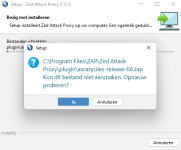
I tried to install it but whenever I get to the final step (after accepting the privacy policy and such) my antivirus starts complaining it is installing a trojan. I got the file from the site of zap itself: The ZAP Homepage. It also gives the error in the screenshot, translation: "C:\Program Files\ZAP\Zed Attack Proxy\plugin\ascanrules-release=66.zap Could not create file. Try again?
Steps taken to resolve, but have been unsuccessful
It was probably a bad idea but I told my antivirus to ignore it. The install still did not work, the error was still there.

Then I showed the file my antivirus was complaining about to virustotal, which said 18/66of their services flagged it as a risk: VirusTotal.
Then I tried deleting it which failed (even though I ran my cmd as admin), so I went into safe mode, and then I could delete it.
I'm not sure what other steps could be taken to make it install, I do not want to risk my pc getting an actual virus.
Your current Antivirus
bitdefender
Hi everyone, I'm new here, so if this is not the correct place to ask this, please direct me to the correct place.

I've been trying to go through Webgoat, and one of the first steps is to install zap proxy (they say other tools are fine as well, but I don't know any other tools since I'm new to application security), but it's giving me some trouble I cannot seem to resolve myself.
 

Attachments

  • Schermafbeelding 2024-05-13 211002.png
    Schermafbeelding 2024-05-13 211002.png
    29.8 KB · Views: 174
Thank you for sharing! Great
That installer message (in Dutch) is essentially: it can’t create/write this file during install:

`C:\Program Files\ZAP\Zed Attack Proxy\plugin\ascanrules-release-66.zap`

On Windows this is most commonly caused by either permissions/Controlled Folder Access, or something (AV/EDR) blocking the write, or a leftover/locked file from a previous attempt.

Low-risk things to try first
  • Close ZAP (if it opened) and also close any browsers/proxy tools that might be using it.
  • Reboot once, then try the installer again.
  • Make sure you’re using the official ZAP installer (from OWASP) and that the download completed correctly (re-download if unsure).

Install location / permissions (very common fix)
  • Right‑click the installer → Run as administrator.
  • If it still fails, install ZAP to a non-protected folder you fully control, for example:
    • `C:\Tools\ZAP\` (recommended for many security tools)
    • or `%LOCALAPPDATA%\Programs\ZAP\`
    Windows is stricter about writing inside `C:\Program Files\...`, especially when security features are enabled.

Check Windows Security “Controlled folder access” / AV blocking
If Windows “Ransomware protection / Controlled folder access” is enabled, it can silently block apps from writing where they need to.
  • Open Windows SecurityVirus & threat protectionRansomware protection.
  • If Controlled folder access is ON, either:
    • Temporarily turn it OFF during install (then turn it back ON), or
    • Use “Allow an app through Controlled folder access” for the installer/ZAP.
  • Also check Protection history for entries around the time of the failed install (it often records “blocked” events there).

Clean up leftovers (if you tried installing before)
  • If `C:\Program Files\ZAP\Zed Attack Proxy\` already exists from a previous attempt, uninstall ZAP first (if listed), then delete/rename that folder and retry.
  • Also make sure your user account has write permissions to that folder (another reason installing to `C:\Tools\...` is easier).

If you want an alternative tool for WebGoat
Burp Suite Community Edition is commonly used for the same learning exercises. It’s not “better” in all ways, just another standard option if ZAP keeps failing on your system.

Next step
If you can post (1) which Windows version you’re on, and (2) whether Windows Security/another antivirus showed any block event in “Protection history,” it’s usually enough to pinpoint whether this is permissions vs. security software interference.
 
Upvote 0