


Advanced Security TuxTalk vs. The Malware Multiverse - Setup 2025

Last updated
Mar 10, 2025
How it's used?
For home and private use
Operating system
Windows 11
Other operating system
None
On-device encryption
BitLocker Device Encryption for Windows
Log-in security
    • Biometrics (Windows Hello PIN, TouchID, Face, Iris, Fingerprint)
Security updates
Allow security updates and latest features
Update channels
Allow stable updates only
User Access Control
Always notify
Smart App Control
On
Network firewall
Enabled
About WiFi router
Ziggo Sagemcom
Real-time security
AVAST Ultimate
Firewall security
Other - Internet Security (3rd-party)
About custom security
None
Periodic malware scanners
NPE
Malware sample testing
I do not participate in malware testing
Environment for malware testing
None
Browser(s) and extensions
Enpass
Ghostery
Secure DNS
Cloudflare
Desktop VPN
NORDVPN
Password manager
Enpass
Maintenance tools
None
File and Photo backup
Google Photo's
Onedrive
iCloud
Subscriptions
    • Apple iCloud+ 2TB
    • Apple iCloud+ 50GB
    • Google One Premium 2TB
    • Microsoft 365 Family 6TB
System recovery
Manual Backups and recovery, i do not use Software for this
Risk factors
    • Browsing to popular websites
    • Working from home
    • Making audio/video calls
    • Opening email attachments
    • Buying from online stores, entering banks card details
    • Logging into my bank account
    • Downloading software and files from reputable sites
    • Downloading software and files from unknown / untrusted / shady sites
Computer specs
Screenshot-2025-03-15-111329.png
Notable changes
New Laptop
What I'm looking for?

Looking for medium feedback.

I never experience any FP, and I’m on aggressive mode in TM

So far browsing speed has not been affected, it's about the same as with F-Secure. I used the Chrome link to install the Toolbar on Brave. It does its thing as far as site security (image below) but since it loads Pay Guard in a isolated window, it opens in Chrome, which I get, and understand.
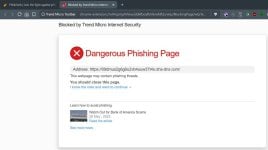
blocked TM.jpg

Nice little novelty, is being able to change the background :) I just wish the app would load in full screen view, or at least being able to expand the window by dragging the edges or corners. It does have a fair amount of settings, not to many as to be confusing, as maybe can be the case with Eset.
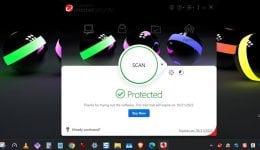
background.jpg

I could not get the Pay Guard desktop shortcut to work, it keeps on giving me this notice, even though I set Edge and then Chrome as the default browser, including all the options in the Windows default settings? But again, it does work when I enter a banking site into the browser address bar :)
payguard2.jpg


edit:sp
 
Last edited:
The Proton free version was stuck connecting overseas even if I did a restart and clicked to use the closest server. IMO, it was a little bloated,

Before I go through all of this, if I remember correctly, and from the last AV-Comparatives test, they, TM have a lot of FP's, F-Secure has gotten way better in that regard. Is it something to think twice about?
I had some issue with Proton von (paid) a few weeks it was "stuck" on older version, IIRC I uninstalled it / DL & installed after disabling an ASR in DefenderUI and it installed ok and updated ok, very fast, even with 2 hops core servers. In practice I see ZERO false positives with TM
 
So far browsing speed has not been affected, it's about the same as with F-Secure. I used the Chrome link to install the Toolbar on Brave. It does its thing as far as site security (image below) but since it loads Pay Guard in a isolated window, it opens in Chrome, which I get, and understand.
View attachment 291437

Nice little novelty, is being able to change the background :) I just wish the app would load in full screen view, or at least being able to expand the window by dragging the edges or corners. It does have a fair amount of settings, not to many as to be confusing, as maybe can be the case with Eset.
View attachment 291438

I could not get the Pay Guard desktop shortcut to work, it keeps on giving me this notice, even though I set Edge and then Chrome as the default browser, including all the options in the Windows default settings? But again, it does work when I enter a banking site into the browser address bar :)
View attachment 291441

edit:sp
I never use the shortcut for Banking. Basically i disabled this function complete, since it does not recognize my Dutch bank at all.

Edit, Just tested when i press the Banking Shortcut i get this

1759296163341.png

My default browser is Chrome, maybe when you set Chrome or Edge as Default it works.
 
Last edited:
During my initial tests with Trend Micro a few weeks ago, the Pay Guard browser never opened automatically, even though I specified my bank's website. After reinstalling, I specified my bank's website again when configuring Pay Guard, and now it opens automatically when I select the site. I use Firefox.
 
Alright folks, gather 'round for another episode of TuxTalk’s Anti-Malware Adventures™.


After a lovely stint with Trend Micro (seriously, it’s like the cozy blanket of cybersecurity – warm, reliable, and oddly comforting), I’ve decided to switch things up again. That’s right: Norton360 Premium is back in my life, and this time, it’s not the scapegoat for my network hiccups. Turns out Norton was just chilling, minding its own business while I was pointing fingers. My bad, Norton. 😅


To make things even more exciting, I’ve teamed it up with Mullvad VPN – because nothing says “I take my privacy seriously” like a VPN that gives you a random account number and zero nonsense. I feel like a digital ninja. 🥷


Why the switch? Because I’m a cybersecurity connoisseur. I test anti-malware like some people test wine. Bitdefender, Kaspersky, ESET – I’ve sipped them all. But today, Norton and Mullvad are my pairing of choice. 🍷🛡️


So here I am, cruising the internet with my new setup, ready to fight off malware like it’s a boss battle. Will this be the final form of my security stack? Probably not. But for now, it’s TuxTalk vs. The Malware Multiverse, and Norton’s got my back.
 
Alright folks, gather 'round for another episode of TuxTalk’s Anti-Malware Adventures™.


After a lovely stint with Trend Micro (seriously, it’s like the cozy blanket of cybersecurity – warm, reliable, and oddly comforting), I’ve decided to switch things up again. That’s right: Norton360 Premium is back in my life, and this time, it’s not the scapegoat for my network hiccups. Turns out Norton was just chilling, minding its own business while I was pointing fingers. My bad, Norton. 😅


To make things even more exciting, I’ve teamed it up with Mullvad VPN – because nothing says “I take my privacy seriously” like a VPN that gives you a random account number and zero nonsense. I feel like a digital ninja. 🥷


Why the switch? Because I’m a cybersecurity connoisseur. I test anti-malware like some people test wine. Bitdefender, Kaspersky, ESET – I’ve sipped them all. But today, Norton and Mullvad are my pairing of choice. 🍷🛡️


So here I am, cruising the internet with my new setup, ready to fight off malware like it’s a boss battle. Will this be the final form of my security stack? Probably not. But for now, it’s TuxTalk vs. The Malware Multiverse, and Norton’s got my back.

I'm sure with the right treatment & with support you may be able to go back into society again, albeit with help & one stage at a time :love::love::love::love:
 
🔥🚨 ALERT: I’ve made the ultimate decision! 💻✨ Avast Ultimate is now the KING of my laptop kingdom 👑. Smooth as silk 🧵, fast as lightning ⚡—I swear my PC just started singing opera 🎶 because there’s ZERO lag! Meanwhile… poor ESET 🪦 got kicked out like a bad roommate. Why? Those HIPS rules were like a jealous partner 🤯—blocking my apps, causing drama, and giving me headaches 🤕. And without HIPS? Just a plain AV wearing a cheap disguise 🎭. Avast walked in like: ‘Don’t worry fam, I got you!’ 💪🔥 So yeah… Avast Ultimate forever ❤️🚀 #NoLagLife #ByeHIPS #AvastFTW”
 
🔥🚨 ALERT: I’ve made the ultimate decision! 💻✨ Avast Ultimate is now the KING of my laptop kingdom 👑. Smooth as silk 🧵, fast as lightning ⚡—I swear my PC just started singing opera 🎶 because there’s ZERO lag! Meanwhile… poor ESET 🪦 got kicked out like a bad roommate. Why? Those HIPS rules were like a jealous partner 🤯—blocking my apps, causing drama, and giving me headaches 🤕. And without HIPS? Just a plain AV wearing a cheap disguise 🎭. Avast walked in like: ‘Don’t worry fam, I got you!’ 💪🔥 So yeah… Avast Ultimate forever ❤️🚀 #NoLagLife #ByeHIPS #AvastFTW”
I suffer the same headache with WDAC.

I call default-deny security the "smartless" solution; they allow only what they know to be good, so they can block non-harmful files just for being alien to.

On the contrary' the "smart" solutions should pick only what they know to be bad, again they can allow harmful files just for being alien to.

To fill the gap of each other, it is wise to combine both.
 
  • Like
Reactions: Miravi and TuxTalk
After a lovely stint with Trend Micro (seriously, it’s like the cozy blanket of cybersecurity – warm, reliable, and oddly comforting), I’ve decided to switch things up again. That’s right: Norton360 Premium is back in my life, and this time, it’s not the scapegoat for my network hiccups. Turns out Norton was just chilling, minding its own business while I was pointing fingers. My bad, Norton. 😅
But you mentioned Norton here?

So it was Linux > Trend Micro > Norton 360 premium > Eset > Avast

Question: will your love for Avast last until Carnival (15th of februari 2026)?
:)
 
I call default-deny security the "smartless" solution; they allow only what they know to be good, so they can block non-harmful files just for being alien to.
What a AV vendor labels as good may not be good for you. For example 'remote access' software which allows remote access back to your PC from a cafe. If you deliberately installed it then it is good. But some hacker installed it, then it is bad. It is better that you be the judge. So default deny is a sound security policy.
 
Last edited:
What a AV vendor labels as good may not be good for you. For example 'remote access' software which allows remote access back to your PC from a cafe. If you deliberately installed it then it is good. But some hacker installed it, then it is bad. It is better that you be the judge. So default deny is a sound security policy.
AV is a blacklisting tool; all is good, except which is known as bad.
App control is a whitelisting tool; all is bad, except which is known as good.
 
  • Like
Reactions: Victor M
What a AV vendor labels as good may not be good for you. For example 'remote access' software which allows remote access back to your PC from a cafe. If you deliberately installed it then it is good. But some hacker installed it, then it is bad. It is better that you be the judge. So default deny is a sound security policy.
It seems SecureAge CatchPulse offers usable default-deny for home users. It has "application control" and you can turn off trust based on digital signature which reminds me of Kaspersky's Application Control.
 
  • Like
Reactions: Behold Eck