


Nothing says incompetency like saving your passwords for admin and/or privileged accounts in an unencrypted Word or Excel file, which everyone can steal and open without any problems.
This is the finding of a recent survey of 750 IT security engineers carried out by CyberArk, that has discovered, once again, weak security protocols deployed at companies across the world.
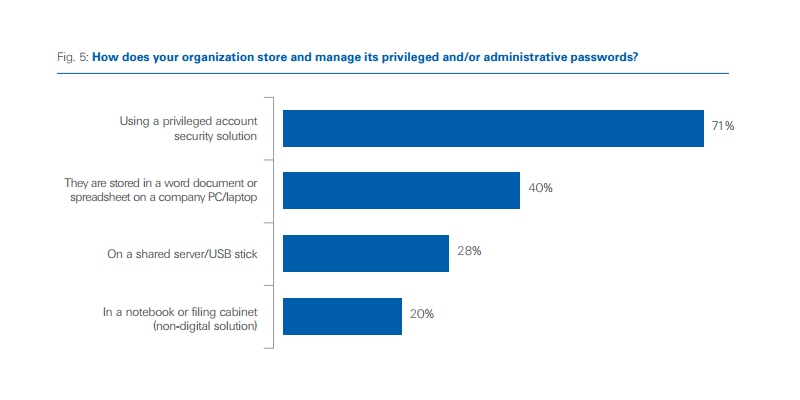
The survey has uncovered that 40 percent of organizations store privileged and/or admin passwords in a Word document or spreadsheet on a company PC or laptop, and 28 percent use a shared server or USB stick.
Encryption is paramount
The problem is not where sysadmins store this data, or in what type of file, but if encryption protects this information. A sysadmin could save passwords in a text file called all-my-admin-passwords.txt and place the file on his desktop, as long as the file is encrypted and easy access to the data is prevented.
Furthermore, malware, such as remote access trojans (RATs), is known to carry out mass scans of entire compromised computers, looking most often for files Office files. Storing passwords in such a manner is downright insane and looking for trouble.
CyberArk's survey also reveals that 71 percent of respondents also store privileged account information in dedicated security software. This means that many of these 750 sysadmins are using Word files as alternatives to more secure, dedicated solutions, probably because Word files are easier to carry around and access, defeating the purpose of deploying a dedicated privileged account security solution in the first place.
Read more: http://news.softpedia.com/news/two-...re-admin-passwords-in-word-files-508628.shtml
This is the finding of a recent survey of 750 IT security engineers carried out by CyberArk, that has discovered, once again, weak security protocols deployed at companies across the world.
The survey has uncovered that 40 percent of organizations store privileged and/or admin passwords in a Word document or spreadsheet on a company PC or laptop, and 28 percent use a shared server or USB stick.
Encryption is paramount
The problem is not where sysadmins store this data, or in what type of file, but if encryption protects this information. A sysadmin could save passwords in a text file called all-my-admin-passwords.txt and place the file on his desktop, as long as the file is encrypted and easy access to the data is prevented.
Furthermore, malware, such as remote access trojans (RATs), is known to carry out mass scans of entire compromised computers, looking most often for files Office files. Storing passwords in such a manner is downright insane and looking for trouble.
CyberArk's survey also reveals that 71 percent of respondents also store privileged account information in dedicated security software. This means that many of these 750 sysadmins are using Word files as alternatives to more secure, dedicated solutions, probably because Word files are easier to carry around and access, defeating the purpose of deploying a dedicated privileged account security solution in the first place.
Read more: http://news.softpedia.com/news/two-...re-admin-passwords-in-word-files-508628.shtml


