Comparison between browser extensions
Test 29/12
Q&A - [Updated 29/12/2018] Browser extension comparison: Malwares and Phishings
Test 24/11
Q&A - [Updated 24/11/2018] Browser extension comparison: Malwares and Phishings
Test 12/11
Q&A - [Updated 12/11/2018] Browser extension comparison: Malwares and Phishings
Test 7/11
Q&A - [Updated 7/11/2018] Browser extension comparison: Malwares and Phishings
Test 6/9
Q&A - [Updated 3/9/2018] Browser extension comparison: Malwares and Phishings
Test 3/9
Q&A - [Updated 3/9/2018] Browser extension comparison: Malwares and Phishings
Test 2/9
Q&A - [Updated 25/7/2018] Browser extension comparison: Malwares and Phishings
Test, quick 1/9
Q&A - [Updated 25/7/2018] Browser extension comparison: Malwares and Phishings
Fun test 25/7/2018
Q&A - [Updated 24/7/2018] Browser extension comparison: Malwares and Phishings
Updated 24/7/2018 (most comprehensive, as possible)
Q&A - [Updated 24/7/2018] Browser extension comparison: Malwares and Phishings
Updated 19/7/2018
Q&A - [Updated 10/7/2018] Browser extension comparison: Malwares and Phishings
Updated 18/7/2018
Q&A - [Updated 10/7/2018] Browser extension comparison: Malwares and Phishings
Updated 10/7/2018
Q&A - [Updated 10/7/2018] Browser extension comparison: Malwares and Phishings
Updated 7/6/2018
Q&A - [Updated 7/6/2018] Browser extension comparison: Malwares and Phishings
Updated 3/6/2018
Q&A - [Updated 3/6/18] Browser extension comparison: Malwares and Phishings
Updated 25/4/2018
Poll - [Updated 25/4/18] Browser extension comparison: Malwares and Phishings
Update: 23/3/2018
Poll - [Updated 23/3/18] Browser extension comparison: Malwares and Phishings
Browser: Google Chrome 65 x64
Malware and phishing links: 10 malc0de, 10 vxvault, 10 openphish, 10 verified phishtank, 10 unverified phishtank
Total: 50 links
Extensions: recently downloaded from Chrome Web Store
- Google Safe Browsing (built-in chrome's protection)
- AdGuard AdBlocker: default settings, uses Google Safe Browsing (delayed) and their own database
- Avira browser safety: default settings
- Norton Safe Web: default settings
- Bitdefender Trafficlight: default settings, it rarely blocks any malware links, just old ones
- Avast Online Security: default settings, only has phishing protection, expected to score 0 against malwares
- Netcraft Extension: default settings, only has phishing protection, expected to score 0 against malwares
- uBlock Origin with some additional filters
NOTE: the result can vary from day-to-day. Tomorrow with different links, the result can be very different. All are live links but they can be dead a few minutes after the test. No duplication
Results:
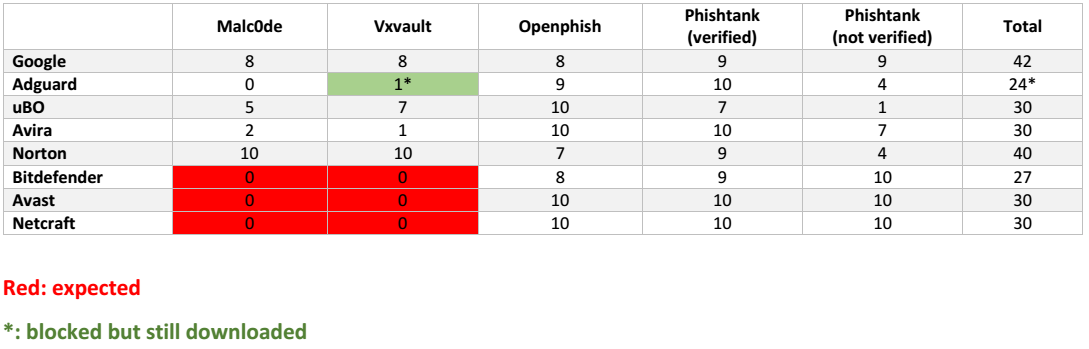
Winner: Google Safe Browsing
Test 29/12
Q&A - [Updated 29/12/2018] Browser extension comparison: Malwares and Phishings
Test 24/11
Q&A - [Updated 24/11/2018] Browser extension comparison: Malwares and Phishings
Test 12/11
Q&A - [Updated 12/11/2018] Browser extension comparison: Malwares and Phishings
Test 7/11
Q&A - [Updated 7/11/2018] Browser extension comparison: Malwares and Phishings
Test 6/9
Q&A - [Updated 3/9/2018] Browser extension comparison: Malwares and Phishings
Test 3/9
Q&A - [Updated 3/9/2018] Browser extension comparison: Malwares and Phishings
Test 2/9
Q&A - [Updated 25/7/2018] Browser extension comparison: Malwares and Phishings
Test, quick 1/9
Q&A - [Updated 25/7/2018] Browser extension comparison: Malwares and Phishings
Fun test 25/7/2018
Q&A - [Updated 24/7/2018] Browser extension comparison: Malwares and Phishings
Updated 24/7/2018 (most comprehensive, as possible)
Q&A - [Updated 24/7/2018] Browser extension comparison: Malwares and Phishings
Updated 19/7/2018
Q&A - [Updated 10/7/2018] Browser extension comparison: Malwares and Phishings
Updated 18/7/2018
Q&A - [Updated 10/7/2018] Browser extension comparison: Malwares and Phishings
Updated 10/7/2018
Q&A - [Updated 10/7/2018] Browser extension comparison: Malwares and Phishings
Updated 7/6/2018
Q&A - [Updated 7/6/2018] Browser extension comparison: Malwares and Phishings
Updated 3/6/2018
Q&A - [Updated 3/6/18] Browser extension comparison: Malwares and Phishings
Updated 25/4/2018
Poll - [Updated 25/4/18] Browser extension comparison: Malwares and Phishings
Update: 23/3/2018
Poll - [Updated 23/3/18] Browser extension comparison: Malwares and Phishings
Browser: Google Chrome 65 x64
Malware and phishing links: 10 malc0de, 10 vxvault, 10 openphish, 10 verified phishtank, 10 unverified phishtank
Total: 50 links
Extensions: recently downloaded from Chrome Web Store
- Google Safe Browsing (built-in chrome's protection)
- AdGuard AdBlocker: default settings, uses Google Safe Browsing (delayed) and their own database
- Avira browser safety: default settings
- Norton Safe Web: default settings
- Bitdefender Trafficlight: default settings, it rarely blocks any malware links, just old ones
- Avast Online Security: default settings, only has phishing protection, expected to score 0 against malwares
- Netcraft Extension: default settings, only has phishing protection, expected to score 0 against malwares
- uBlock Origin with some additional filters
http://hosts-file.net/emd.txt
http://hosts-file.net/exp.txt
http://hosts-file.net/pup.txt
http://hosts-file.net/psh.txt
https://raw.githubusercontent.com/StevenBlack/hosts/master/hosts
https://ransomwaretracker.abuse.ch/downloads/RW_DOMBL.txt
https://ransomwaretracker.abuse.ch/downloads/RW_IPBL.txt
https://ransomwaretracker.abuse.ch/downloads/RW_URLBL.txt
http://hosts-file.net/exp.txt
http://hosts-file.net/pup.txt
http://hosts-file.net/psh.txt
https://raw.githubusercontent.com/StevenBlack/hosts/master/hosts
https://ransomwaretracker.abuse.ch/downloads/RW_DOMBL.txt
https://ransomwaretracker.abuse.ch/downloads/RW_IPBL.txt
https://ransomwaretracker.abuse.ch/downloads/RW_URLBL.txt
NOTE: the result can vary from day-to-day. Tomorrow with different links, the result can be very different. All are live links but they can be dead a few minutes after the test. No duplication
Results:
Winner: Google Safe Browsing
Last edited:



 and just paste the link