

Verification Issue
- Thread starter AMD1
- Start date
You are using an out of date browser. It may not display this or other websites correctly.
You should upgrade or use an alternative browser.
You should upgrade or use an alternative browser.


Hello Andy,Hi,
I have carried out the verification process and entered the code i was emailed, i then checked the box to retain verification for 30 days but every day i am finding i am having to verify myself again.
Am i doing something wrong here ??
Andy
Do you use any software for cleaning your browser cookies or modified any browser settings?
Jack,
Yes i do daily
Yes, i will have to try and figure out how to exclude this ???
Yes i do daily
Hello Andy
Have you deleted the browser's cookies?
Yes, i will have to try and figure out how to exclude this ???
Last edited by a moderator:
Yes, if you are using CCleaner for example, you can add MalwareTips cookies to the ecxlusion list.Yes, i will have to try and figure out how to exclude this ???
So that's the issue, basically the site requests your verification code because it cannot find the cookie that was set on the last verification. Now, to solve this you can add this website to the "white list" of the cleaning software that you are using. For instance, I have the habit of running very often Ccleaner, and that was causing the issue that you've described, but I solved this by adding our community site to their "Cookies to keep" list. What software are you using to do your daily PC clean-up, maybe we can help you find the Ignore feature on it.Jack,
Yes i do daily
Wisecare 365 by default does not scan/clear for cookies so if you haven't changed this settings you should have no issues.Hi,
I have added malwaretips.com to the cookies to keep section.
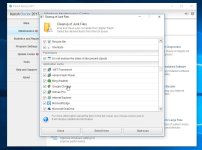
I also run Wisecare 365 and Kerish doctor but cannot find anything for settings on these at the moment - any guidance appreciated.
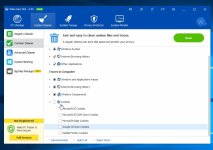
Kerish Doctor 2017 has a lot of features, and this is the first time I've taken a look at this program, as far as I can tell it won't clear the cookies. Other members that use this program more often may be able to shade some light here.
So basically, Ccleaner should have been the culprit in this case, if you added our community to the "Cookies to keep" list, you could give it a run and see if you are requested again that verification code.
Al done and fixed now thanks. It was just CCleaner deleting the cookie which has now been set to exclude.
Many thanks for your assistance.
Andy
Many thanks for your assistance.
Andy
Happy to have helped you, Andy. Glad to hear that the issue is solved!Al done and fixed now thanks. It was just CCleaner deleting the cookie which has now been set to exclude.
Many thanks for your assistance.
Andy
You may also like...
-
 So Frustrating. You every place an order and have this happen?
- Started by annaegorov
- Replies: 4
-
 New Update Telegram Introduces Third-Party Verification to Combat Scams
- Started by enaph
- Replies: 0
-
Security News Trust Wallet says 2596 wallets drained in $7 million crypto theft attack
- Started by enaph
- Replies: 1
-
-

