Advice Request What mode do you use for Configure Defender?

Please provide comments and solutions that are helpful to the author of this topic.

What mode do you use Configure Defender?


  • Total voters
    35

Lenny_Fox

Level 22
Thread author
Verified
Top Poster
Well-known
Oct 1, 2019
1,119
1
6,441
2,068
Netherlands
@Andy Ful

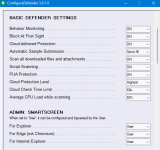
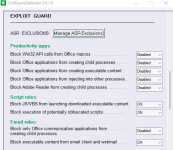
Since you developed Configure Defender i have had it run on MAX settings with no problems on my two desktops (with MSI mobo/AMD GPU and ASUS mobo/Nvidia GPU) and on my girlfriend's laptop's (Lenovo-Intel and HP-AMD). I know you have warned for MAX settings because the cloud engine could block essential software, but Lenovo and HP are good for nearly half of the PC market. Therefor I started this poll to find out what mode other members use (who also use configure defender).
 
For friends and family I use High, for myself I use High + CFA enabled.
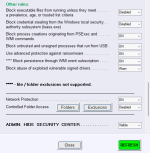
@ Andyful would it be possible to add an option for people who disable CFA to enable CFA for disk sector write protection only?

1626940778945.png
 
Did you vote (I only count 1 custom vote)

@Andy Ful
It makes sense for people setting configure defender to MAX to have the security center visible to check the blocked operations for trouble shooting. So could you change mode to visible when people select MAX protection?
 
I have been used always "custom" as well, just tried out different ASR settings to enable or disable...
In the upcoming version of ConfigureDefender, this new mode looks most interesting: "Interactive"
 
Did you vote (I only count 1 custom vote)

@Andy Ful
It makes sense for people setting configure defender to MAX to have the security center visible to check the blocked operations for trouble shooting. So could you change mode to visible when people select MAX protection?
Whoops, my bad. Just voted :)
 
Did you vote (I only count 1 custom vote)

@Andy Ful
It makes sense for people setting configure defender to MAX to have the security center visible to check the blocked operations for trouble shooting. So could you change mode to visible when people select MAX protection?
I could exclude this setting, but then the MAX term would not mean the maximum protection (for inexperienced users). This setup should prevent inexperienced users from doing stupid things like disabling Defender real-time protection, installing applications bundled with malware, etc.
Anyway, the alert about MAX settings should be probably changed to allow choosing the option to hide the Security Center or keep it unhidden.:unsure:(y)
 
I could exclude this setting, but then the MAX term would not mean the maximum protection (for inexperienced users). This setup should prevent inexperienced users from doing stupid things like disabling Defender real-time protection, installing applications bundled with malware, etc.
Anyway, the alert about MAX settings should be probably changed to allow choosing the option to hide the Security Center or keep it unhidden.:unsure:(y)
In my opinion your decision is right and users which want it visible, can do another click. No big deal in my opinion.

keep it simple (y)