
As a malware evangelist — and proudly a greedy, sarcastic one — my standards are completely unreasonableWhat is left for paid AV?


Open MalwareTips from your Home Screen or desktop. Follow discussions, find answers and pick up where you left off.
If you cannot find an install option, update your browser or use its bookmark option to keep MalwareTips close.
After installation, open the app and sign in. Enable push notifications in Preferences if you want alerts. On iPhone and iPad, push requires a Home Screen web app and iOS or iPadOS 16.4 or later.
Sign in to manage notificationsInstallation is optional. Your notification settings stay under your control.
As a malware evangelist — and proudly a greedy, sarcastic one — my standards are completely unreasonableWhat is left for paid AV?


I was getting more nagging and ads from the paid McAfee Total. I've found if I just install the basic Avast free modules (helps keep things quieter), and disable Smart Scan and just occasionally run the Quick Scan, I really don't get any nag screen pop ups or ads. This is what my UI looks like on two laptops.WF & WD with Firewall Hardening & Configure Defender should provide enough protection for an average user with safe habits. IMHO, the only 2 Free AV’s that have all the required protections are Avast Free & AVG Free (if you can tolerate their nagging & ads).
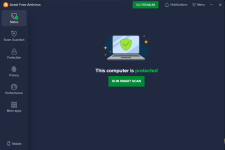
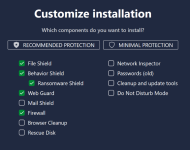
My experience with Avast Premium has been terrific. Over time, ads only became more and more prominent in McAfee Total Protection. They're giving Norton real competition in the upselling department. Gen Digital is famous for selling addons, but it's nothing too obtrusive in my instance of Avast.I was getting more nagging and ads from the paid McAfee Total. I've found if I just install the basic Avast free modules (helps keep things quieter), and disable Smart Scan and just occasionally run the Quick Scan, I really don't get any nag screen pop ups or ads. This is what my UI looks like on two laptops.
I disabled in General Notifications/Offers/Share app usage data. General Notifications/Pop-up notifications treatment to Limited mode.
In General/Privacy Preferences I disabled Help improve our products and business processes by allowing....and disabling Personalized discounts.
Also, I don't log into an account. The We have a gift for you banner on the bottom, and notice at the top, disappear after awhile of Xing out of them.
View attachment 296013 View attachment 296014
I would give you an Up, Reputation arrow, but the option isn't showing, but you get oneMy experience with Avast Premium has been terrific. Over time, ads only became more and more prominent in McAfee Total Protection. They're giving Norton real competition in the upselling department. Gen Digital is famous for selling addons, but it's nothing too obtrusive in my instance of Avast.
I like Avast's firewall configuration, which you can still make use of in the free antivirus. It's been totally problem-free on my end.
I could heartily recommend setting up Avast Free Antivirus as a more set-and-forget solution than MS Defender.

For basic home use, there’s no need to set up a secret lab: with Defender, Andy Ful’s tools, and a couple of suggestions from @Digmor Crusher , you’ve already got a pretty solid combo. Now, if your daily life is more like 007… or better yet, if you’re an undercover agent moonlighting as an interdimensional pizza delivery guy with Pentagon server access, then sure — maybe you’ll want all those extra modules and NASA‑grade configurations. For the rest of us mortals, the smart move is to keep things simple and let the PC remain a routine companion, not a sci‑fi command center.
Honestly after testing Bitdefender Free last week (well ok I had the paid version but I didn't need the paid features) I do not think one would require anything more to keep themselves safe. Else just run a chromebook for banking and bitdefender free on windows for gaming and you are all set.As far as I can tell, free antiviruses have everything you realistically need. It's important for the security-conscious user not to fall under the illusion that your antivirus is the end-all, self-sufficient defense against all threats.
I do believe that Microsoft Defender provides a complete solution, particularly if you tap the hidden settings to maximize its potential. Numerous large, important companies rely on Defender for Endpoint with a lot at stake—Defender for Endpoint has the same foundation as the free desktop offering, but it also benefits from superior tampering protection and sophisticated attack surface reduction rules, just to simplify. Hardening Defender on a desktop can set you up well.
One of the main reasons that I still pay a little for an antivirus is performance. Defender simply isn't the lightest. I also don't mind enjoying a more robust UI and some extra security tools.
User have evolved beyond some meaningless trivialities like an Up Reputation Arrow; he is the one.I would give you an Up, Reputation arrow, but the option isn't showing, but you get one

I'm now wondering who would be that guy if there were someone like this in MT!!!if you’re an undercover agent moonlighting as an interdimensional pizza delivery guy with Pentagon server access, then sure


I keep saying it for years, I would not use a paid AV full of "features" for free, but I would gladly pay for a free AV, like FortiClient. I would not mind using it, if it were still available.A free AV will always have less modules then their paid counterpart, some paid AV's are full of bloat. IMO all anyone needs is a free AV and a secondary program such as Cyberlock, Osarmour or one of Andy's tools.

Available, but paid.FortiClient

 www.fortinet.com
There you go, where have you been?In 2026, a free antivirus should at least have a module—Upgrade to COMODO!

Should has a containerIn 2026, a free antivirus should at least have a module—Upgrade to COMODO!

Members who viewed this thread in the last 5 minutes


