Battle Which antivirus program is the best solution for protecting against fake online stores and credit card fraud? I'd appreciate some recommendations.

Compare list
Kaspersky
McAfee
F-Secure
Norton
Eset
Platform(s)
  1. Microsoft Windows

Szellem

Level 13
Thread author
Verified
Top Poster
Well-known
Forum Veteran
Apr 15, 2020
619
2,104
1,168
Hungary
The thing is, I’m usually careful about where I enter my credit card information. However, my bank called me today to say they’d detected several suspicious transactions on one of my cards over the past month. No money was withdrawn because the bank blocked the transactions. I tried to find where I might have entered my card details, but I couldn’t find it. What worries me, though, is that I might have done this on a site where my information could have been misused. Which antivirus product offers the strongest protection against this kind of threat? I would really appreciate your help with this.
 
Are you meaning what Identity/Credit/Fraud Monitoring service would be able to provide this information, as I'm not sure an AV in and of itself would be able to tell you anything except malicious sites visited/blocked etc. Review your passwords in your password manager, and look for any re-used or weak passwords and change them, in my case, Pass Monitor of Proton Pass. And it sounds like your bank was doing its job, as this has happened to me before.

Hopefully, a more advanced user can provide better options and insights.

edit: and FWIW, I touched on this in a Gemini Plus chat yesterday, and was shown this albeit simple summary comparison:


FeatureMcAfee Identity MonitoringF-Secure Identity Protection
Alert FrequencyVery High (includes unverified/old leaks).Low (focuses on verified/new leaks).
InfrastructureProprietary & Massive. Includes credit monitoring/insurance.Curated & Lean. Focuses on credential integrity.
User ExperienceCan be overwhelming; focuses on "Protection Scores."Minimalist; only speaks when there is a clear "To-Do."
Data PrivacyMore aggressive data collection for their own "scores."Higher privacy; less "profiling" of your identity.
 
Last edited:
Are you meaning what Identity/Credit/Fraud Monitoring service would be able to provide this information, as I'm not sure an AV in and of itself would be able to tell you anything except malicious sites visited/blocked etc. Review your passwords in your password manager, and look for any re-used or weak passwords and change them, in my case, Pass Monitor of Proton Pass. And it sounds like your bank was doing its job, as this has happened to me before.

Hopefully, a more advanced user can provide better options and insights.

edit: and FWIW, I touched on this in a Gemini Plus chat yesterday, and was shown this albeit simple summary comparison:


FeatureMcAfee Identity MonitoringF-Secure Identity Protection
Alert FrequencyVery High (includes unverified/old leaks).Low (focuses on verified/new leaks).
InfrastructureProprietary & Massive. Includes credit monitoring/insurance.Curated & Lean. Focuses on credential integrity.
User ExperienceCan be overwhelming; focuses on "Protection Scores."Minimalist; only speaks when there is a clear "To-Do."
Data PrivacyMore aggressive data collection for their own "scores."Higher privacy; less "profiling" of your identity.
Thanks for the help! I’ve got all of these covered now. Actually, what would be best for me is if, when I bank online and enter my information, the antivirus software alerts me to potential fraud and prevents the website from stealing my card details.
 
Thanks for the help! I’ve got all of these covered now. Actually, what would be best for me is if, when I bank online and enter my information, the antivirus software alerts me to potential fraud and prevents the website from stealing my card details.
This is where I like F-Secure's Banking protection. Here is the answer from Gemini Plus regarding if it could be spoofed (F-Secure) by my landing on a phishing site. I'm sure the other Banking apps are geared this way, and work great as well, but F-Secure has a very good two year track history in Adrian's testing.

"Will F-Secure help prevent me from accessing a website that will steal my credentials, in this regard, will banking protection only open on a legitimate banking site, or can it be spoofed to open on a phishing site, and my thinking all is okay and start typing in my personal information"?

F-Secure provides a multi-layered defense to address exactly this scenario. To answer your core concern: No, Banking Protection cannot be easily "spoofed" to open on a phishing site, because it functions on a whitelist principle rather than just a "detect bad things" principle.


Here is the breakdown of how F-Secure's different modules work together to keep you from typing your credentials into a fake site.


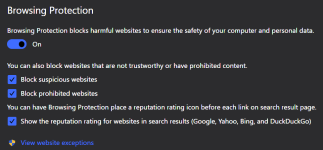
1. The Gatekeeper: Browsing Protection​

Before you even reach a page, Browsing Protection acts as the first filter.

  • Reputation Check: Every URL you click is checked against F-Secure’s Security Cloud. If the site is a known phishing or malware host, it is blocked entirely with a full-screen warning.
  • Real-Time AI (2026 Update): In the current 2026 suite, F-Secure has integrated advanced Scam Protection that uses AI to analyze the page content (like suspicious forms or mismatched certificates) even if the URL is brand new and not yet on a "blacklist."

2. The Safe Room: Banking Protection​

This is the specific feature you asked about. Unlike general browsing protection, Banking Protection only activates when it recognizes a URL from a verified list of legitimate financial institutions.
  • The Whitelist Mechanism: When you land on a site, F-Secure queries its cloud to see if that specific domain is a "trusted banking site."
  • Why it can't be spoofed: If a phisher creates mybank-security-update.com, F-Secure will not see that domain on its verified banking whitelist. Consequently, the Banking Protection banner will not appear, and the extra security measures (like blocking other network connections) will not trigger.
  • The "Silent" Signal: The most important thing for you to remember is that the absence of the banner is your warning. If you are on what looks like your bank's login page but you don't see the F-Secure "Banking Protection" notification at the top of your browser, you should assume the site is illegitimate.


I also only use a Chrome Vault where I'm not logged into my Google account, and have a shortcut to my bank there (homepage). I only open the one tab. I use Chrome as it's a F-Secure "sanctioned" supported browser so no worries there, compared to Brave, where it does work, but for something as critical as this, I want to make sure to use Chrome. I also had sites I double verified added into Banking Protection to open when I accessed them. I know you're familiar with F-Secure, and am not trying to convince you or anyone else here to use it, we all have our comfort zones, and this is just happens to be one of mine :)

Screenshot 2026-05-04 133409.png


banking protection.png
 
Last edited:
Thank you very much for your reply! I'll wait for Shadow's test results. Then I might install it on my computer.
Are there better AV's out there in general, yes, but since I'm not downloading and running multiple apps in a week (testing, trialing etc.) I'm not worried about a Shadowra test result, as my main concern is the browsing and banking protection, which is 95% of my daily use. And F-Secure is right up there with the "best" of them, in the 98 - 99+ protection range according to AV-Comparatives, and in my general observation and use over the years. Again, I don't want to sound like a paid spokesman for F-Secure, and maybe should put my old avatar back up? :)
 
Thanks for the help! I’ve got all of these covered now. Actually, what would be best for me is if, when I bank online and enter my information, the antivirus software alerts me to potential fraud and prevents the website from stealing my card details.
If this is the case,best way is to revoke your old Card and ask for a new Replacement to avoid future and unknown headaches.
 
You can’t rely on antivirus software to give you 100% protection when browsing websites. If you really want to verify whether a site is trustworthy, you should look deeper starting with its WHOIS data. Websites that were created very recently or have their ownership information hidden through masking services can often be suspicious. That doesn’t always mean they’re malicious, but it’s a common red flag especially if the site is pretending to be a major retailer or well-known brand. You can also use tools like ScamAdviser, which analyze websites and provide risk assessments. In many cases, these tools are more effective at spotting potentially unsafe sites than the built-in web protection offered by most antivirus programs. Manual research is always better even if you have to use multiple security tools or websites to do it.


You can’t rely on antivirus software to give you 100% protection when browsing websites. If you really want to verify whether a site is trustworthy, you should look deeper starting with its WHOIS data. Websites that were created very recently or have their ownership information hidden through masking services can often be suspicious. That doesn’t always mean they’re malicious, but it’s a common red flag especially if the site is pretending to be a major retailer or well-known brand. You can also use tools like ScamAdviser, which analyze websites and provide risk assessments. In many cases, these tools are more effective at spotting potentially unsafe sites than the built-in web protection offered by most antivirus programs. Manual research is always better even if you have to use multiple security tools or websites to do it.


Unfortunately, I'm well aware of that. But I'm still looking for the best solution in this area, since I've already paid for it. But I know that's not enough on its own.
 
The only thing that will provide you 100% protection in this case is simply using a separate bank account and card specifically for online transactions. This is what I do. You can register with Revolut and get free virtual cards that you use for online payments. Whenever you want to buy something online, simply transfer money from your personal bank account to Revolut and when asked for payment card details, enter the details of said virtual card.

Even if hackers gets the payment details of your Revolut virtual cards, they can't do anything because you only transfer as much money as it's necessary for buying something. And virtual cards are valid as much as you want them to be.

So don't waste money on antivirus suites with "banking protection"; sometimes the best protection is completely free.
 
Last edited:
AV web protection will detect the malicious page, but only after few hundreds of victims; no AV can gaurantee all customers will not be one of.
Unless the website is whitelisted on the AV's server end, and it's not a general search?

  • The Whitelist Mechanism: When you land on a site, F-Secure queries its cloud to see if that specific domain is a "trusted banking site."
  • Why it can't be spoofed: If a phisher creates mybank-security-update.com, F-Secure will not see that domain on its verified banking whitelist. Consequently, the Banking Protection banner will not appear, and the extra security measures (like blocking other network connections) will not trigger.
Edited, as to not cause confusion regarding general browsing.
 
Last edited:
AV web protection will detect the malicious page, but only after few hundreds of victims; no AV can gaurantee all customers will not be one of.
Correction: it will only detect the malicious page if they had it in their database, otherwise they won't. These fake shops usually don't last long, same as phishing sites. Only few "customers" are enough for hackers.

Still, using a separate bank account and card for online shopping eliminates the risk 100% and you don't have to worry if AV will block the website or not.
 
Correction: it will only detect the malicious page if they had it in their database, otherwise they won't. These fake shops usually don't last long, same as phishing sites. Only few "customers" are enough for hackers.

Still, using a separate bank account and card for online shopping eliminates the risk 100% and you don't have to worry if AV will block the website or not.
If its a scam site do you lose your money with Revolut though, what sort of service do they give if you pay & don't get the service/item for example? I've never had any issues though just wondering? And if it is a fake site its likely they have other personal details such as valid phone/email/address/name etc??
 
Unless the website is whitelisted on the AV's server end, and it's not a general search?

  • Reputation Check: Every URL you click is checked against F-Secure’s Security Cloud. If the site is a known phishing or malware host, it is blocked entirely with a full-screen warning.
  • Real-Time AI (2026 Update): In the current 2026 suite, F-Secure has integrated advanced Scam Protection that uses AI to analyze the page content (like suspicious forms or mismatched certificates) even if the URL is brand new and not yet on a "blacklist."
  • The Whitelist Mechanism: When you land on a site, F-Secure queries its cloud to see if that specific domain is a "trusted banking site."
  • Why it can't be spoofed: If a phisher creates mybank-security-update.com, F-Secure will not see that domain on its verified banking whitelist. Consequently, the Banking Protection banner will not appear, and the extra security measures (like blocking other network connections) will not trigger.
I have dozens of malicious websites missed by all major AVs web protection, to be detected only later on.
If you feel AV web protection is 100% fault-proof, this is good; no need to banking mode or isolation with performance taxing.
 
I have dozens of malicious websites missed by all major AVs web protection, to be detected only later on.
If you feel AV web protection is 100% fault-proof, this is good; no need to banking mode or isolation with performance taxing.
100%, nope, that wasn't what I was implying or saying, but especially in regards to the Banking protection of F-Secure. I edited that post to more accurately reflect that :)
 
Last edited: