


The MalwareTips app
Your community, one tap away.
Open MalwareTips from your Home Screen or desktop. Follow discussions, find answers and pick up where you left off.
- Home Screen access
- Optional push alerts
- Your community
You're ready to explore.Explore what's new
Installation instructions
iPhone & iPad
- Open MalwareTips in Safari and tap Share. You may need to open the Page Menu first.
- Choose Add to Home Screen. If it is not listed, use Edit Actions to add it.
- Keep Open as Web App enabled if shown, then tap Add.
Android
- Open MalwareTips in Chrome or another browser that supports app installation.
- Open the browser menu and look for Install app, Install and create shortcut, or Add to Home screen.
- Choose Install and confirm. Wording varies by browser.
Desktop
- Chrome: use the install icon in the address bar, or the menu under Cast, save and share.
- Edge: open the menu, then More tools, Apps and Install this site as an app.
- Safari on Mac: choose Share or File, then Add to Dock. Firefox on Windows: look for the web apps button in the address bar.
If you cannot find an install option, update your browser or use its bookmark option to keep MalwareTips close.
Keep up with your conversations
After installation, open the app and sign in. Enable push notifications in Preferences if you want alerts. On iPhone and iPad, push requires a Home Screen web app and iOS or iPadOS 16.4 or later.
Sign in to manage notificationsInstallation is optional. Your notification settings stay under your control.
You are using an out of date browser. It may not display this or other websites correctly.
You should upgrade or use an alternative browser.
You should upgrade or use an alternative browser.
Advice Request Which do you prefer for blocking malware and phishing --> DNS, separate web filter extension or malware/phishing list in µBO, etc.?
-
 Thread starter
oldschool
Thread starter
oldschool
- Start date
- 15 Replies
- 5,047 Views
Share practical recommendations that address the author's needs.

I see a discussion going on here at Wilders about the best list to use in µBO for malware and phishing protection. I wonder what method you prefer for blocking malware and phishing --> separate web filter or filter list added to extension? and why?
I use WD's SmartScreen in Edge and then I use the UBO medium mode variation described here Extension - uBlockOrigin flexible modes which seems to work pretty seamlessly for me. I think the extended lists just slow down my browsing and I'd rather just blacklist the common abused TLDs as described in that post by @Lenny_Fox
Setup PCPC setup
Ideally both but prefer a minimal browser configuration. Getting rid of some un-needed and largely obsolete filter lists helps a lot, thanks to Wilders. Surprisingly, Vivaldi in Sandboxie opens in 2-3 seconds. Edge opens in 1-2 sec on here.
I replaced two of the three default malware domain filters with one import and am also using SmartScreen.
That uBlock Origin thread is awesome. A treasure-trove of good information by people with a lot of expertise.
I replaced two of the three default malware domain filters with one import and am also using SmartScreen.
That uBlock Origin thread is awesome. A treasure-trove of good information by people with a lot of expertise.

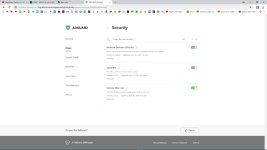
I prefer DNS filtering, but if I would have to choose, I choose privacy. Web filtering extensions send URL home and even if it is encrypted (mostly not), the owner of the extension can see. Filter list checks URL offline, but I was never able to find any malware filter anyway, most block ADs, so I use only those:separate web filter or filter list added to extension
Attachments
F
ForgottenSeer 85179
Best protection is before browser level, e.g. at DNS level.
Then the browser and browser extension need a lot less work and performance is better.
Mostly it doesn't depending on used filter lists as many just use the same or copy from other lists.
For example currently I use PiHole with 20-30 filter lists but the same can be archived with nextdns "stock" lists.
Also always use browser internal protection to be on safe side.
Then the browser and browser extension need a lot less work and performance is better.
Mostly it doesn't depending on used filter lists as many just use the same or copy from other lists.
For example currently I use PiHole with 20-30 filter lists but the same can be archived with nextdns "stock" lists.
Also always use browser internal protection to be on safe side.
Edited OP based on your response.Best protection is before browser level, e.g. at DNS level.
Then the browser and browser extension need a lot less work and performance is better.

Thanks to all here and at Wilders. After reading a lot, I've replaced the default malware filters with the Urlhaus online and Phishing Army filters, for a net saving of about 20,000 rules in uBO. I stopped using malware Hosts files months ago because most were poorly maintained, and troubleshooting is much easier with uBO filters.

S M G
Level 2
@South Park Are you using the regular P. A. blocklist or the extended one?
I use a combo of extensions and filters in uBO/Adguard.
For anti-phishing still Netcraft extension is more effective than using filters
For anti-malware I'm using filters like
Steven Blacks's Hosts
Vxvault
1Hosts mini
And I have KIS to protect me as well
For anti-phishing still Netcraft extension is more effective than using filters
For anti-malware I'm using filters like
Steven Blacks's Hosts
Vxvault
1Hosts mini
And I have KIS to protect me as well
Last edited:
The regular blocklist. I also leave the default "phishing and malware protection" on in Firefox, since it's more privacy-conscious than the same feature on Chromium.@South Park Are you using the regular P. A. blocklist or the extended one?

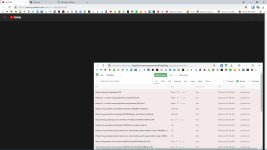
I have setup nextdns in dns level and at system level uses adguard ( only the base adguard lists) and on browser uses malwarebytes browser guard (only to block malware,scams and pups). Most of my filtering takes place at dns level.

One of the reasons, I do not like custom filters, they always block more that one has asked for. This one even blocks malicious youtube videos.
Attachments
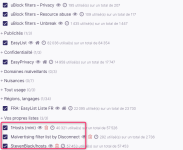
I've been using Ublock Origin for the last 6 months in medium mode without the malware protection. Added a few filters. They do the job. 1Hosts ( mini), Malvertising filter by Disconnect and StevenBlack/hosts. TrafficLight for web protection.
Attachments
Last edited:

1. DNS level (because all the filtering is done on the servers of the DNS)I see a discussion going on here at Wilders about the best list to use in µBO for malware and phishing protection. I wonder what method you prefer for blocking malware and phishing --> DNS, separate web filter or filter list added to an anti-tracking extension? and why?
2. Browser build-in (because Microsoft Smartscreen and Google Safe Browsing are top-notch)
3. Antivirus extension (BitDefender Traffic Light would be my choice because I like single purpose extensions and url detection is a numbers game).
I simply can't believe than a (community) based blocklist can beat the crawling and honeypot infrastructure of an Antivirus company or monitors as much traffic as a DNS service (e.g. Quad9 or NextDNS) or an OS (Microsoft) or a search engine (Google). It is as likely as Luxemburg winning the world cup soccer. URL filtering is a numbers game,.
NOTE
I am a firm 'less is more' fan, but for URL filtering 'bigger is better'.
Last edited:
Remove outdated and unuseful Disconnect list · Issue #3147 · gorhill/uBlock Malvertising list is dead wood, is not maintainedI've been using Ublock Origin for the last 6 months in medium mode without the malware protection. Added a few filters. They do the job. 1Hosts ( mini), Malvertising filter by Disconnect and StevenBlack/hosts. TrafficLight for web protection.
Recently browsing
Members who viewed this thread in the last 5 minutes


