

The MalwareTips app
Your community, one tap away.
Open MalwareTips from your Home Screen or desktop. Follow discussions, find answers and pick up where you left off.
- Home Screen access
- Optional push alerts
- Your community
You're ready to explore.Explore what's new
Installation instructions
iPhone & iPad
- Open MalwareTips in Safari and tap Share. You may need to open the Page Menu first.
- Choose Add to Home Screen. If it is not listed, use Edit Actions to add it.
- Keep Open as Web App enabled if shown, then tap Add.
Android
- Open MalwareTips in Chrome or another browser that supports app installation.
- Open the browser menu and look for Install app, Install and create shortcut, or Add to Home screen.
- Choose Install and confirm. Wording varies by browser.
Desktop
- Chrome: use the install icon in the address bar, or the menu under Cast, save and share.
- Edge: open the menu, then More tools, Apps and Install this site as an app.
- Safari on Mac: choose Share or File, then Add to Dock. Firefox on Windows: look for the web apps button in the address bar.
If you cannot find an install option, update your browser or use its bookmark option to keep MalwareTips close.
Keep up with your conversations
After installation, open the app and sign in. Enable push notifications in Preferences if you want alerts. On iPhone and iPad, push requires a Home Screen web app and iOS or iPadOS 16.4 or later.
Sign in to manage notificationsInstallation is optional. Your notification settings stay under your control.
You are using an out of date browser. It may not display this or other websites correctly.
You should upgrade or use an alternative browser.
You should upgrade or use an alternative browser.
Question Which Ubo filters do you use ?
Help answer the author's question with clear explanations and useful steps.


Regarding Bypass Paywalls Clean filters, the "gitflic.ru" site where it is hosted now has added DDoS protection on their site. Visiting via browser is possible after the check is done but adblockers cannot directly update the filter anymore. The filter list also hasn't been updated in a week. Maybe the dev is trying to find alternate solution once again. From GitHub to GitLab to GitFlic. What's next?

 gitflic.ru
magnolia1234/bypass-paywalls-clean-filters
Участвуйте в разработке magnolia1234/bypass-paywalls-clean-filters, создав учетную запись в GitFlic.
gitflic.ru

I had this as well.Regarding Bypass Paywalls Clean filters, the "gitflic.ru" site where it is hosted now has added DDoS protection on their site. Visiting via browser is possible after the check is done but adblockers cannot directly update the filter anymore. The filter list also hasn't been updated in a week. Maybe the dev is trying to find alternate solution once again. From GitHub to GitLab to GitFlic. What's next?

Now I have to manually download, then upload the filter list to Dropbox and then import that URL in uBO...
Last edited:

Regarding Bypass Paywalls Clean filters, the "gitflic.ru" site where it is hosted now has added DDoS protection on their site. Visiting via browser is possible after the check is done but adblockers cannot directly update the filter anymore. [...]
Thanks for posting.Now I have to manually download, then upload the filter list to Dropbox and then import that URL in uBO...
About an hour ago, I posted an issue at BPC Firefox support (as I found no dedicated location to post issues regarding the filterlist).
https://github.com/bpc-clone/bpc_firefox_support/issues/465
I think there is no need to download the way nicolaasjan mentioned.
When I visit the BPC filters page at gitflic.ru and the page loads, next uBlock Origin can check and update the filterlist.
And perhaps not deleting the gitflic.ru cookie when Firefox closes might be a way to resolve the issue.
No, keeping the gitflic.ru cookie when Firefox closed did not resolve the issue.And perhaps not deleting the gitflic.ru cookie when Firefox closes might be a way to resolve the issue.
Next day, I still had to visit the BPC filters page at gitflic first, to enable uBlock Origin to check and update the filterlist.
gitflic has put 10 cookies here after the browser check; some of them very short-lived.No, keeping the gitflic.ru cookie when Firefox closed did not resolve the issue.
Next day, I still had to visit the BPC filters page at gitflic first, to enable uBlock Origin to check and update the filterlist.
I also had to disable uBO there for the check to proceed...
The days before, and today, each time I visited the BPC filters page at gitflic the experience was a little different.I also had to disable uBO there for the check to proceed...
Sometimes the page loaded after the DDoS-Guard check, sometimes I had to do a CAPTCHA first. I had no need to disable uBlock Origin to load the page.
@nicolaasjan, did you use uBlock Origin on Firefox or on another browser?
On Firefox.@nicolaasjan, did you use uBlock Origin on Firefox or on another browser?
GitFlic stopped using DDoS-Guard, so it seems.Regarding Bypass Paywalls Clean filters, the "gitflic.ru" site where it is hosted now has added DDoS protection on their site. Visiting via browser is possible after the check is done but adblockers cannot directly update the filter anymore. [...]
No longer a need to visit the BPC filters page at GitFlic first, to enable uBlock Origin to check and update the filterlist.
See bpc-clone's reply at GitHub:
https://github.com/bpc-clone/bpc_firefox_support/issues/465#issuecomment-2979008332

Those are the filter lists I use in uBlock Origin:
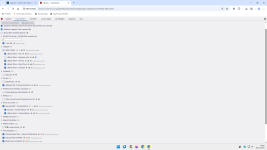
I replaced EP minified with EP Optimized.

Mine  (using uBol to alllow only common TLD's and Country Code's from extended EU-zone and 5 Eyes countries from HTTPS).

Cloudflare Zero Trust DNS with OISD small and Brave build-in on Aggressive do the heavy lifting in my surfing profile (simple red theme).
In my work profile (baby blue theme) Brave shields are disabled and anti-tracking enabled in Avira Browser Safety. OISD small (in DNS) and Avira anti-tracking are so conservative, that they never have broken any website functionality (until now). I really like the 2 profile approach, in stead of trying to balance compatibility and blocking annoying ads, I have one profile for compatibility (with mild/light filtering) and one for surpressing annoying ads (with aggressive filtering and attack surface reduction).
(using uBol to alllow only common TLD's and Country Code's from extended EU-zone and 5 Eyes countries from HTTPS).Cloudflare Zero Trust DNS with OISD small and Brave build-in on Aggressive do the heavy lifting in my surfing profile (simple red theme).
In my work profile (baby blue theme) Brave shields are disabled and anti-tracking enabled in Avira Browser Safety. OISD small (in DNS) and Avira anti-tracking are so conservative, that they never have broken any website functionality (until now). I really like the 2 profile approach, in stead of trying to balance compatibility and blocking annoying ads, I have one profile for compatibility (with mild/light filtering) and one for surpressing annoying ads (with aggressive filtering and attack surface reduction).
Last edited:
Il mio
View attachment 294226
Cloudflare Zero Trust DNS con OISD piccolo e Brave integrato su Aggressive svolgono il lavoro più pesante nel mio profilo di navigazione (semplice tema rosso).
Nel mio profilo di lavoro (tema celeste), gli scudi Brave sono disabilitati e l'anti-tracciamento è abilitato in Avira Browser Safety. L'OISD ridotto (nel DNS) e l'anti-tracciamento di Avira sono così conservativi che non hanno mai compromesso alcuna funzionalità del sito web (finora). Mi piace molto l'approccio a due profili: invece di cercare di bilanciare la compatibilità e bloccare le pubblicità fastidiose, ho un profilo per la compatibilità (con un filtraggio moderato/leggero) e uno per la soppressione delle pubblicità fastidiose (con un filtraggio aggressivo e una riduzione della superficie di attacco).
Have you ever tried checking tracker blocking in particular?
I did a serious test over a year ago.
I removed only EP from uBo and checked whether DNS filtering alone (my usual filter list + AG tracking protection + EP) could block all trackers from websites known for their high tracker content.
I used Firefox with its built-in tracker blocking capability.
Firefox's developer tools are more specific than chromium-based browsers in highlighting the categories of blocked trackers.
I used Privacy Badger as a control extension.
The result was interesting.
I had to add 4 personal rules to uBo and AG.
They are almost certainly redundant today, but I haven't deleted them, I still use them now.
What a nice idea.Have you ever tried checking tracker blocking in particular?
I did a serious test over a year ago.
I removed only EP from uBo and checked whether DNS filtering alone (my usual filter list + AG tracking protection + EP) could block all trackers from websites known for their high tracker content.
I used Firefox with its built-in tracker blocking capability.
Firefox's developer tools are more specific than chromium-based browsers in highlighting the categories of blocked trackers.
I used Privacy Badger as a control extension.
The result was interesting.
I had to add 4 personal rules to uBo and AG.
They are almost certainly redundant today, but I haven't deleted them, I still use them now.
I recently removed Avira Browser Security (with anti-tracking enabled), because Cloudflare did a good job blocking phishing and malware websites and Avira tracking counter remained zero (subscribing the point your are making). In my work profile just Cloudflare with OISD-small seems to block as much as Avira's (AdGuard based) anti-tracking (only Avira is way more conservative using only the server sublists of AG looking at the memory usage of Avira extension).
I am a bit reluctant to add advertising and tracking blocklists in the DNS. I used ControlD plus OISD free in the past until something was blocked for work and I had to switch to Quad9 DNS. I switched to Cloudflare Zero Trust with OISD small, but have not ran into problems (while doing simular work last week), making me assume that OISD-small was the culpritt of the block and it has been corrected. The benefit of Cloudflare free plan versus ControlID free is that in can see what is blocked in the Zero Trust panel.
Would you PM the 4 rules you added?
Thanks
What a nice idea.
I recently removed Avira Browser Security (with anti-tracking enabled), because Cloudflare did a good job blocking phishing and malware websites and Avira tracking counter remained zero (subscribing the point your are making). In my work profile just Cloudflare with OISD-small seems to block as much as Avira's (AdGuard based) anti-tracking (only Avira is way more conservative using only the server sublists of AG looking at the memory usage of Avira extension).
I am a bit reluctant to add advertising and tracking blocklists in the DNS. I used ControlD plus OISD free in the past until something was blocked for work and I had to switch to Quad9 DNS. I switched to Cloudflare Zero Trust with OISD small, but have not ran into problems (while doing simular work last week), making me assume that OISD-small was the culpritt of the block and it has been corrected. The benefit of Cloudflare free plan versus ControlID free is that in can see what is blocked in the Zero Trust panel.
Would you PM the 4 rules you added?
Thanks
I don't think they're very useful for you, as they are not general rules but specific to websites that were tested over a year ago.
I don't think they'll be very useful to you, as they are not general rules but specific to websites that were tested over a year ago.
WhoTracks.Me
Scroll down to where you find
"Popular Websites with the most tracking"
and then I also used the complete list.
P.S.
Anyway, let me know if you still want the specific rules and I'll send them to you.
These are my final filter lists in uBo:
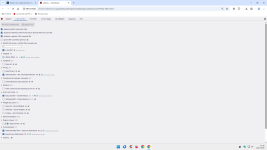
They are only important for the 9 TLDs that I use.
They are only important for the 9 TLDs that I use.
Better visibility.

Gandalf_The_Grey
Level 86
Verified
Honorary Member
Top Poster
Content Creator
Well-known
Forum Veteran
It seems that the AdGuard optimized lists are no longer optimized.
Have you checked the default EasyPrivacy in uBlock vs your EasyPrivacy optimized list?

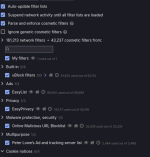
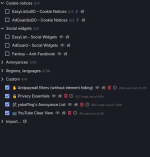
It seems that the AdGuard optimized lists are no longer optimized.
Have you checked the default EasyPrivacy in uBlock vs your EasyPrivacy optimized list?
Hi,
I don't quite understand your question.
EP optimized has slightly fewer rules than EP, but not as few as EP minified.
For ChatGPT 5.2, this reduction is irrelevant in terms of protection, but I don't know if the AI's assessment is correct.
For a better assessment, it should be noted that the list of filters I use at the DNS level, HaGeZi Multi Ultimate, also incorporates EP.
Recently browsing
Members who viewed this thread in the last 5 minutes
