Question Which Ubo filters do you use ?

Please provide comments and solutions that are helpful to the author of this topic.
Hi, you use the optimized list to have less rules in uBlock Origin.
The last time I used them there was no difference in number of rules between EasyPrivacy and EasyPrivacy Optimized.
What I mean is that you can use the default list in uBlock Origin now.
 
Hi, you use the optimized list to have less rules in uBlock Origin.
The last time I used them there was no difference in number of rules between EasyPrivacy and EasyPrivacy Optimized.
What I mean is that you can use the default list in uBlock Origin now.

EP (rules used) = 55096
EP optimized (rules used) = 54711
 
I decided to remove my 1p script rules applied outside of allowed TLDs.
I added the:

  • Frogeye firstparty-only-trackers

1.png


list, which integrates with the 3p tracker block implemented both at the allowed TLD level and outside of allowed TLDs with greater aggressiveness.

This filter list should also integrate with the Brave 1p lists at the DNS level found in the HaGeZi filter list that I use.

The result is therefore greater protection + greater compatibility on websites especially in permitted TLDs

P.S.

Same change applied to AG.

______________________________________________________

P.S. 1

If any forum members want the rules I used, which consist of a general 1p script block rule + 9 TLD exception rules.
And 2 rules for 2 websites I used to visit, you can ask and I will write them in this thread.;)
 
Last edited:
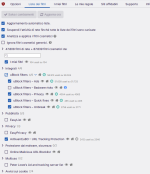
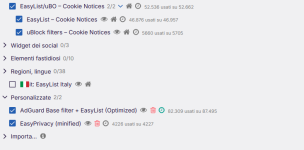
Filter lists in Firefox (desktop):

1.png
2.png

It’s interesting to note that in Firefox for Android, I also had to enable:

  • AdGuard – Cookie Notices

while disabling

  • uBlock filters – Cookie Notices

to achieve the same browsing experience.
The number of custom rules is also limited in Firefox for Android(65).
 
Last edited:
Filter lists in Firefox (desktop):


It’s interesting to note that in Firefox for Android, I also had to enable:

  • AdGuard – Cookie Notices

while disabling

  • uBlock filters – Cookie Notices

to achieve the same browsing experience.
The number of custom rules is also limited in Firefox for Android(65).
Why not "uBlock badware risk" filter?
 
Here are some annoyance rules for free ChatGPT users that I have come across while using ChatGPT. Those pop-ups are extremely annoying. So free users can use these in their uBO MV2 and AdGuard MV2/MV3.
Code:
chatgpt.com##aside:has-text(/^Improve accuracy for/)
chatgpt.com##aside:has-text(Create richer image sets)
chatgpt.com##aside:has-text(Get more thorough answers with Thinking)
chatgpt.com##aside:has-text(Increase memory for more relevant answers)
chatgpt.com##aside:has-text(Meet Codex.)
chatgpt.com##aside:has-text(Upgrade for serious build-and-debug sessions)
chatgpt.com##button[aria-label="Claim offer"]
 
Here are some annoyance rules for free ChatGPT users that I have come across while using ChatGPT. Those pop-ups are extremely annoying. So free users can use these in their uBO MV2 and AdGuard MV2/MV3.
Code:
chatgpt.com##aside:has-text(/^Improve accuracy for/)
chatgpt.com##aside:has-text(Create richer image sets)
chatgpt.com##aside:has-text(Get more thorough answers with Thinking)
chatgpt.com##aside:has-text(Increase memory for more relevant answers)
chatgpt.com##aside:has-text(Meet Codex.)
chatgpt.com##aside:has-text(Upgrade for serious build-and-debug sessions)
chatgpt.com##button[aria-label="Claim offer"]

Hi,
thanks, I copied your rules into the uBo - Android Firefox app on my wife's smartphone.
Is it better to use ChatGPT without a login account, or even a free ChatGPT login account?
 
Using without logging in makes it more limited, I think. I am always logged in, so I can't say for sure. If I need to ask something for which I don't want the chat history saved, I open ChatGPT/Gemini in a private/incognito tab and use it that way. Otherwise, I'm always logged in.